Free Photoshop alternative with layers, masks, filters, PSD support and familiar shortcuts. A chat-style AI Assistant, AI image generation with 4 selectable models, generative fill, background remover and upscaling all run offline on your PC. No subscription, ads or login.
v0.8.0·Published October 13, 2026·Updated October 15, 2026·Downloads 10,940
#포토샵대체#포토샵무료대안#무료포토샵#무료이미지편집기#AI이미지생성#생성형채우기#배경제거#누끼#AI지우개#업스케일#PSD편집#로컬AI#오프라인AI#한국어프롬프트#StableDiffusion#AI어시스턴트#HanPix+11Official site
Free · Offline AI · Korean-first · Photoshop alternative
Same familiar screen and shortcuts, with every old annoyance fixed.
HanPix is a free image editor for anyone looking for a Photoshop alternative.
It has layers, masks, adjustment layers, filters, type, vectors and brushes, and it follows Photoshop's menu layout and shortcuts, so it feels familiar right away. It opens and saves PSD·PSB files too.
On top of that we added AI image generation, generative fill and a background remover, and all of it runs locally on your own PC. No subscription, no ads, no login — and your photos and prompts are never sent anywhere.
0 won a monthNo account or loginUnlimited generative AIPhotos never leave your PCUSB portable
44MB
Installer
About 170MB installed
650MB
Memory in use
Light enough for laptops
0.065s
To first render
24 MP photo
∞
Generative AI
No credit limits
0won
Monthly fee
No ads, no account
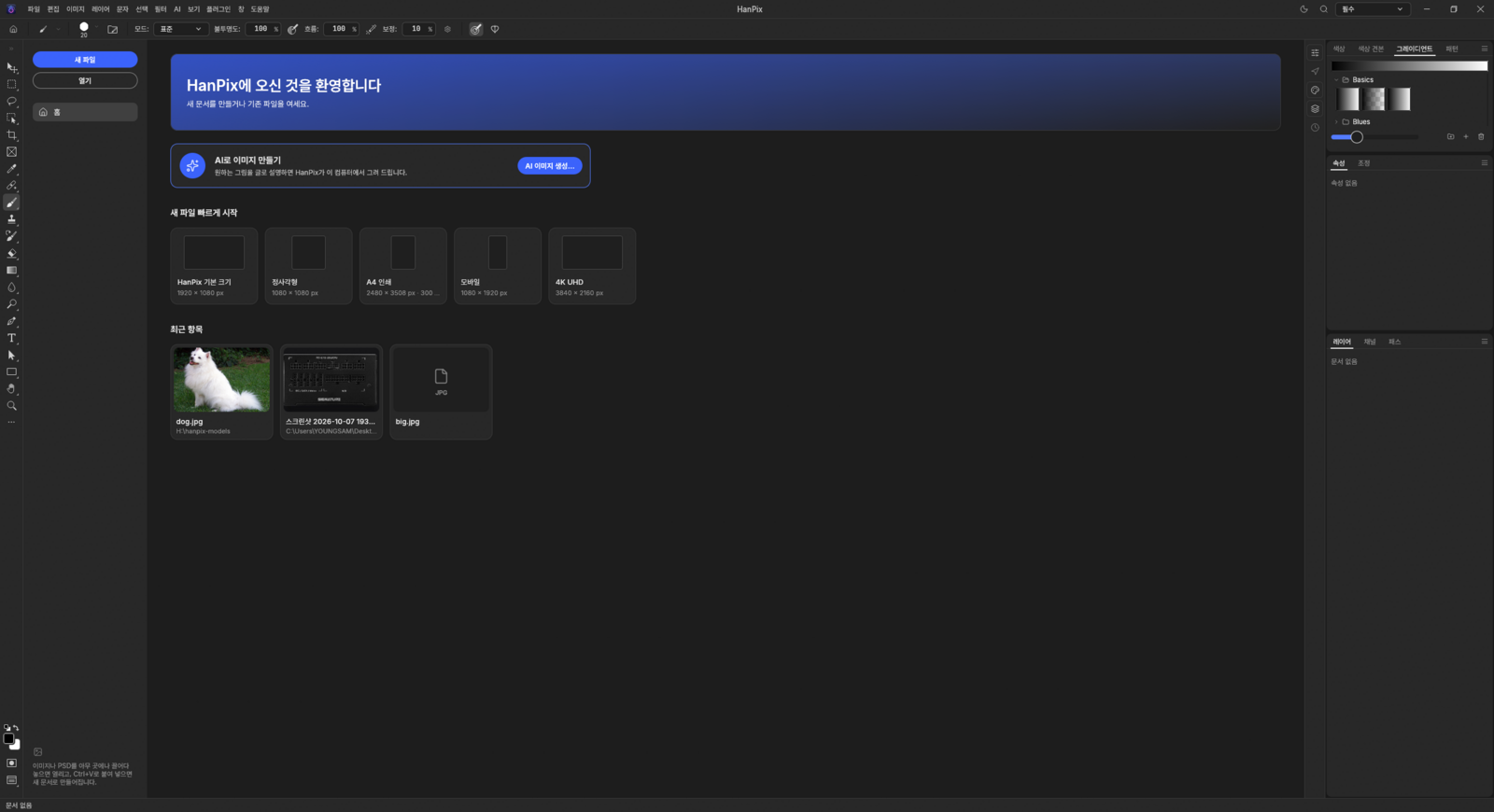
Home screen — new file presets (Default, Square, A4, Mobile, 4K), recent items, and a "Create an image with AI" card to jump right in. Drag in an image or PSD, or paste with Ctrl+V, and it opens as a new document instantly.
NEW 0.8.0What changed in 0.8.02026-10-13
●AI Assistant (chat)
Just say it — “paint a cat in watercolor”, “remove the background” — and it draws and edits for you. Runs offline on your PC.
●Choose from 4 image models
On top of the default SD 1.5, download DreamShaper 8 (illustration), Realistic Vision 5.1 (photoreal) or Stable Diffusion XL (1024px, top quality).
●Move the AI model folder
See where models live and how much space they take, and move them to another drive such as D:. Shows progress, can be cancelled, checks free space first.
●Choose the AI device
Pick Auto (default), GPU or CPU.
●Crash protection during generation
Falls back to CPU when GPU memory runs low and autosaves right before generating. If a driver reset closes the app, it restarts and recovers your document.
●Pen tool, task bar and fonts
Pen-nib cursor with auto add/delete anchor points, a movable task bar, and larger, clearer Korean text in the right-hand panels.
Installer: just install over your current version to update (settings and models are kept). Portable: Extract All, run hanpix.exe from the new folder, and copy your old HanPixData folder into it to keep your settings.
01 · COMPARE
HanPix by the numbers — compared with subscription editors like Photoshop
Both kinds of editor do the same job, but the burden of installing, launching and using them is this different.
Item
Photoshop & other subscription editors
HanPix
Installer size
Several GB
✓47MB (installer)
Size after install
Several GB or more
✓About 170MB (excluding AI models)
Install time
Minutes to tens of minutes
✓Seconds
Memory in use
Often several GB
✓About 650MB
Monthly fee
Billed every month
✓0 won
Account / login
Required
✓None
Internet connection
Needed periodically
✓Not required
Generative AI usage
Credit-limited
✓Unlimited
Photos sent externally
Uploaded to servers for AI
✓Never sent
Korean prompts
English-centric
✓Understood as written
Carry it on a USB stick
Not possible
✓Yes (portable version)
* HanPix figures are our own measurements (Windows 11, 24 MP photo). Subscription editor entries describe typical cases and vary by version and environment.
02 · PHOTOSHOP ALTERNATIVE
Can HanPix really replace Photoshop?
For photo retouching, cutouts, compositing, thumbnails and product detail pages, HanPix is a capable Photoshop alternative. Here are the four things Photoshop users usually check first.
1
Your PSD files, as they are
Open PSD and PSB files and save back to PSD. Files built with layers, masks, blend modes, adjustment layers and type layers can be picked up and edited further.
2
Same shortcuts, same tools
V Move, M Marquee, L Lasso, B Brush, Ctrl+J, Ctrl+T Free Transform — the shortcuts you know work as they are. Even with the Korean keyboard layout active, tool shortcuts still work.
3
Generative fill, for free
Like Photoshop's Generative Fill and Generative Expand, it redraws a selection or extends the canvas and fills it in. It runs on your PC with no cloud credits, so there is no limit on how often you use it.
4
No subscription, no account
Download it once and you're done. No monthly payments, no login, no online license checks. It even installs on work or school PCs without admin rights.
To be honest, HanPix is not identical to Photoshop. Not every menu and feature has a one-to-one equivalent, and some effects in complex PSDs may look different, so keep a backup of important originals while you work. There are no 3D or video editing features, and it is Windows-only for now.
03 · ONLY IN HANPIX
Features you won't find in subscription editors
We built in the things that made you ask, "Why can't it do this?"
💬Ctrl+F
Command search that understands plain Korean
Type what you want in Korean — "remove the background", "black and white", "make it brighter", "shrink it", "for Instagram" — and the matching feature appears at the top as a suggestion, even if you don't know where the menu is.
🔒Offline
Generative AI that runs on your PC, no internet needed
AI image generation, generative fill and generative expand as much as you like, with no credits to worry about. Photos and prompts never leave your PC, so you can safely work on company files, client photos and personal pictures.
🇰🇷Korean
Understands Korean prompts as written
Write in Korean, like "a small boat on the sea at sunset", and it translates on your PC and creates the image. Key words the translation drops are automatically added back.
📐
One-click export sized for Korean social media
Pick Instagram square, portrait or story, YouTube thumbnail, blog, or KakaoTalk profile, and it crops and saves a high-quality JPG for you. Your original stays untouched.
🎨
11 mood plugins built in
Mood color grading, film looks, portrait skin retouching, comic and webtoon effects and more — ready to use, no extra purchase.
💾
Portable mode
Just unzip and run. Settings are saved in the same folder, so your setup goes with you to school, work or a PC café.
⬇️
One-click AI model install + auto resume
If a model you need is missing, it tells you the size and installs it in one go, then automatically continues the task you were doing.
⚡
AI warms up while idle
While the program is idle, it preloads the AI models you use most, so even the first click has little wait.
⏱️
Progress with time remaining
Long tasks show progress and "about 20 seconds left", and you can cancel at any time.
04 · AI IMAGE GENERATION
AI image generation that draws what you describe in Korean
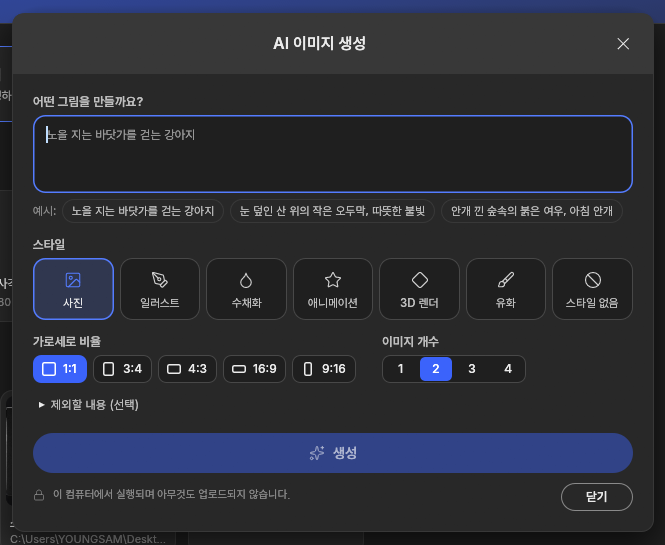
Start from [File › AI Image Generation…], the [AI] menu, or the card on the home screen. Just write the picture you want, even in plain Korean — that's all it takes.
AI image generation window — the note at the bottom reads "Runs on this computer; nothing is uploaded."
StylePhoto · Illustration · Watercolor · Anime · 3D render · Oil painting · No style
Aspect ratio1:1 · 3:4 · 4:3 · 16:9 · 9:16
CountUp to 4 at once — each arrives as a 'variation' layer to pick from
ProgressLive preview, time remaining, cancel any time
ExcludeA separate "Exclude" field for things you don't want
PrivacyPhotos and prompts never leave your PC
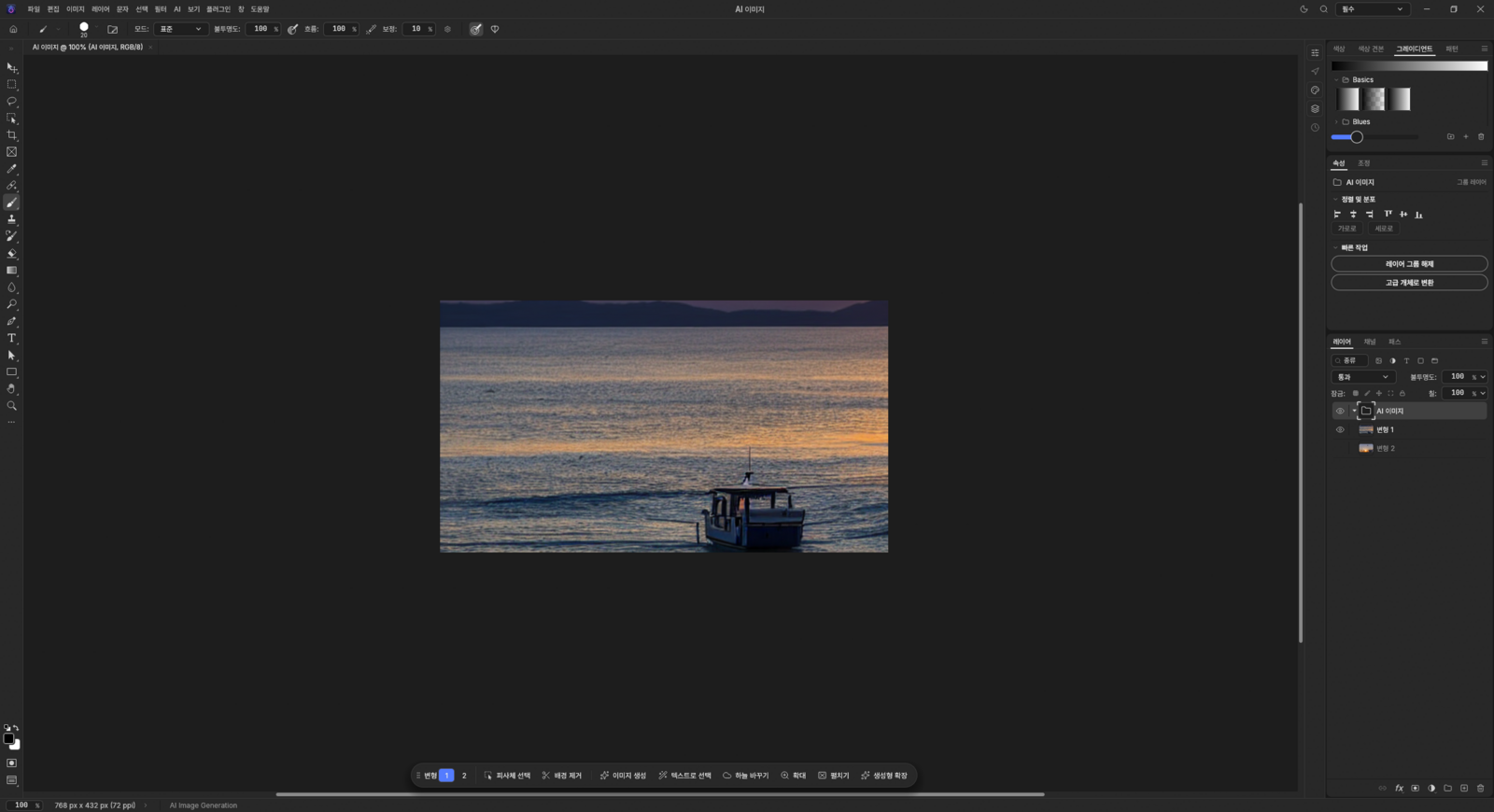
“A small boat on the sea at sunset”
Photo · 16:9 · 2 images — switch between variations 1 and 2 in the task bar below, then go straight on to background removal, sky replacement or upscaling.
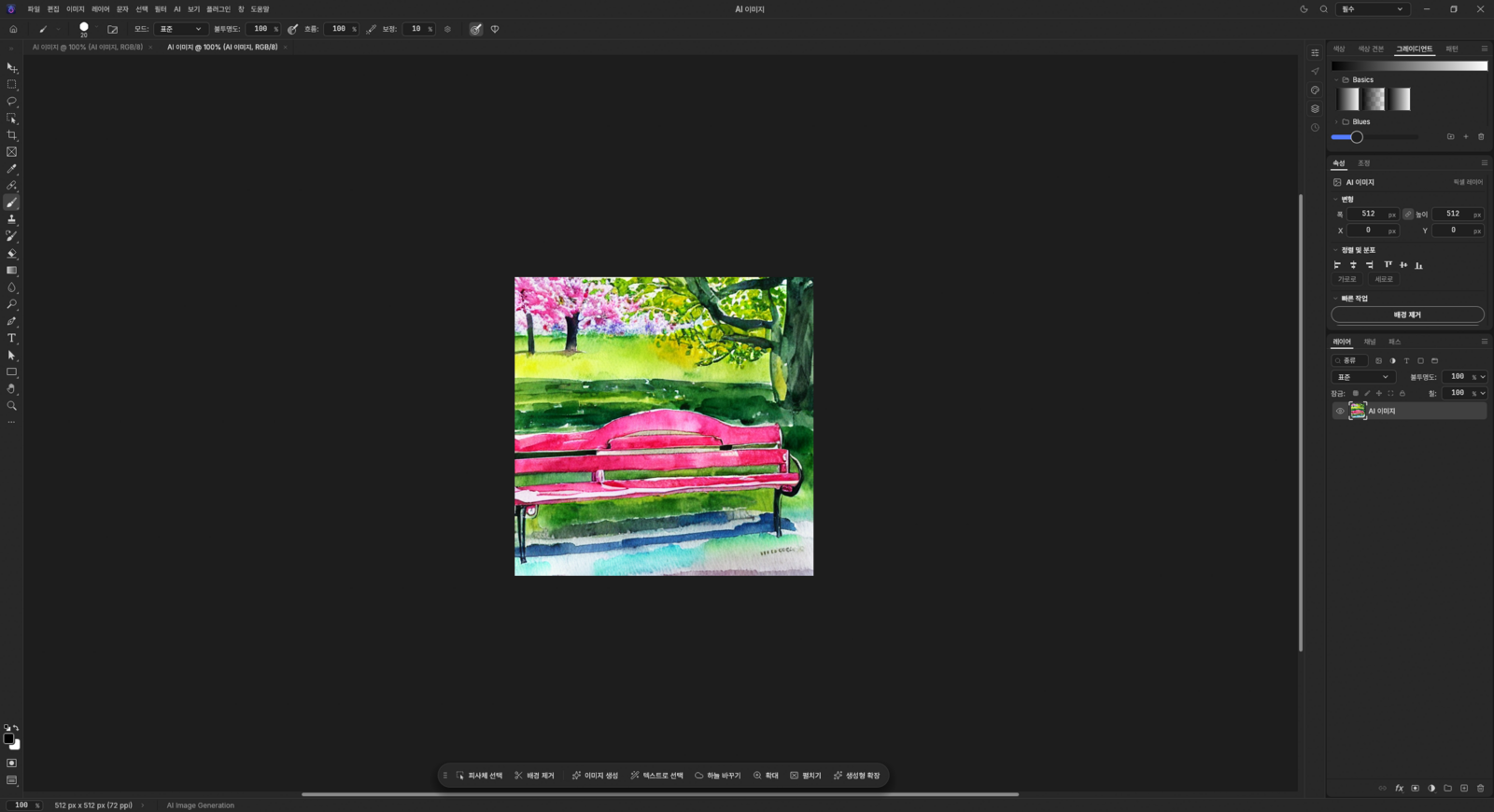
“A park bench under cherry blossoms, a spring afternoon”
Watercolor · 1:1 · 512×512 — generated images are ordinary pixel layers, so you can add brushes, filters and type right on top.
05 · AI ASSISTANT
AI Assistant you can talk to, plus a choice of image models
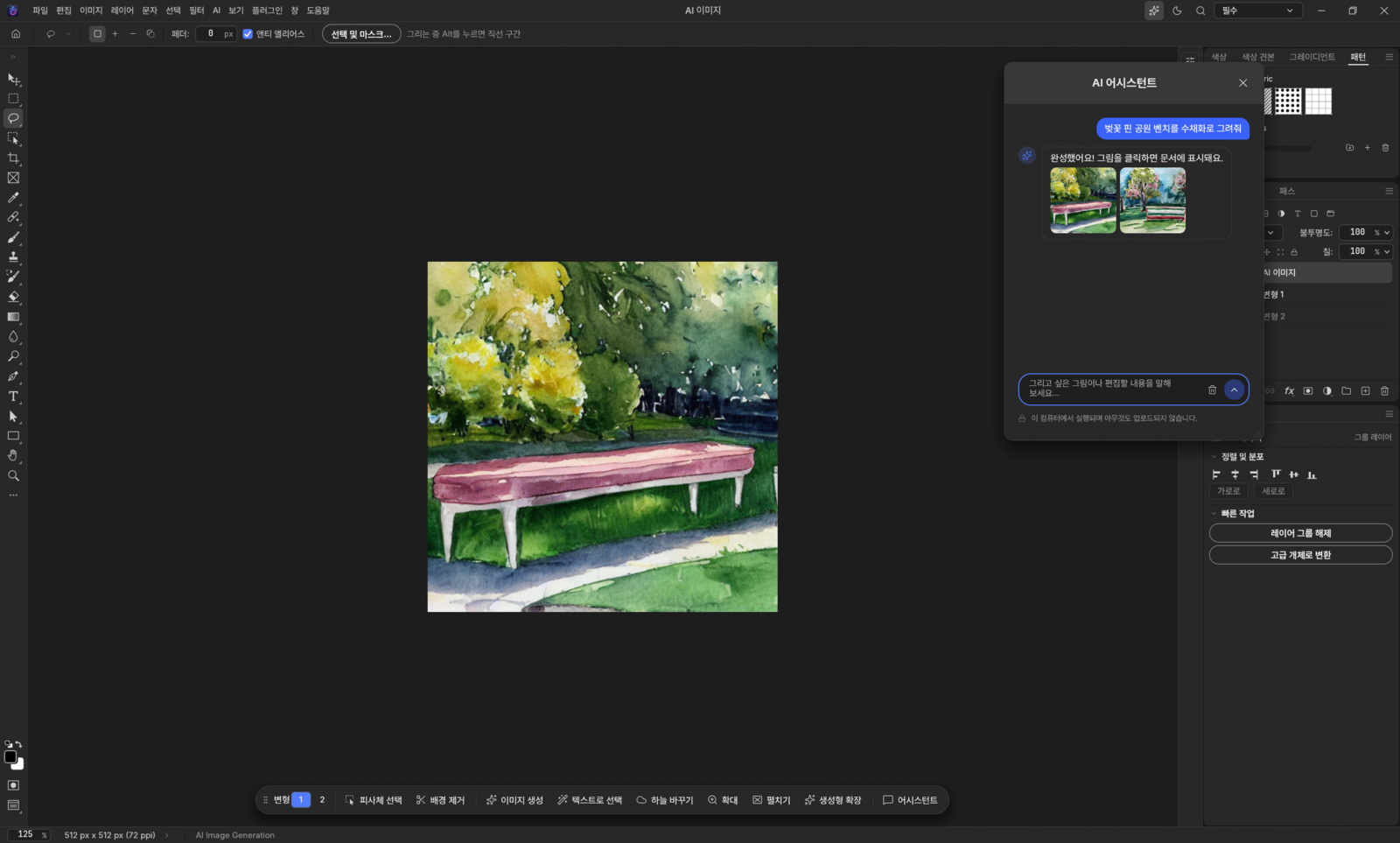
Open it from [AI › AI Assistant], the sparkle button at the top, or [Assistant] on the task bar under the canvas. Describe what you want in plain words and it creates images, refines them in follow-up messages and runs editing commands. The chat and the generation both stay on your PC.
AI Assistant — Asked to paint a park bench under cherry blossoms in watercolor, it drew two versions. Click one to show it in the document; the note below says it runs on this computer and uploads nothing. (Korean UI shown)
Draw“Paint a cat in watercolor” — style, aspect ratio and count in words too
Follow up“Again, but portrait”, “make it an oil painting”, “show me #2”
Edit“Make it black and white”, “brighter”, “remove the background”, “save for Instagram”
4 image models — pick the one that fits the job
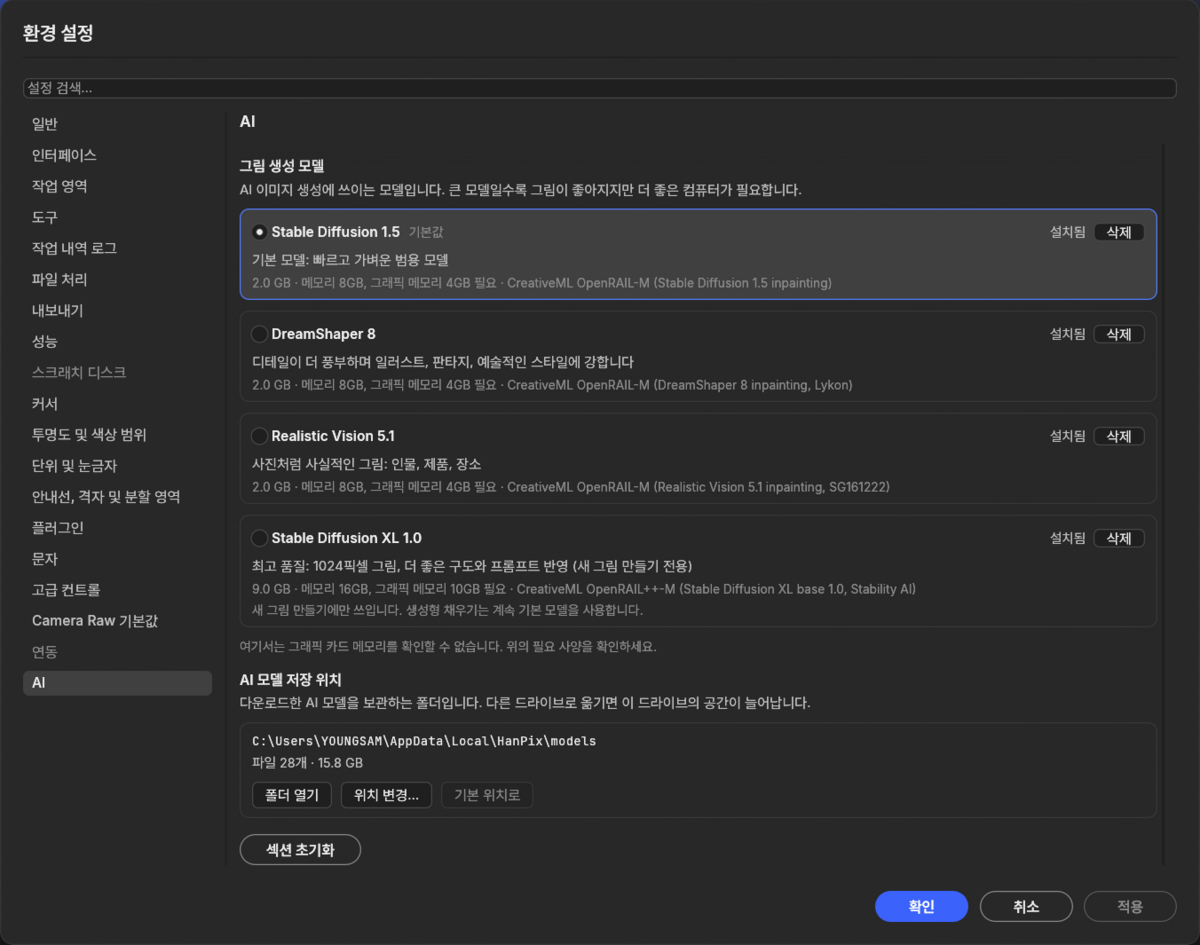
Choose in [Preferences › AI › Image generation model]; only the model you pick is downloaded, once. Bigger models draw better but need a stronger PC.
Stable Diffusion 1.5Default
Fast, lightweight all-rounder
2.0GB · 8GB RAM · 4GB VRAM
DreamShaper 8Illustration
Strong at illustration, fantasy and artistic styles
2.0GB · 8GB RAM · 4GB VRAM
Realistic Vision 5.1Photoreal
Photorealistic people, products and places
2.0GB · 8GB RAM · 4GB VRAM
Stable Diffusion XL 1.0Top quality
1024px images with better composition and prompt following · new images only
9.0GB · 16GB RAM · 10GB VRAM
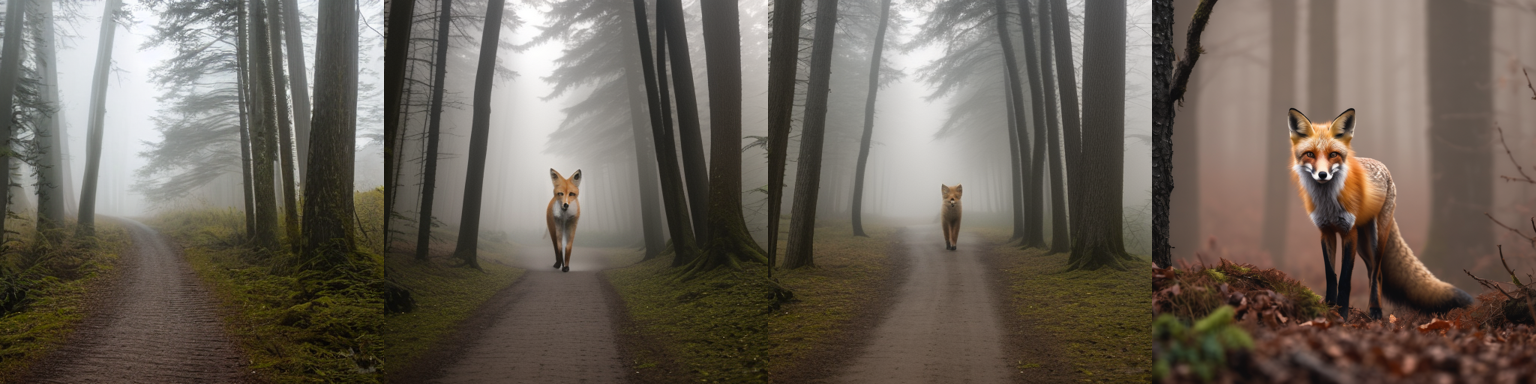
Model comparison — The same prompt drawn by each model. Composition and style differ noticeably between them.
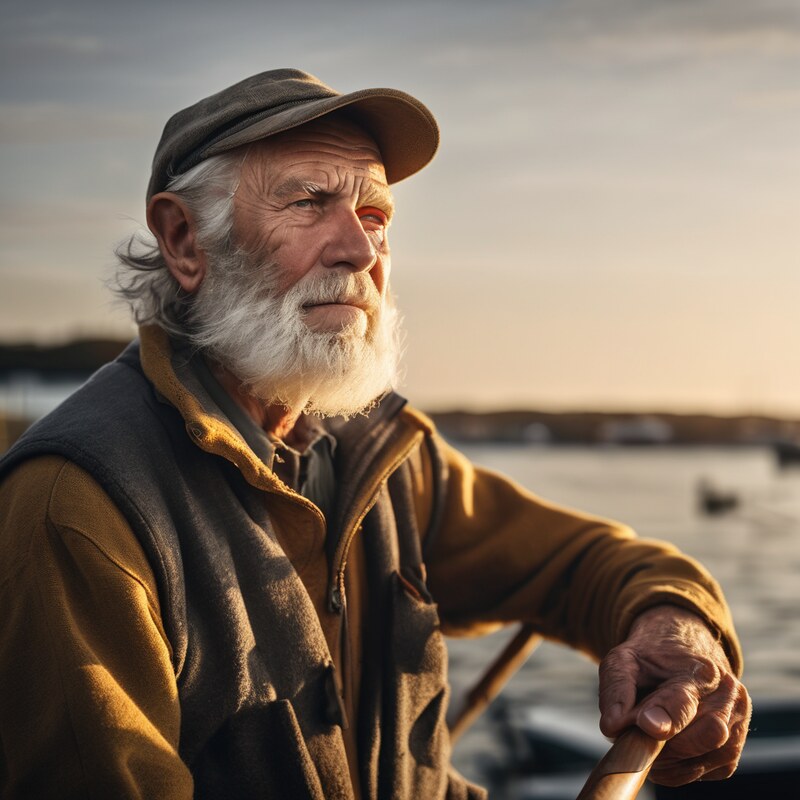
Preferences › AI — The four image models and the AI model storage location, with file count and size. [Change location…] moves them to another drive. (Korean UI shown)Stable Diffusion XL example — A photoreal 1024×1024 portrait. Recommended for PCs with 10GB+ of GPU memory.
Running out of space on C:? Each model is 2–9GB. In [Preferences › AI › AI model storage location], click [Change location…] and HanPix asks whether to move the existing models (Move / Leave them / Cancel). Same-drive moves are instant; moves to another drive copy, verify, then clean up the originals. Free space is checked first and you can cancel mid-way. [AI device] lets you pick Auto, GPU or CPU.
Your work survives a crash mid-generation If GPU memory runs short, that generation runs on the CPU instead, and open documents are autosaved right before generating starts. If a graphics driver reset closes the app, it restarts and recovers your document, and from then on generates safely on the CPU on that PC (pick the AI device again to retry the GPU).
06 · AI TOOLS
All AI features — every one runs on your PC
Create
AI image generationGenerative fillGenerative expandSky replacement
Redraw a selected area, or widen the canvas and fill the outside to match the photo. Especially handy for turning a landscape photo into a vertical thumbnail. Skies come in Clear, Sunset, Dusk, Night and Cloudy.
Select
Background remover (automatic cutout)Select SubjectClick-to-select objectsSelect by textSelect person parts
Cutouts are made as layer masks, so the original is kept. Shift+click adds to an object selection and Alt+click removes parts. Select by typing words like "dog" or "sky", or pick just hair, face, skin, clothes, eyes or lips.
Fix
AI eraserAI upscale 2× / 4×Batch background removal for folders
Paint over people, wires, text or specks with the Remove tool (J) and they are filled naturally from the surrounding background. Folder batch cutouts support transparent, white or black backgrounds, PNG or JPG, and automatic margin trimming.
Below the canvas, a floating task bar offers the next likely steps (Select Subject, Remove Background, Generate Image, Select by Text, Replace Sky, Upscale, Uncrop, Generative Expand) as one-click buttons. If GPU acceleration (DirectML) fails, it automatically re-runs on the CPU, and if AI is turned off or a model cannot be downloaded, it falls back to classic algorithms so features never stop working.
07 · SPEED
Built for speed — real measurements
Test setup: Windows 11, RTX 3090, 24 MP (6000×4000) photo, release build. Shorter bars are faster.
Screen refresh while dragging a large layerUp to ~10× faster
Before86~223ms
Now8~21ms
From opening a file to first render~10–30× faster
Before0.7–2.1s
Now0.065s
AI processing time · Runs on your PC, measured on an RTX 3090
AI image generation (16:9, 2 at once)About 23–39s
AI image generation (512×512, 1 image)About 17s
Generative fill (1 variation)About 9s
Background removal / Select SubjectA few seconds
Smooth animated zoom and pan, with brush input latency cut by one frame
All heavy processing uses GPU acceleration plus multi-core parallelism
While the program is idle, it preloads the AI models you use most, so even the first run has little wait
Every feature works without a dedicated graphics card. Integrated laptop graphics (Intel, AMD) are also accelerated; on CPU-only PCs, generative features may be slower than the figures above.
08 · FAMILIAR
Familiar where it counts — industry-standard shortcuts and editing tools
VMove
MMarquee
LLasso
WObject Selection
JRemove / Heal
BBrush
EEraser
TType
Ctrl+JDuplicate layer
Ctrl+TFree Transform
Ctrl+FCommand by words
Ctrl+VPaste as new document
Tool shortcuts keep working even with the Korean keyboard layout active, and you can remap them yourself.
Adjustments & filters16 adjustment layers including Levels, Curves, Hue/Saturation, Color Balance, Black & White and Photo Filter; 70+ filters; Smart Filters
Selection & retouchingLasso, Magnetic Lasso, Magic Wand, Quick Selection, Color Range / Spot Healing, Healing Brush, Patch, Content-Aware Move, Clone Stamp
Painting, type & vectorsBrush, Pencil, Mixer Brush, Gradient / horizontal and vertical type, Korean input, kerning, variable fonts / Pen, paths, shapes
Color8/16/32-bit, RGB, CMYK, Lab, Grayscale, ICC color management, soft proofing
FilesOpen and save PSD/PSB, PNG, JPG, WebP, TIFF, GIF, BMP, TGA, HEIC (read), some camera RAW
Automation & safetyActions, batch processing, command line (CLI), autosave and recovery — your work comes back even after a sudden crash
09 · MADE FOR KOREA
Made for Korean users — social media export and Korean presets
Choose a size in [File › Export › Export for Social Media] and it crops from the center and saves a high-quality JPG. Your original is left untouched.
Instagram square
1080×1080
Instagram portrait
1080×1350
Stories & Reels
1080×1920
YouTube thumbnail
1280×720
Blog landscape
1200px
KakaoTalk profile
640×640
New Document › Korean web & social presets
Shop detail page 860pxProduct main image 1000Blog image 966pxCard news 1080×1350Instagram post & storyYouTube thumbnailEvent banner
Menus, dialogs and even error messages are in Korean, and the bundled Pretendard font keeps Korean text crisp even without system fonts.
10 · PLUGINS
11 built-in plugins — free, no extra purchase
Find them in the [Plugins] menu. Each has a preview window, and you can turn them on or off in the plugin manager. Previews are instant; the times below are for applying to a 24 MP original.
Retro Duotone0.5s
Vignette Pro1.5s
Pixel Art1.5s
Mood Color Grading · 8 presets2s
Glitch3s
VHS Effect3.5s
Light Leaks & Bokeh4s
Film Look · 7 films5s
One-Click Photo Enhance5.5s
Comic & Webtoon Effect7s
Portrait Skin Retouch8.5s
11 · FOR YOU
Who it's for
💸
Anyone tired of paying a subscription every month
🛍️
Online sellers who need quick product cutouts and social media images
🏢
Teams that can't upload photos to outside AI servers for security reasons
💻
Laptop users who need a light, fast editor
🔤
Anyone who found English menus and English prompts a hassle
12 · DOWNLOAD
Installation & requirements
Installer versionRecommendedAbout 47MB
HanPix-Setup-0.8.0-x64.exe
✓Run → Next → Install, done in seconds
✓Installs without admin rights
✓Optional desktop icon, uninstall from Control Panel
AI modelsDownloaded once on first use (size shown first) · download or delete ahead of time in [AI › Manage AI Models…] · choose image models and change the storage location in [Preferences › AI]
PriceFree · No ads · No account
"Windows protected your PC" on first launch This notice appears because it is an independently developed program without a code signing certificate. Click "More info" → "Run anyway" to continue. You can first verify that the file matches the original using the SHA-256 values below.
The installer updates in place when installed over an older version, keeping your settings and AI models. For the portable version, copy the old HanPixData folder into the new folder to keep your settings.
13 · PRIVACY & LICENSE
Privacy and open-source licenses
Your photos never leave your PC
HanPix never sends your photos, work or prompts anywhere. It uses the internet only to download AI models the first time and to open blog links from Help. There's no account, so no personal data is collected.
MIT or Apache-2.0 open source
Built by Youngsam.net on the open-source editor PhotoCraft, released under the same licenses, adding the AI engine, the entire AI menu, the task bar, Korean localization, Korea-specific presets and more. It also bundles ONNX Runtime and DirectML (MIT, Microsoft) and the Pretendard and Inter fonts (SIL OFL).
AI models are not included in the program; they are downloaded from their public repositories on first use. Background removal, selection, erasing and upscaling use BiRefNet (MIT), IS-Net, U²-Net, MobileSAM, Segment Anything, LaMa and CLIPSeg (Apache-2.0), and Real-ESRGAN (BSD-3); Korean prompt translation uses OPUS-MT ko-en (Apache-2.0).
Usage restrictions for the generative models The Stable Diffusion 1.5 inpainting model used for AI image generation, generative fill and generative expand, and the optional DreamShaper 8 and Realistic Vision 5.1 models, are licensed under CreativeML Open RAIL-M; Stable Diffusion XL 1.0 is under CreativeML Open RAIL++-M. The full license is shown before you download a model and in [AI › AI Models…], and you may not use the models or their outputs for the purposes listed in Attachment A (illegal activity, content that harms or deceives others, etc.). You are responsible for the images you create.
Yes. HanPix is a free image editor you can use as a Photoshop alternative. It supports layers, masks, adjustment layers, filters, type, the Pen tool and PSD open/save, with the same shortcuts, so you can do photo retouching, cutouts, compositing, thumbnails and product detail pages without a subscription. Not every feature is a one-to-one match, so keep a backup of important PSD originals while you work.
Does it have generative fill like Photoshop?
Yes. Select an area and run Generative Fill to redraw that part, or use Generative Expand to extend the image beyond the canvas. It runs locally on your PC, not in the cloud, so there are no credits or usage limits; one variation takes about 9 seconds (on an RTX 3090).
Does it use the same shortcuts as Photoshop?
Yes. It follows industry-standard shortcuts — V Move, M Marquee, L Lasso, W Object Selection, J Heal/Remove, B Brush, E Eraser, T Type, Ctrl+J, Ctrl+T Free Transform and more — and they work even with the Korean keyboard layout active. You can also remap shortcuts yourself.
Is HanPix really free?
Yes, completely free. There is no subscription, no ads, no sign-up and no login, and the AI features have no usage limits. That's possible because the AI runs on your own PC, so there are no server costs.
How big is the install, and how much memory does it use?
The installer is about 47MB, about 170MB once installed (excluding AI models), and installation takes only seconds. It uses about 650MB of memory while running. AI models are downloaded once, only for the features you use.
Can I use it offline, without internet?
Yes. The editing features never need the internet, and each AI feature works offline once its model has been downloaded the first time.
Are my photos uploaded to an external server?
No. AI image generation, background removal and generative fill are all processed on your PC, and your photos and prompts are never sent anywhere. That means you can safely work on company files and client photos.
Do I need a dedicated graphics card?
No. Every feature works, and Intel and AMD integrated graphics also get DirectML acceleration. However, AI image generation and generative fill may be slow on CPU-only PCs. The measured times (about 17 seconds for one 512×512 image) are on an RTX 3090.
Can I write prompts in Korean?
Yes. Write in Korean as you would naturally, like "a small boat on the sea at sunset", and it translates on your PC before generating, automatically adding back key words the translation dropped. Select by Text also understands Korean words like "dog" and "sky".
Can it open and save PSD files?
Yes. It can open and save PSD and PSB, so you can continue working on existing project files. It also supports PNG, JPG, WebP, TIFF, GIF, BMP, TGA, HEIC (read) and some camera RAW formats.
Can I use AI-generated images on my blog or online store?
Yes. All four image models (Stable Diffusion 1.5, DreamShaper 8, Realistic Vision 5.1, Stable Diffusion XL 1.0) use licenses that allow commercial use (CreativeML Open RAIL-M / Open RAIL++-M) and claim no rights over the outputs. You can use them as long as the use isn’t prohibited by Attachment A (illegal activity, harming or deceiving others, etc.). You are responsible for the images you create.
Is there an AI assistant I can just talk to?
Yes. Since 0.8.0 HanPix has an AI Assistant (chat). Type “paint a cat in watercolor” to create an image, follow up with “again, but portrait” or “make it an oil painting”, and give editing commands like “make it black and white”, “remove the background” or “save for Instagram”. It runs offline on your PC.
Can I keep the AI models on drive D: instead of C:?
Yes. In [Preferences › AI › AI model storage location], click [Change location…] and pick a new folder; HanPix asks whether to move the models you already downloaded. Moves to another drive copy, verify and then clean up the originals, with a progress bar and cancel. Each model is 2–9GB.
Which image generation model should I choose?
The default Stable Diffusion 1.5 is light and fast, and enough to start. DreamShaper 8 suits illustration and fantasy art; Realistic Vision 5.1 suits photo-like people and products. Stable Diffusion XL 1.0 gives top 1024px quality but is 9GB, recommends 10GB+ of GPU memory, and is used only for creating new images.
What's the difference between the installer and portable versions?
The features are the same. The installer version adds a Start menu entry and uninstall from Control Panel, and saves settings in your user folder. The portable version runs hanpix.exe straight from the unzipped folder and saves settings in HanPixData in the same folder, so you can carry it on a USB stick and use it at school, work or a PC café.
Where do I report a problem?
Youngsam.net Community — please post your report there. You can also get there from [Help › Developer Blog (Youngsam.net)…] inside the program.
Adobe and Photoshop are registered trademarks of Adobe Inc. HanPix is not affiliated with Adobe; comparisons are provided only to help users understand the product.
Version history(3)
v0.8.0Latest
October 13, 2026
말로 시키는 AI 어시스턴트(채팅) 추가 — 그림 생성·이어서 수정·편집 명령. 그림 생성 모델 선택(SD 1.5 기본, DreamShaper 8, Realistic Vision 5.1, Stable Diffusion XL). AI 처리 장치 선택(자동/GPU/CPU). AI 모델 저장 위치 변경·이동(진행률·취소·남은 공간 확인). AI 생성 중 비정상 종료 대응(그래픽 메모리 부족 시 CPU 처리, 생성 직전 자동 저장, 드라이버 리셋 후 자동 재실행·문서 복구). 펜 도구 커서·점 자동 추가/삭제, 작업 바 이동, 창 크기 조절, 오른쪽 패널 한글 가독성 개선.
무설치판에서 "DLL 파일이 없다"며 실행되지 않던 문제 해결(Visual C++ 런타임 동봉). 창 가장자리·모서리로 크기 조절, 오른쪽 아래 크기 조절 손잡이 추가. AI 이미지 생성 창 디자인 개선(예시 문장 바로 넣기, 스타일 선택 타일, 큰 생성 버튼). 설치 화면 사용권 안내 한국어 정리.
첫 공개 버전 — 레이어·마스크·조정 레이어 16종·필터 70여 종·문자·벡터·브러시, PSD/PSB 열기·저장. 내 PC에서 실행되는 AI: 한국어 프롬프트 AI 이미지 생성(스타일 7종·비율 5종·최대 4장), 생성형 채우기·확장, 배경 제거, 피사체·개체·텍스트·인물 부위 선택, AI 지우개, 하늘 바꾸기, 2·4배 업스케일, 폴더 일괄 누끼. 말로 하는 명령(Ctrl+F), SNS 내보내기, 한국형 새 문서 프리셋, 기본 플러그인 11종, 자동 저장·복구.