Free, lightweight Windows Notepad alternative: ready to type in 0.054s (5.4× faster), 6.2MB RAM, ~1MB app. Tabs, dark theme, 1-second auto-backup, text tools, UTF-8/CP949. Installer or portable, Windows 10/11.
v1.1.1·Published October 13, 2026·Updated October 17, 2026·Downloads 358
Free · Installer & Portable · Windows Notepad Alternative
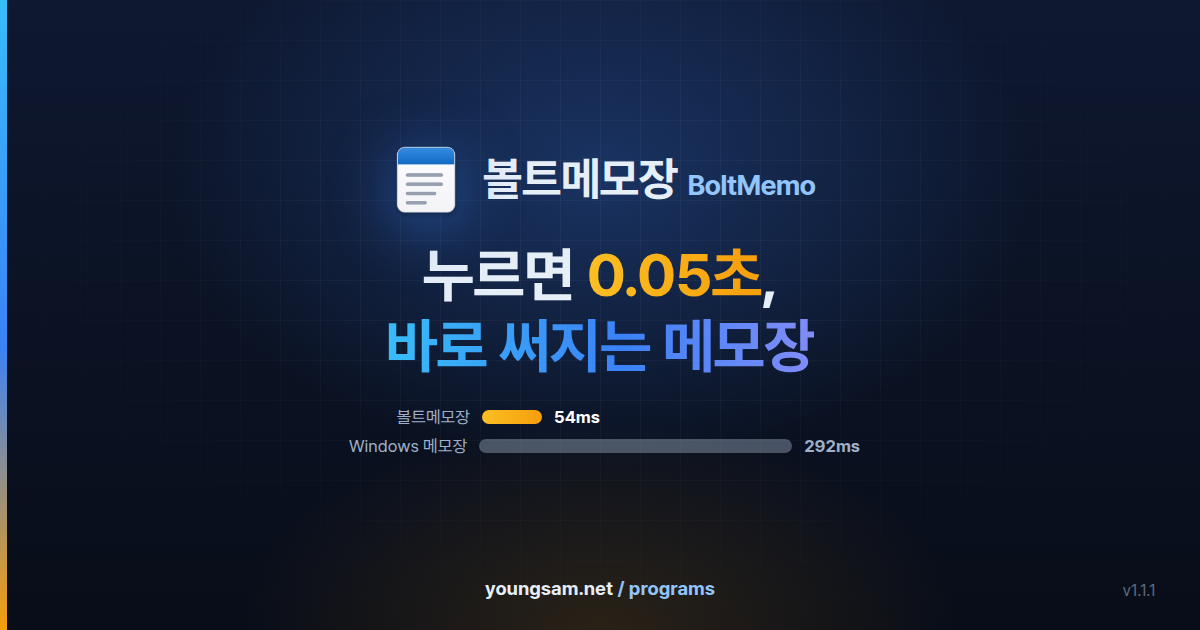
Click, and in 0.05s, you're already typing
BoltMemo is a free notepad you can use instead of the sluggish Windows Notepad.
Click the icon and in 0.054s the cursor is blinking; memory use for an empty memo is just 6.2MB.
Tabs, a find card, dark theme and auto-backup are all built in, yet the program is only about 1MB.
📌 Today's to-doWeekly meeting notes ✕+
[Weekly meeting notes] October, week 3
Date: Mon, Oct 13, 10:00 AM
1. Progress last week
- Applied new find card & settings window design
2. To-do this week
-
⚡ 0.054s
Ln 7, Col 5344 charsUTF-8
Free⚡ Launches 5.4× faster than Windows NotepadInstaller · PortableTabs · Dark themeKorean CP949 · UTF-8
0.054s
Launch → ready to type
Median of 10 runs
5.4×
faster launch
vs. Windows Notepad
6.2MB
Memory
Empty memo
1MB
Program size
A single BoltMemo.exe
$0
Price
No ads, no account
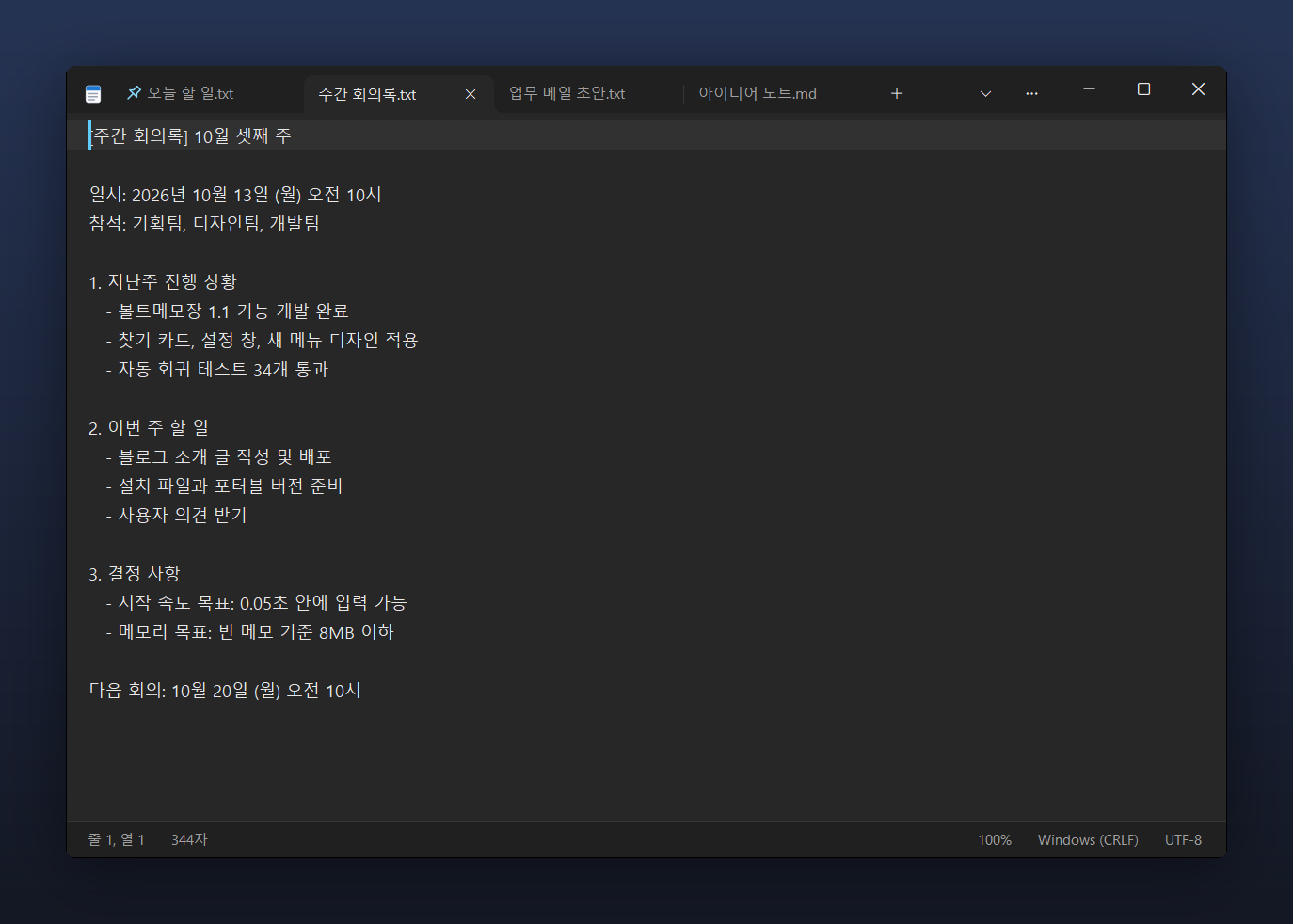
Main window (dark theme) — Keep multiple memos open in tabs and pin the ones you use most to the left. The status bar shows line/column, character count, zoom level, line-ending format and encoding.
NEW 1.1.1Fixed in 1.1.12026-10-17
●Bold and italic fonts now stick
Choosing a Bold (or Italic) font no longer falls back to Regular. The style is saved and applies on screen and in print. (Thanks to anfy for the report)
●Font dialog and half-point sizes
The Font dialog now opens with your current font selected. Half-point sizes such as 10.5pt work, and sizes no longer change by themselves at 125% display scaling.
●Deleting with Replace All
Replace All with an empty replacement no longer skips every other adjacent match.
●Safer saving
When the disk is full, saving now reports a failure and leaves the original untouched. Saving as ANSI on PCs with Windows' "Use Unicode UTF-8 (Beta)" option no longer produces an empty file.
●Two windows and Windows shutdown
Fixed a second window opening while a large file was loading, two windows deleting each other's unsaved-memo backups, and shutdown being blocked when "Restore previous memos" was off.
●Smaller fixes
The right tab is selected on reopen, and Ctrl+wheel no longer shrinks text too far. Very large documents (8MB+) back up less often so typing stays smooth.
Speed and memory are the same as 1.1. Install the new setup over your current version; memos and settings live in %LOCALAPPDATA%\BoltMemo, so they carry over.
01 · COMPARE
A Windows Notepad Alternative — Compared with Windows Notepad
As Windows 11 Notepad gained tabs and features, it also gained a noticeable "hitch" when you open it. BoltMemo aims to bring back the old Notepad's best trait: it opens the instant you click. Figures are the median of 10 launches of each program on the same PC.
Item
Windows Notepad
BoltMemo
Launch until ready to type
0.292s
✓0.054s (about 5.4× faster)
Memory usage (empty memo)
113.5MB
✓6.2MB (about 1/18)
Program size
Included with Windows
✓About 1MB (installer 2.6MB)
Carry it on a USB drive
Not possible
✓Yes (portable version)
Text tools like sort lines and remove duplicate lines
None
✓Built in
※ Measured on the developer's PC. Windows Notepad refers to the built-in Windows 11 app; results may vary with PC specs and other programs running at the time.
02 · SPEED
Speed — 0.054 seconds is shorter than a blink
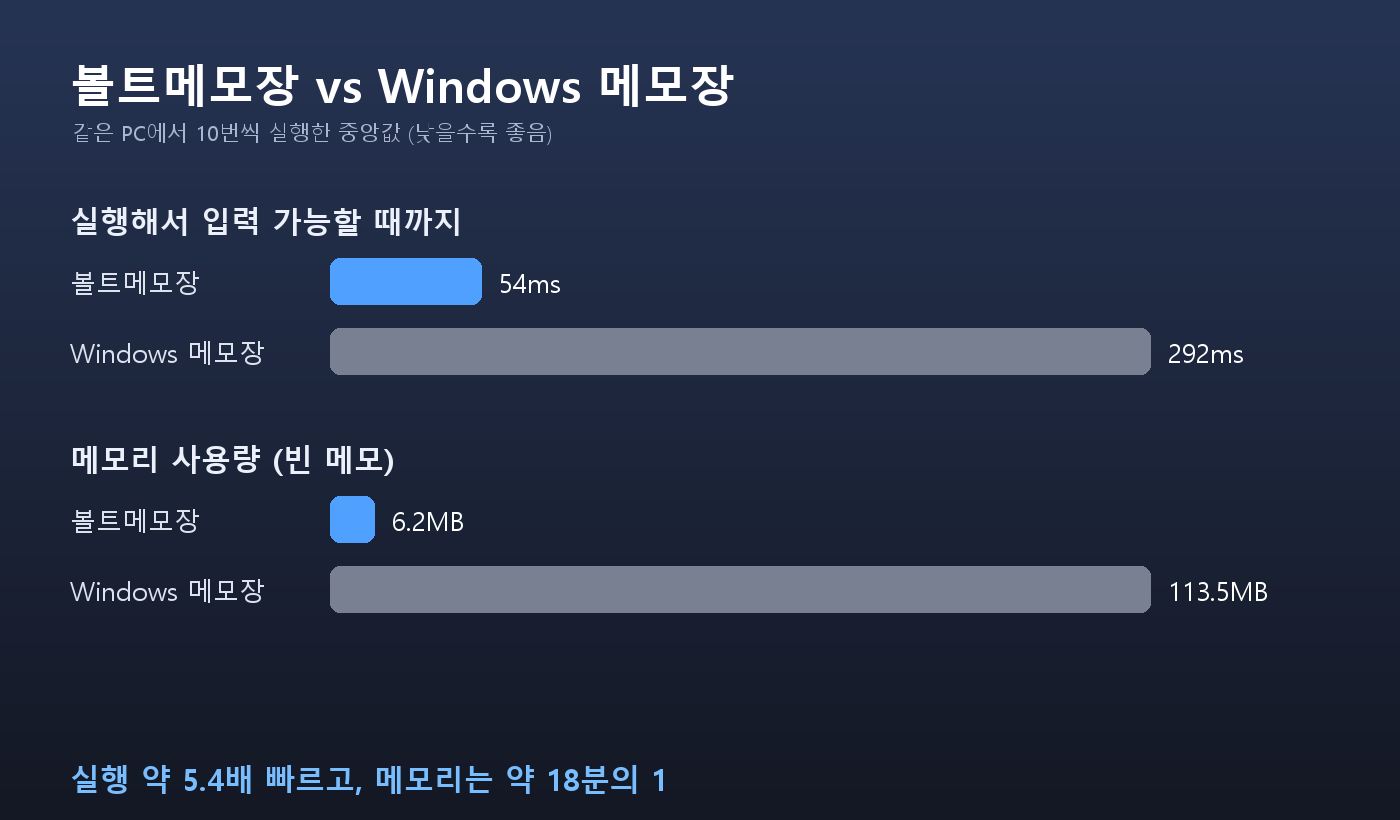
A single blink takes about 0.1–0.15 seconds. BoltMemo is ready for typing, even before that blink is over. There's simply no feeling of "waiting for it to open." Shorter bars are better.
Launch until ready to type0 ─ 300ms
BoltMemo54ms
Windows Notepad292ms
Memory usage (empty memo)0 ─ 120MB
BoltMemo6.2MB
Windows Notepad113.5MB
Handles large files with ease
0.03s
Open a 10MB document (100,000 lines)
0.1s
Count search matches across 100,000 lines
0.001s
Type one character → shown on screen
0.002s
Per character, in a file that is one 2MB line
Measured comparison — Median of 10 launches each on the same PC. Launch is about 5.4× faster and memory use is about 1/18.
03 · WHY SO FAST
Why is it so fast? — An editing engine built from scratch
BoltMemo was built from scratch with no heavy external frameworks — just the features Windows already has and nothing else. The single executable is about 1MB, and there are no extra libraries to install.
0ms
Draw window
Show the screen first
~54ms
Ready to type
Prepare only tabs and the current document
After that
Everything else on demand
Settings, printing and dialogs load the first time you open them
⚙️ Its own editing engine
The editor core that draws text and handles input was written in-house. Features a notepad doesn't need were never added, so it stays light.
🎯 Only the essentials at startup
Only the window, the tabs and the document you're viewing are prepared first. So even as features grow, startup speed stays the same.
🖼️ Screen first
The window is drawn and shown first, and the rest is prepared afterwards. That's why it feels even faster than it actually is.
📎 Already open? Uses that window
If BoltMemo is already running, opening a file doesn't launch a new instance — it attaches as a tab in the open window.
04 · DESIGN
Not just fast — a design that fits Windows 11
We wanted to break the stereotype that "fast programs look crude." Every screen — menus, find, settings window, even the scrollbars — was drawn by hand.
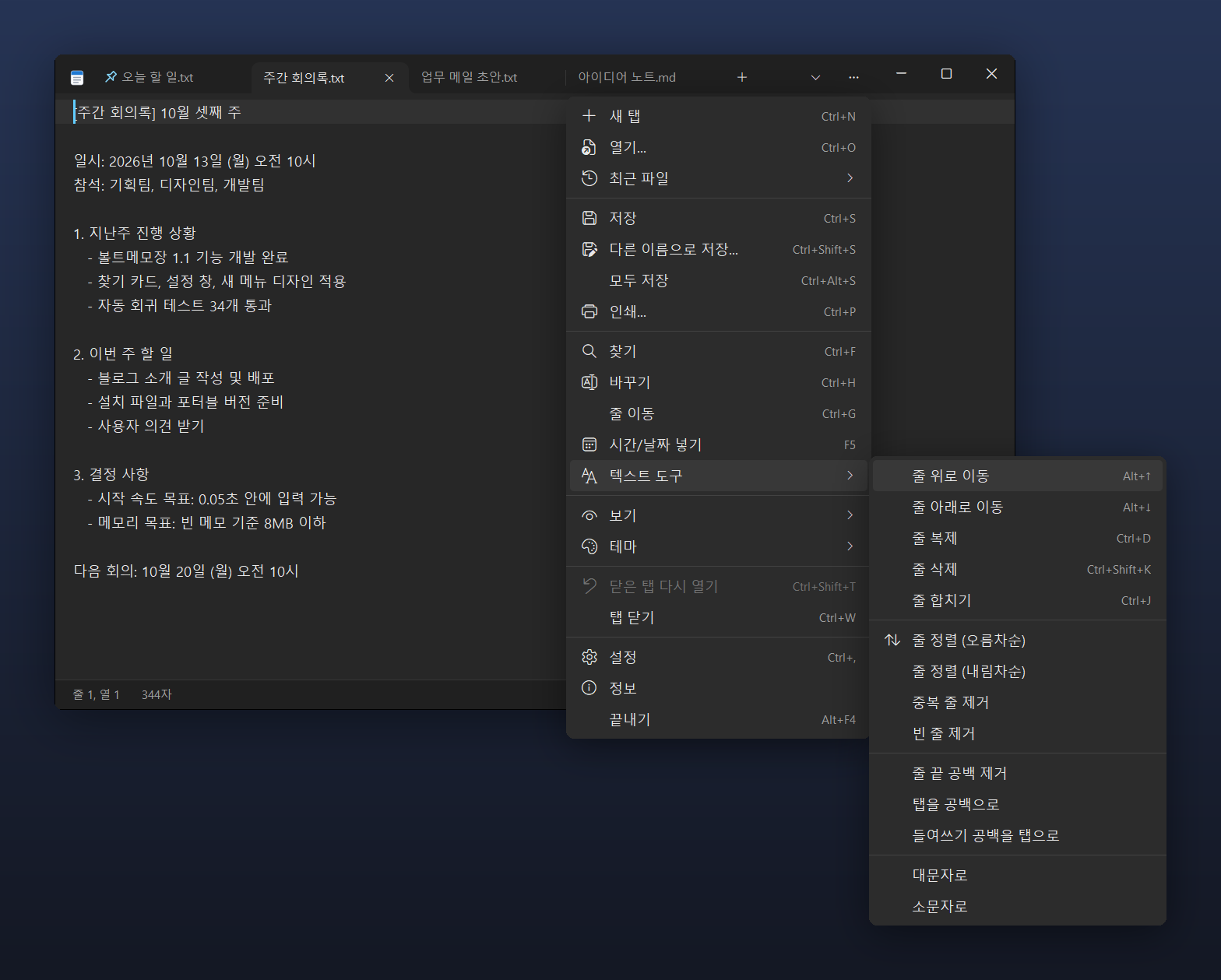
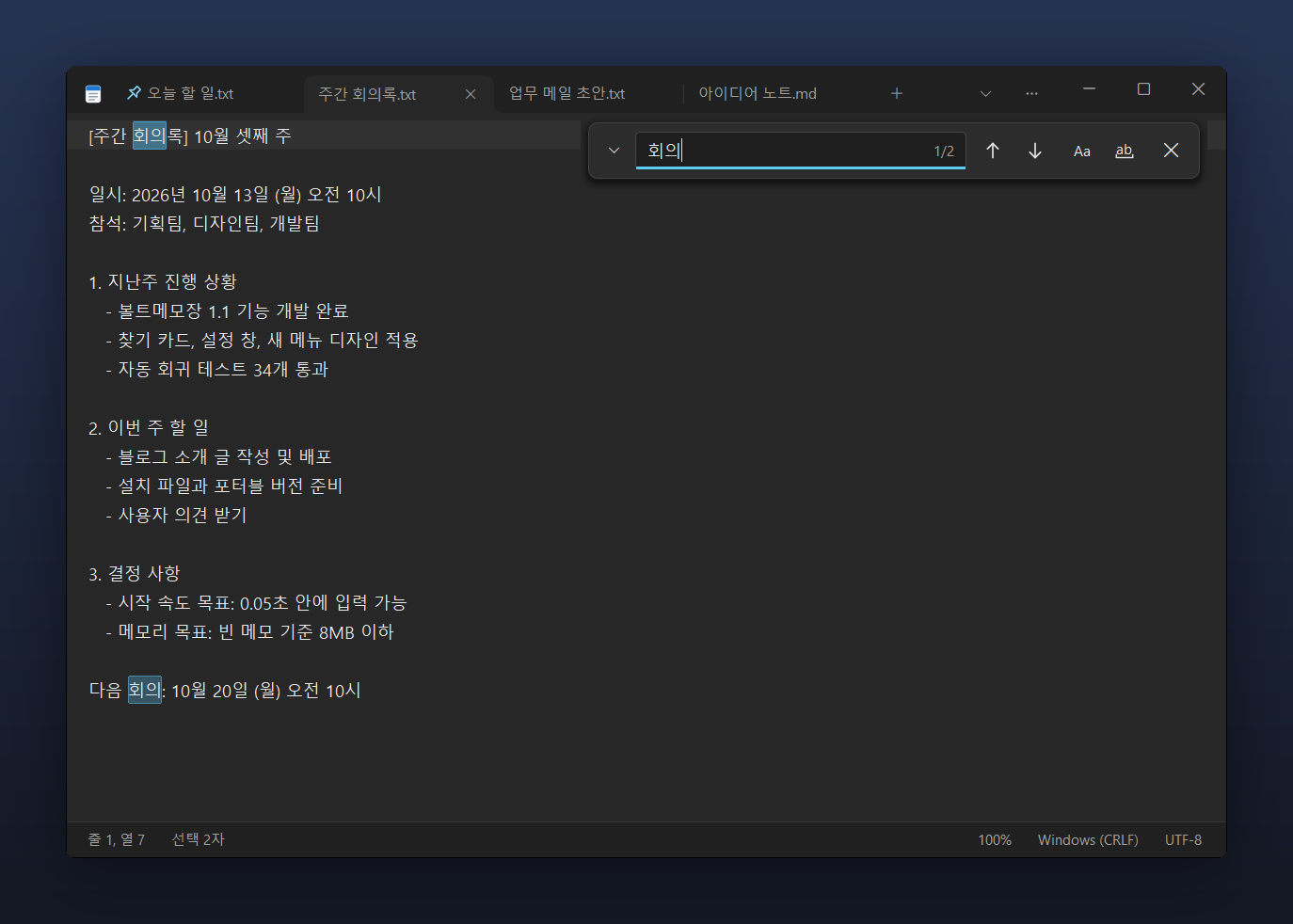
Redesigned menu — A rounded card with neatly aligned icons and shortcuts. In dark theme, the menu doesn't flash white either.Floating find card (Ctrl+F) — The match count (1/2) appears right inside the input box, and Match Case / Whole Word search toggle with a single button.
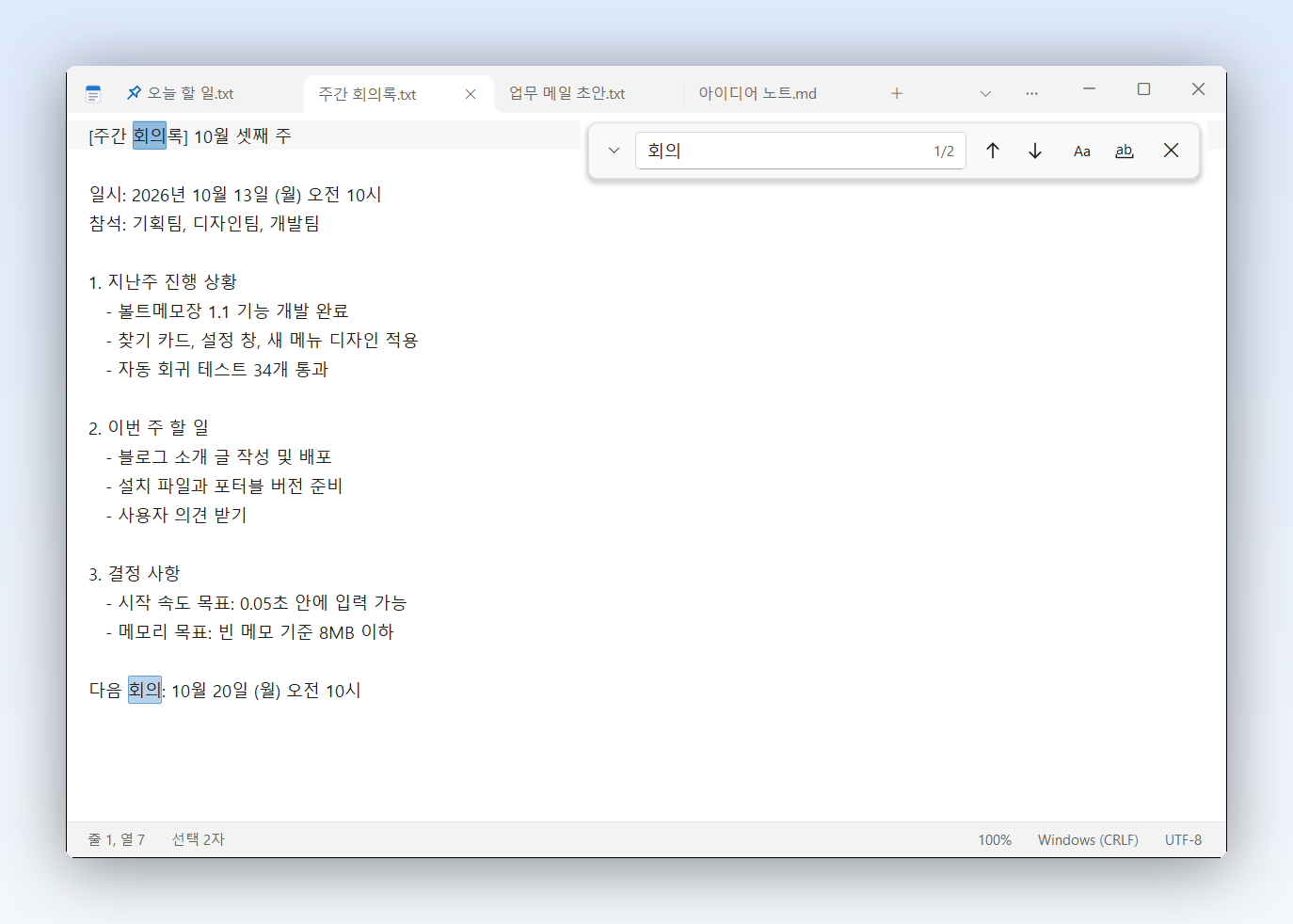
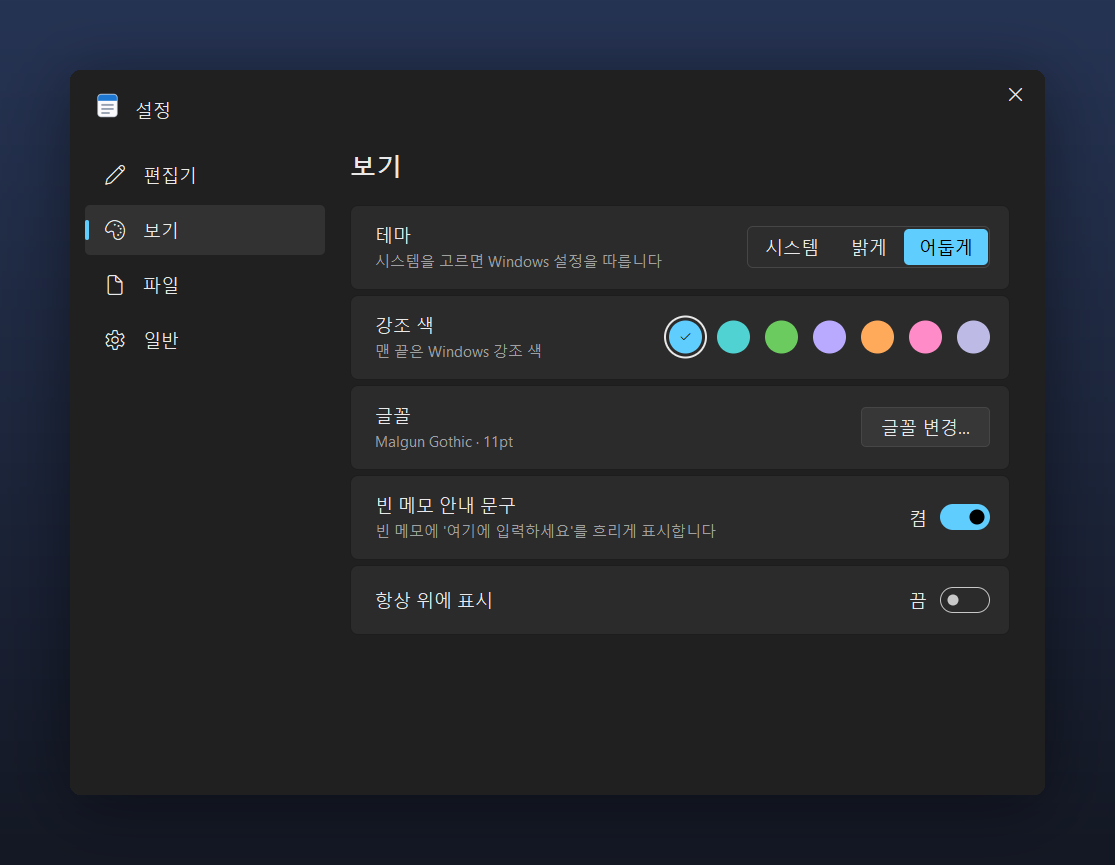
Light theme — Follows your Windows setting, or choose light or dark yourself.Choose an accent color — Pick the color used for buttons and switches, or let it follow the Windows accent color.
Accent colorWindows accentBlueTealGreenPurpleOrangePinkEach color is tuned separately for the light and dark themes, so it's easy on the eyes in either.
🗂️
Clean tabs
Open multiple memos as tabs and pin frequently used ones to the left. With many tabs, the ▾ button shows the full list.
✍️
Empty-memo placeholder
A new memo shows a faint "Type here" so you can just start writing.
🎚️
Windows 11–style settings
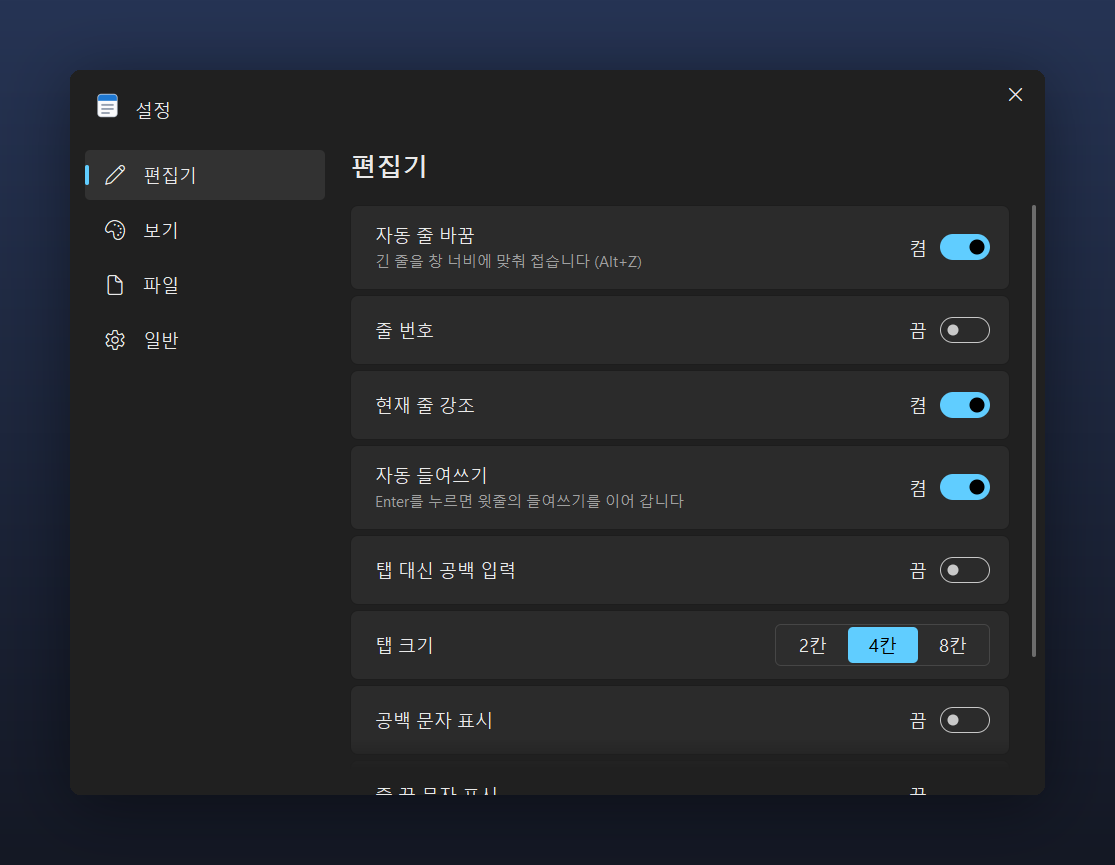
Pick a category on the left and flip the switches on the right — changes apply instantly. No Save button needed.
〰️
Slim scrollbars
Normally just a thin line, they widen when you hover the mouse. They never cover your text.
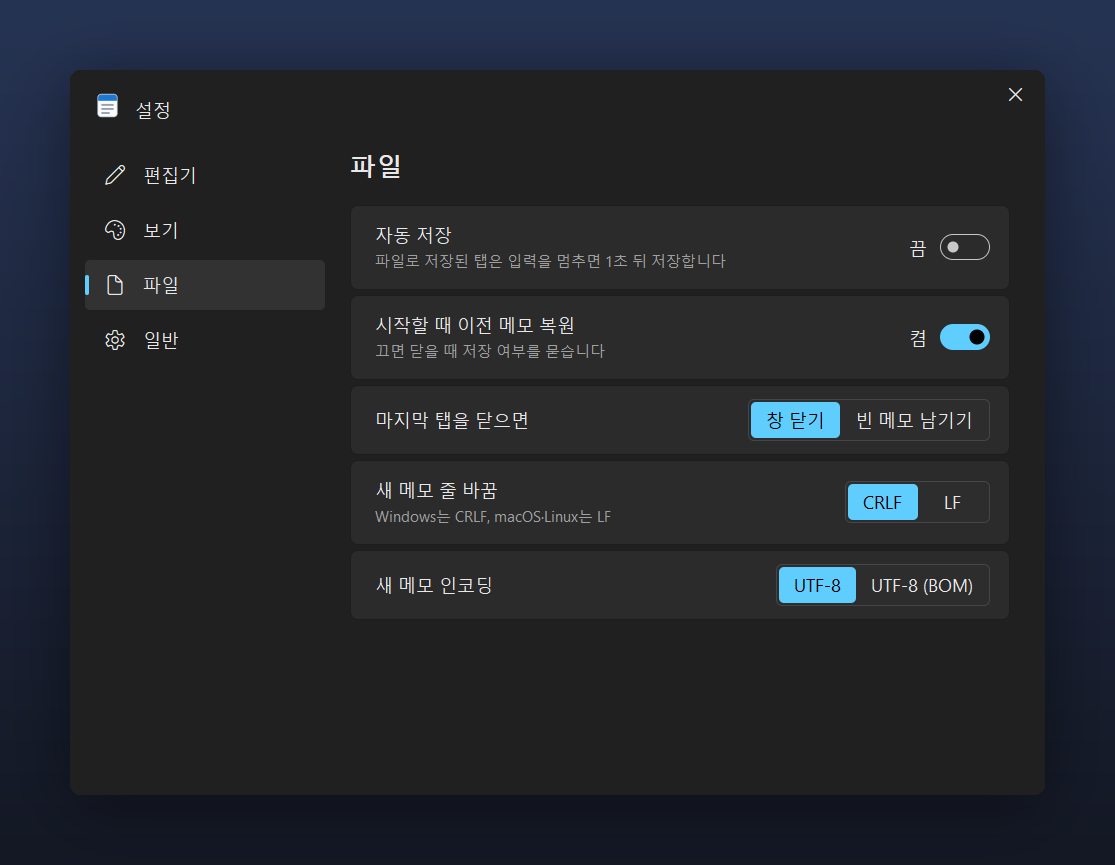
Settings › Editor — Word wrap, line numbers, current-line highlight, auto indent, tab size (2, 4 or 8 spaces) and show whitespace.Settings › File — Auto save, restore previous memos on startup, and line endings (CRLF/LF) and encoding (UTF-8/UTF-8 BOM) for new memos.
05 · FEATURES
A notepad that does all this
💾 Memos that survive closing
Even unsaved memos are automatically backed up every second. Close the window and reopen it, or lose power suddenly, and your memo comes right back. In Settings, turn on Auto Save, and memos saved as files save themselves 1 second after you stop typing — no worries if you forget Ctrl+S.
Click "Ln 1, Col 1" to go to a line, click the character count to see words and lines. Click the encoding or line-ending format to change it instantly.
🎯
Focus mode · F11
Hides tabs and the status bar and shows only your text in the center of the screen. Great for long writing.
🕘
Recent files · Reopen closed tabs
Ctrl+Shift+T brings back the tab you just closed, and the recent files list opens files instantly. Printing (Ctrl+P) is supported too.
📌
Always on top
Keep a memo floating above other windows while you copy from it.
🔁
Use instead of Windows Notepad
Click Settings › General › "Use instead of Windows Notepad" and double-clicking a .txt file will open it in BoltMemo.
"Windows protected your PC" on first launch Because this is an independently developed program without a code-signing certificate, you may see an "Unknown publisher" notice. Choose "More info" → "Run anyway", and it will proceed. You can first check that the file matches the original using the SHA-256 values below.
BoltMemo contains no internet connectivity at all (we verified the executable doesn't use Windows networking components). It sends no usage data and doesn't check for updates; your memos and settings are kept only in %LOCALAPPDATA%\BoltMemo, and nowhere else. With no account, no personal information is collected.
Coming in the next version
Restore earlier versions of a memo, and a quick memo you can open from anywhere with a hotkey. New versions will be posted on this page. If there's a feature you'd like, let us know in the community.
10 · FAQ
FAQ
Is there a fast, free notepad to replace Windows Notepad?
Yes. BoltMemo is a free notepad you can use as a Windows Notepad alternative. In the median of 10 launches each on the same PC, it was ready to type in 0.054 s (Windows Notepad: 0.292 s, about 5.4× faster), and an empty memo used 6.2MB of memory (about 1/18 of 113.5MB). It has tabs, find & replace, dark theme and auto-backup, and the program is about 1MB.
Windows 11 Notepad is slow — how can I fix it?
As Windows 11 Notepad gained tabs and features, it sometimes makes you wait briefly when it launches. The simplest fix is to switch to a lightweight notepad. Install BoltMemo and click Settings › General › "Use instead of Windows Notepad", and .txt files will open in BoltMemo when you double-click them.
Is BoltMemo really free?
Yes, it's free. No ads, no sign-up, no login, and no feature limits.
How is it so fast?
Its editing engine was built from scratch using only Windows' built-in features, with no heavy external frameworks. At startup it prepares only the window, the tabs and the current document; settings, printing and dialogs load the first time you open them. The window is drawn first, and if BoltMemo is already open, files attach as tabs in that window instead of launching a new instance.
Can it open large text files?
Yes. It opens a 10MB (100,000-line) document in about 0.03 s and counts search matches across 100,000 lines in about 0.1 s. A typed character appears on screen in about 0.001 s, and even in a file that is a single 2MB line it takes about 0.002 s per character (measured on the developer's PC).
If I close the window without saving, will my memo be lost?
No. Even unsaved memos are automatically backed up every second, so if you close and reopen the window or your PC shuts down suddenly, your memo comes right back. Turn on Auto Save in Settings and memos saved as files save themselves 1 second after you stop typing.
Will Korean .txt files display without garbled characters?
Yes. It automatically detects UTF-8, UTF-8 (BOM), UTF-16 and ANSI (CP949) documents — including legacy Korean .txt files — and saves them in the same format. You can also click the encoding in the status bar to change it instantly.
Can I open multiple memos in tabs?
Yes. Ctrl+N opens a new tab, Ctrl+W closes it, Ctrl+Shift+T reopens a closed tab, and Ctrl+Tab goes to the next tab. Pin frequently used memos, and when there are many tabs, use the ▾ button to see the full list.
Is there a dark theme?
Yes. Follow your Windows setting or choose light or dark yourself, and pick an accent color from blue, teal, green, purple, orange and pink — or follow the Windows accent color. Even the menus and settings window are drawn in the dark theme.
What's the difference between the installer and the portable version?
The features are the same. The installer (recommended, about 2.6MB) installs without admin rights, adds a Start menu entry and can be removed from Windows Settings › Apps. The portable version is just unzip and run BoltMemo.exe (about 1MB), so you can carry it on a USB drive.
Where are my memos and settings stored?
In the %LOCALAPPDATA%\BoltMemo folder. BoltMemo has no internet connectivity, so your memos never leave your PC.
A "Windows protected your PC" window appears — is it safe?
This notice appears because it's an independently developed program without a code-signing certificate. Click "More info" → "Run anyway". You can first check that the hash of the downloaded file matches the SHA-256 values on this page.
Where can I report a problem or request a feature?
Leave a post in the Youngsam.net community, or email info@youngsam.net. The next version will add restoring earlier versions of a memo and a quick memo you can open from anywhere with a hotkey.
Windows and Notepad are trademarks of Microsoft Corporation. BoltMemo is not affiliated with Microsoft; comparisons are provided for reference only.
Version history(2)
v1.1.1Latest
October 17, 2026
글꼴 굵게·기울임이 보통으로 돌아가던 문제, 글꼴 창이 비어 열리던 문제 수정. 0.5pt 단위 글꼴 크기, 125% 배율 크기 변화 수정. 모두 바꾸기로 지울 때 글자를 건너뛰던 문제, UTF-8(베타) PC의 ANSI 저장 빈 파일, 디스크 가득 시 원본 손상 위험, 창 두 개·보관본 삭제·Windows 종료 막힘 수정. 8MB 이상 문서 자동 보관 간격 조정.
새 메뉴 디자인(둥근 카드·아이콘·단축키), 떠 있는 찾기 카드(찾은 개수 표시·대소문자·단어 단위), 강조 색 선택(파랑·청록·초록·보라·주황·분홍·Windows 강조 색), 빈 메모 안내 문구, Windows 11 스타일 설정 창, 얇은 스크롤바, 탭 고정·전체 목록, 1초 자동 보관과 자동 저장, 줄 편집 단축키, 텍스트 도구, 집중 모드, 닫은 탭 다시 열기, Windows 메모장 대신 사용하기.