

and KakaoTalk PC ads quietly disappear
TalkShield finds and clears the bottom banner ad, the lock-screen ad and the pop-up ads in KakaoTalk for PC in real time, then fills the space where the ad used to be with your friend list. It is a small system-tray app. Since 1.2.0 it also removes the bottom ad, and the empty space it leaves, in the new KakaoTalk Beta for PC. It never touches KakaoTalk's files or memory and only tidies up the ad windows on your screen.
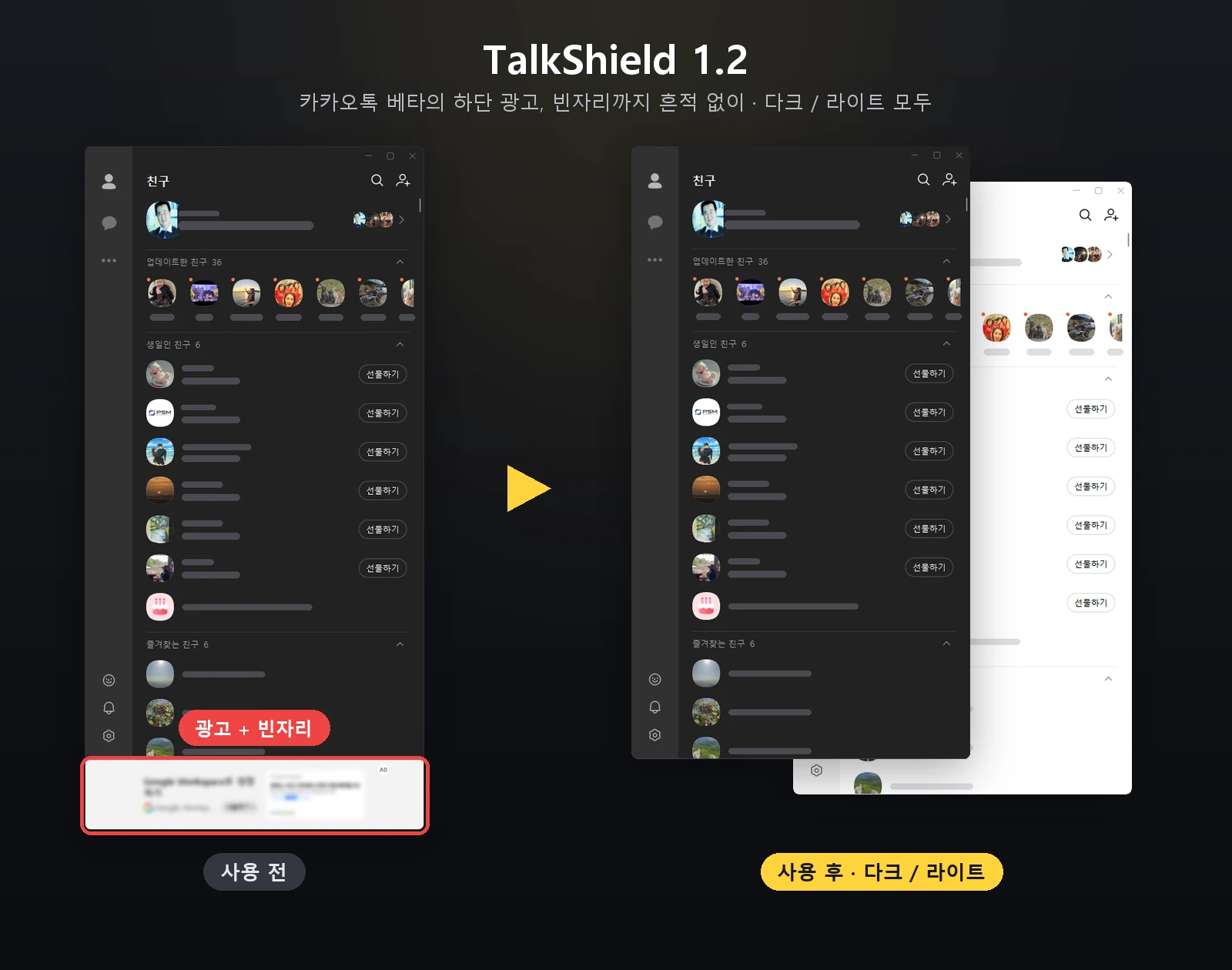
Three kinds of ads it clears
While KakaoTalk is running, TalkShield looks for ad windows on screen and clears them. On the existing KakaoTalk for PC it handles all three below; on KakaoTalk Beta it clears the bottom banner ad, the empty space it leaves, and the lock-screen ad too (Beta currently shows no separate ad pop-ups). Real content such as chats and the friend list is never touched.
Light, quiet, and hands off KakaoTalk
TalkShield.cs — a single file) is on GitHub under the MIT License, so you can read it and build it yourself.How it works — it just tidies windows
TalkShield looks at KakaoTalk's window structure, picks out only the ad windows and does the three things below. It never touches the KakaoTalk program files or memory (no injection).
Natural in both dark and light
Whether you use KakaoTalk in dark or light mode, the space where the ad was is tidied to match its surroundings. It even refines the window shape, with no border lines and no flicker.

Three steps, no installation
TalkShield-v1.2.4.zip (about 46KB) below and extract it to any folder.TalkShield.exe — double-click it.∧ (hidden icons) area of the taskbar. Click ∧ and drag the TalkShield speech-bubble icon next to the clock to keep it visible.The new tray menu — just five items
Right-click the tray icon to open a Windows 11-style menu (the app's menus are in Korean), with the current status and the total block count at the top. The icon is on when it has a red block badge, and off when it is a gray speech bubble. The menu and icon follow the Windows dark or light theme automatically.
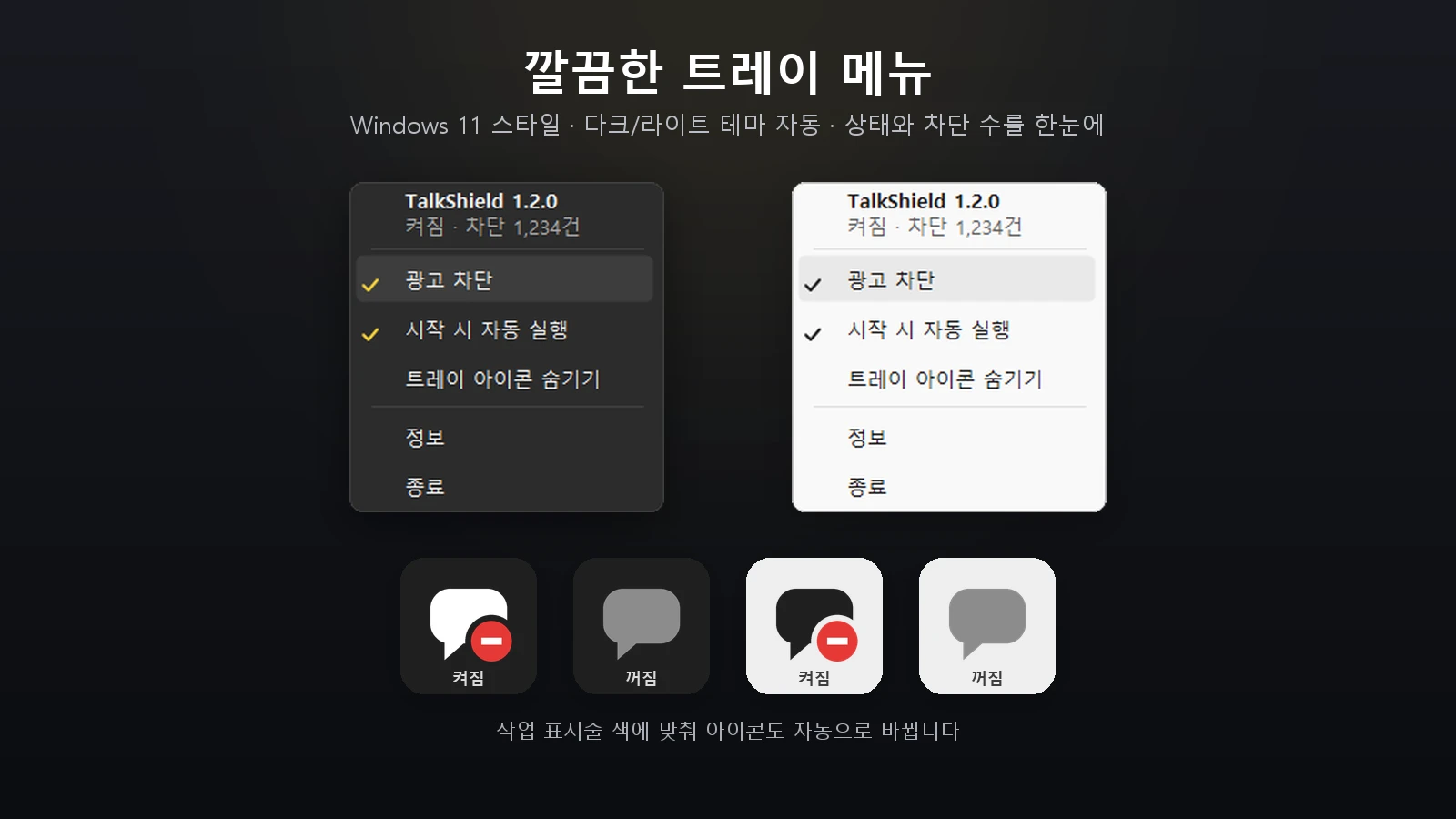
TalkShield.exe once more. The hidden state is kept after a reboot.Settings and the total block count are saved automatically and carry over to the next run.
Build it from source
It only uses the .NET Framework compiler built into Windows (csc.exe), so you can build it from source without installing anything. The full 1.2.0 source (TalkShield.cs — a single file), including KakaoTalk Beta support, is public under the MIT License on GitHub, and issues are handled there too.
git clone https://github.com/openr03/TalkShield.git
cd TalkShield
build.bat
build.bat creates the icon and uses csc.exe to build TalkShield.exe. If antivirus warnings worry you, you can build it yourself this way.
Changelog
Download
TalkShield.exeSHA-256 of the ZIP file and of TalkShield.exe inside it.
# PowerShell
Get-FileHash .\TalkShield-v1.2.4.zip -Algorithm SHA256
Get-FileHash .\TalkShield.exe -Algorithm SHA256

# Expected (1.2.4)
# TalkShield-v1.2.4.zip
# 6727275c1c332822231029dfe42a8123adfd9186bd3a86c5688e650fde49107b
#
# TalkShield.exe
# a7ad3d14c9308f2f64e051229bd3e74338ab8fb8e59055b4192bc435e054792bFrequently asked questions
How do I remove the bottom ad in KakaoTalk for PC?
Just keep TalkShield running. It closes the banner ad at the bottom of the main window (friends · chats) and fills the empty space with the friend list. On the existing KakaoTalk for PC it also clears the lock-screen ad and ad pop-ups that open separately, and on KakaoTalk Beta it removes the bottom banner ad, the empty space it leaves, and the lock-screen ad.
Does it remove ads in the new KakaoTalk Beta for PC too?
Yes. Since 1.2.0 it removes the bottom banner ad in KakaoTalk Beta along with the empty space it leaves, and the lock-screen ad too (Beta currently shows no separate ad pop-ups). The existing KakaoTalk for PC is still supported, so the same single file works whichever one you use.
Does it look natural in KakaoTalk's dark mode?
Yes. In both dark and light modes the ad space is tidied to match its surroundings, and no border lines or flicker show up while you resize the window. The tray icon and menu also follow your Windows theme automatically.
Will KakaoTalk act strangely if I turn TalkShield off?
When you exit, or turn off "Ad blocking" in the tray menu, TalkShield restores the KakaoTalk window. It is also built so the program keeps running even if an unexpected error occurs.
Is TalkShield free?
Yes, completely free. No ads, no sign-up, and the full 1.2.0 source code is public on GitHub under the MIT License.
Do I need to install it?
No installation needed. Unzip the ZIP (about 46KB) and double-click TalkShield.exe; it starts working from the tray right away. To remove it, exit and delete the file.
Could my KakaoTalk account get suspended or restricted?
TalkShield does not interfere with the KakaoTalk program, servers or memory; it only tidies windows shown on your own PC screen, which is the same way ordinary window-management tools work. However, you use it at your own responsibility.
Does it read my chats or personal information?
It only looks at KakaoTalk's window structure to find ad windows. Content windows such as chats and the friend list are told apart and left untouched. You can check how it works in the full source published on GitHub.
Ads came back after a KakaoTalk update.
That means KakaoTalk's window structure changed. Let us know via GitHub Issues or email (info@youngsam.net) and it will be addressed. TalkShield notifies you when a new version is released.
My antivirus or SmartScreen shows a warning. Is it safe?
This is a common warning for free personal projects without code signing. In the SmartScreen window, click "More info" → "Run anyway". You can confirm the file matches the original with the SHA-256 values on this page, and since all the source is public, you can also build it yourself with build.bat.
Can it start automatically when I turn on my PC?
Right-click the tray icon and turn on "Run at start-up". You can turn it off again from the same menu.
If I hide the tray icon, does ad blocking stop?
No. Only the icon is hidden; blocking keeps running. The hidden state is kept after a reboot. To show the icon again, run TalkShield.exe once more.
Will it slow down my PC?
1.2.0 uses only about 5–8MB of memory (working set), and its CPU usage is about a third of 1.1.1's (measured by the developer). The download is small too, at about 46KB.
KakaoTalk is a trademark of Kakao Corp. TalkShield is a personal project not affiliated with Kakao. Windows is a trademark of Microsoft Corporation.