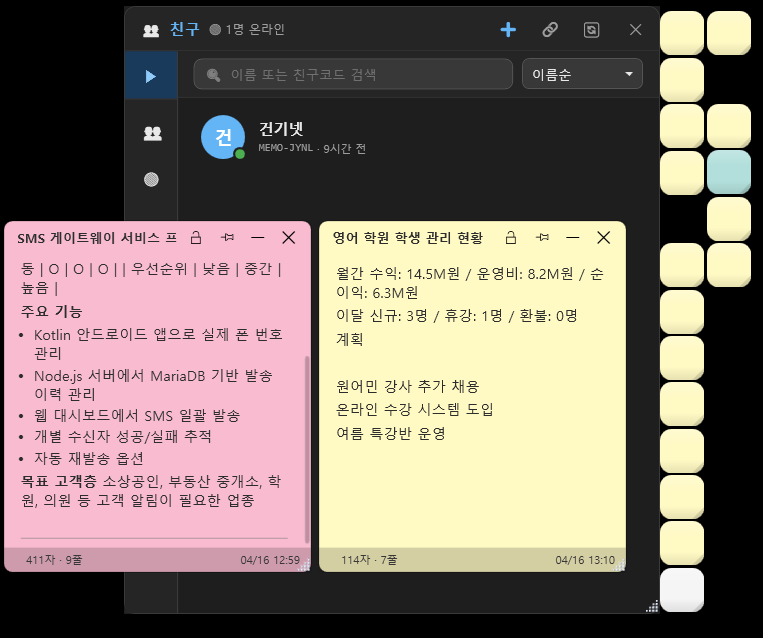
Overview
Like a sticky note pinned to your desktop, jot down whatever comes to mind and send it to friends and coworkers with a single shortcut — the lightest note app there is.
Offline-first, with online sync optional. Start using it right after install with no sign-up; you only need an email login when you use the friend-sharing feature.
Since its first release in October 2023, it has been refined over about 2 years and 6 months, one piece of real user feedback at a time, up to v2.11.6. Built on the principle of "start from the simplest sticky note and add only as much as is truly needed," it aims to be a tool you can use naturally from the moment you boot up.
Official site · download: memo.youngsam.net
The problems StickyMemo solves
- Opening and closing Notepad.exe every time is a hassle
- Notes in the messenger's "chat with myself" get hard to find once it gets long
- Sharing a one-liner with a teammate means opening a browser, logging in…
- You write down a to-do and then forget it — you'd like a reminder attached
- You want to lock away things like passwords or payment records
StickyMemo is designed to get all of this done with a single right-click in the tray, or one press of Ctrl+Shift+N.
Core features at a glance
| Feature | Description |
|---|---|
| Desktop notes | Pop a new note anywhere and drag it freely |
| Rich formatting | Bold, italic, highlight, headings, code blocks, tables, images |
| Reminders | Set a time and the note pops up and alerts you automatically |
| Pin on top | Always stays on top, never hidden behind other windows |
| Fold / mini mode | Fold notes small to tidy up your desk |
| Magnetic snap | Clicks onto screen edges and other notes |
| Per-note lock | Lock individual notes with a password |
| Friend sharing | Send a note to a friend instantly with Ctrl+S |
| Scheduled send | Automatically send to a friend at a time you choose |
| Workspaces | Shared workspace for teams and departments |
| Offline-first | Local SQLite, works 100% with no network |
| Dark / light | Auto-detects the system theme + manual switch |
| Multilingual | Korean · English · 日本語 · 中文 |
Features in detail
1. Writing notes
- Two-part structure of title + body, with the body in rich text (RTF-based)
- 10 default colors + custom colors, opacity adjustable 0-100%
- Set font / font size / line spacing individually
- Paste inline images (
Ctrl+V), resize images by dragging - Insert tables · code blocks · highlight · numbered/bulleted lists
- Checklists · strikethrough to mark done
- Position and size are saved automatically and restored exactly after a reboot
2. Reminders (alerts)
- Right-click a note → "Alert" → quick presets (5 min / 15 min / 30 min / 1 hour / 3 hours / 9 AM tomorrow / next Monday) or set a date and time directly
- Repeat options: daily / same day every week / same date every month
- When the time arrives, all of this happens at once:
- The event sound you set plays (can be turned off too)
- A balloon notification at the bottom-right of the tray (title/body preview)
- The note window unfolds automatically (even if it was folded)
- Red border blinks + shakes side to side for about 3 seconds
- Alerts whose time passed while the app was off are triggered right after restart
- The alert fires even if the note was deleted, so you never miss it
3. Friends & sending notes
- Exchange 6-digit friend codes → add friend → approve
- When a friend request arrives, a balloon notification shows instantly at the bottom right; click it and the friends window opens right away
- A badge showing the number of pending requests next to "👥 Friends" in the tray menu
- Right-click a note or press
Ctrl+S→ pick a friend → sent - Body formatting, images and attachments are all delivered as-is
- Received notes appear on your desktop instantly as a balloon notification + an unfolded note
- Online status (🟢🟡⚫) shown via real-time Socket.IO connection
- Invite link: invite in one line with
memo.youngsam.net/invite/CODE - Sort by recent chats · favorites · friend groups (folders)
4. Scheduled send (new in v2.11.0)
- Automatically send a note you write now to a friend at a time you choose
- Quick presets or a directly specified date and time
- Checked every 30 seconds, with a tray notification + sound on success/failure
- Right-click a note → "⏰ Scheduled send: N" to view the list + cancel
5. Workspaces (teams & departments)
- Create a shared team space and add members with an invite code
- Share notes within the workspace · sort by department
- Invite links valid for 7 days, reusable
6. Search & organization
Ctrl+Shift+Fglobal search (title · body · tags combined)- Tag system · filter by color · sort by created/modified date
- Category (Default / Work / Personal / Received notes, etc.) indexing
- Archive · Trash · Hidden notes separated into 3 stages
7. Mini mode & tidying up
- Fold a note to just its title to save screen space
- Auto-arrange: left/right N-column stacks, horizontal/vertical stacks
- Batch-place to the four corners of the screen
- Magnetic snap: clicks onto screen edges and the edges of other notes
- Hover with the mouse to preview a folded note's content
8. Security
- Per-note password lock (locked notes have their content blurred)
- Whole-app lock (requires a password on launch)
- Stored in local SQLite · your personal notes are never uploaded to the server
9. Notification sounds
- Independent sound settings per event: receive · send · create · delete · close · reminder
- 10 built-in sounds:
ding,pop,chime,beep,bubble,knock,winreceive,win7trash,newmemo,memoclose - Add your own custom sounds (drop in wav/mp3)
- Choose "disabled" per event
- Do Not Disturb (DND) mode · mute by time of day
10. Auto-update
- Background check every 6 hours, with a balloon notification when a new version is available
- Click the balloon → auto-download → auto-restart
- Silent update option (applied on next launch)
- Progress shown during download
11. Backup
- Auto-backup: daily / weekly, keeping up to N copies
- Manual export · import (JSON)
- Direct access to the SQLite DB file
Default shortcuts
| Shortcut | Action |
|---|---|
Ctrl + Shift + N | New note |
Ctrl + Shift + L | Note list window |
Ctrl + Shift + S | Show / hide all notes toggle |
Ctrl + Shift + F | Global search |
Win + Shift + V | Clipboard → create a note directly |
Ctrl + Shift + 1~9 | Favorite note slots 1-9 |
| Within an individual note window | |
Ctrl + S | Send to a friend |
Ctrl + B / I / U | Bold / italic / underline |
Ctrl + K | Highlight |
Ctrl + E | Code block |
| Right-click → Alert | Set a reminder |
※ Every shortcut can be changed individually in Settings → Shortcuts
Recommended for
- Anyone who finds constantly opening and closing Notepad a chore
- Anyone who keeps losing important notes in the messenger's "chat with myself"
- Anyone who wants to quickly share a one-line note with teammates or family
- Anyone who wants to write down a to-do and get an alert at a set time
- Anyone who wants to lock away sensitive notes like passwords or payment records
- Anyone who wants to use their desktop like sticky notes
- Anyone who wants a local note app that works safely offline
How to install
Installer version (recommended)
- Download StickyMemo-Setup.exe → run → Next · Next
- Start menu shortcut registered automatically
- Auto-update works properly
- Auto-start after a Windows reboot (can be turned off in settings)
Portable version
- Download just the single file StickyMemo.exe
- Keep it on a USB drive · cloud folder and run it anywhere
- Data is stored in
%LOCALAPPDATA%\StickyMemo\
You can start using it on first launch with no login or sign-up.
An email login is only needed when you use the friend-sharing feature (Settings → Friends).
System requirements
| OS | Windows 10 (version 1809 or later) / Windows 11 |
| Architecture | x64 |
| Runtime | Bundled (.NET 8 single-file, no separate install needed) |
| Disk | About 75 MB (portable single exe) |
| Memory | ~50 MB when idle, ~120 MB with many notes open |
| Network | Needed only when using online sync (HTTPS) |
Technical specifications
| Client | WPF · .NET 8 (single-file deployment) |
| Local storage | SQLite |
| Server | Node.js · Socket.IO · PostgreSQL |
| Real-time connection | Socket.IO (friend status, note sending, request alerts) |
| Body format | Rich text (RTF-based) |
| Window control | Win32 API (SetWindowPos, WS_EX_LAYERED transparency) |
| Shortcuts | RegisterHotKey (global) |
| Auto-update | Background every 6 hours, full replacement without deltas |
| License | Freeware (all features unlocked, free for personal · business use) |
Frequently asked questions
Q. Is it free? Will it become paid later?
It's completely free and every feature is unlocked. It's a premium app refined over a long time that we're releasing for free, so there are no plans to switch to paid.
Q. Do my notes get uploaded to the server?
No. All personal notes are stored only in a SQLite file on your PC. Only a note you press "send" on to a friend passes through the server at that moment to reach them.
Q. Do I have to create an account to use it?
The basic note features need no account. An email login is only needed when you use friend sharing.
Q. Can I sync my notes across other PCs?
Instead of a sync feature, it currently uses a "friend sharing" model. You can move notes to another PC with manual backup/restore.
Q. My antivirus flags it as a virus
Because it's a single exe without a code-signing certificate, SmartScreen / some antivirus software may be cautious. It uses only open-source components and its server source is public too. We recommend the installer version.
Q. Updates aren't working
Go to Settings → Update → click "Check now." If that still doesn't work, download the new exe yourself and overwrite it in the existing location.
Q. Where do I send suggestions or bug reports?
In the app, Settings → Feedback (we aim to respond within 24 hours).
A note from the developer
StickyMemo is the result of about 2 years and 6 months of refinement since its first release in October 2023, incorporating real user feedback one piece at a time.
On the principle of "start from the simplest sticky note and add only as much as is truly needed," it aims to be a tool that ordinary users — those who find flashy professional productivity apps overwhelming — can use naturally from the moment they boot up.
Built on WPF · .NET 8 · SQLite · Node.js · Socket.IO · PostgreSQL.