Free Excel alternative — AI spreadsheet that opens and saves .xlsx, with 41 templates
A free spreadsheet program you can use instead of Excel. Opens and saves Excel files (.xlsx) as they are, and AI builds formulas, formatting and charts when you ask in plain words. 41 Korean templates such as a household budget, quotation and payslip, Korean amount and holiday functions, local AI (Ollama) support. Windows · Linux · Web, free Excel alternative with no sign-up or ads.
v0.9.2·Published October 14, 2026·Updated October 18, 2026·Downloads 113
#엑셀대체프로그램#무료엑셀#엑셀무료다운로드#무료스프레드시트#AI엑셀#AI스프레드시트#엑셀템플릿#가계부엑셀#견적서양식#급여명세서양식#부가세신고#자영업장부#로컬AI#무료프로그램#한칸#엑셀#엑셀대체#무료엑셀프로그램#엑셀뷰어#xlsx#스프레드시트#가계부#견적서#급여명세서#간트차트#Ollama#HanKan+21Official site
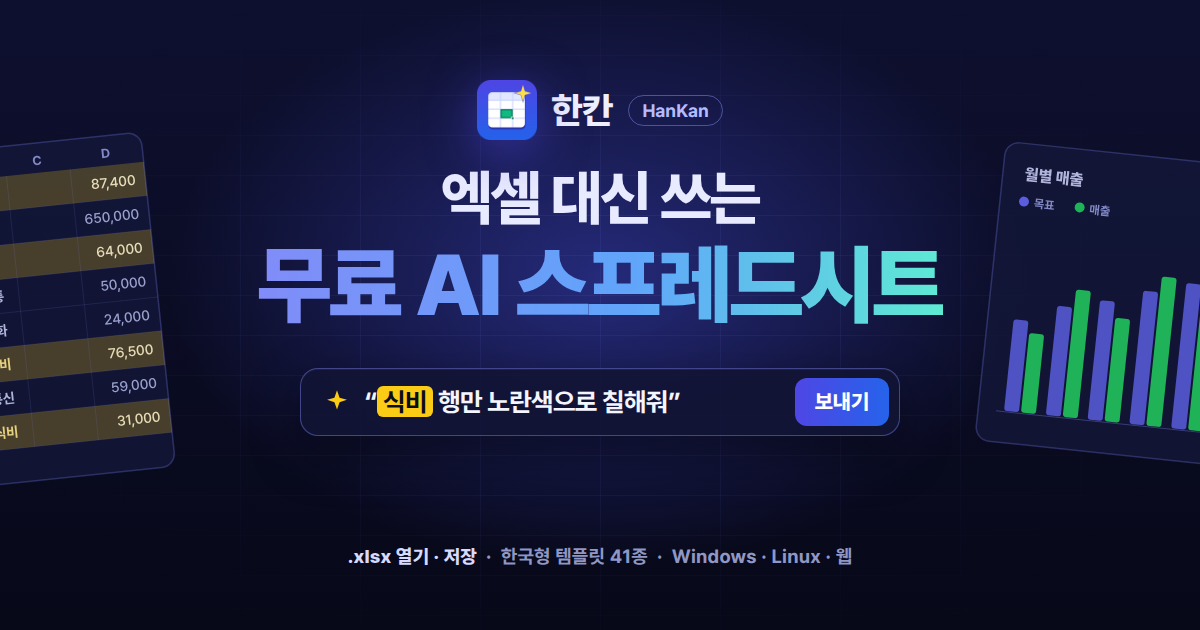
A free spreadsheet to use instead of Excel — just ask, and AI builds the table
HanKan is a free spreadsheet program you can use instead of Microsoft Excel. It opens and saves Excel files (.xlsx) as they are, and when you say something like “Color the food rows yellow and put the total at the bottom.”, AI builds the formulas, formatting and charts for you. It ships with 41 Korean-style templates such as a household budget, quotation and payslip, with no sign-up, ads or payments.
Excel alternative · every feature free.xlsx open and saveWindows · Linux · WebLocal AI (Ollama) support
$0
Price
Personal · business · school
41
Korean templates
Built into the app
4
AI options
Gemini · Claude · GPT · local
.xlsx
Excel files
Open and save as is
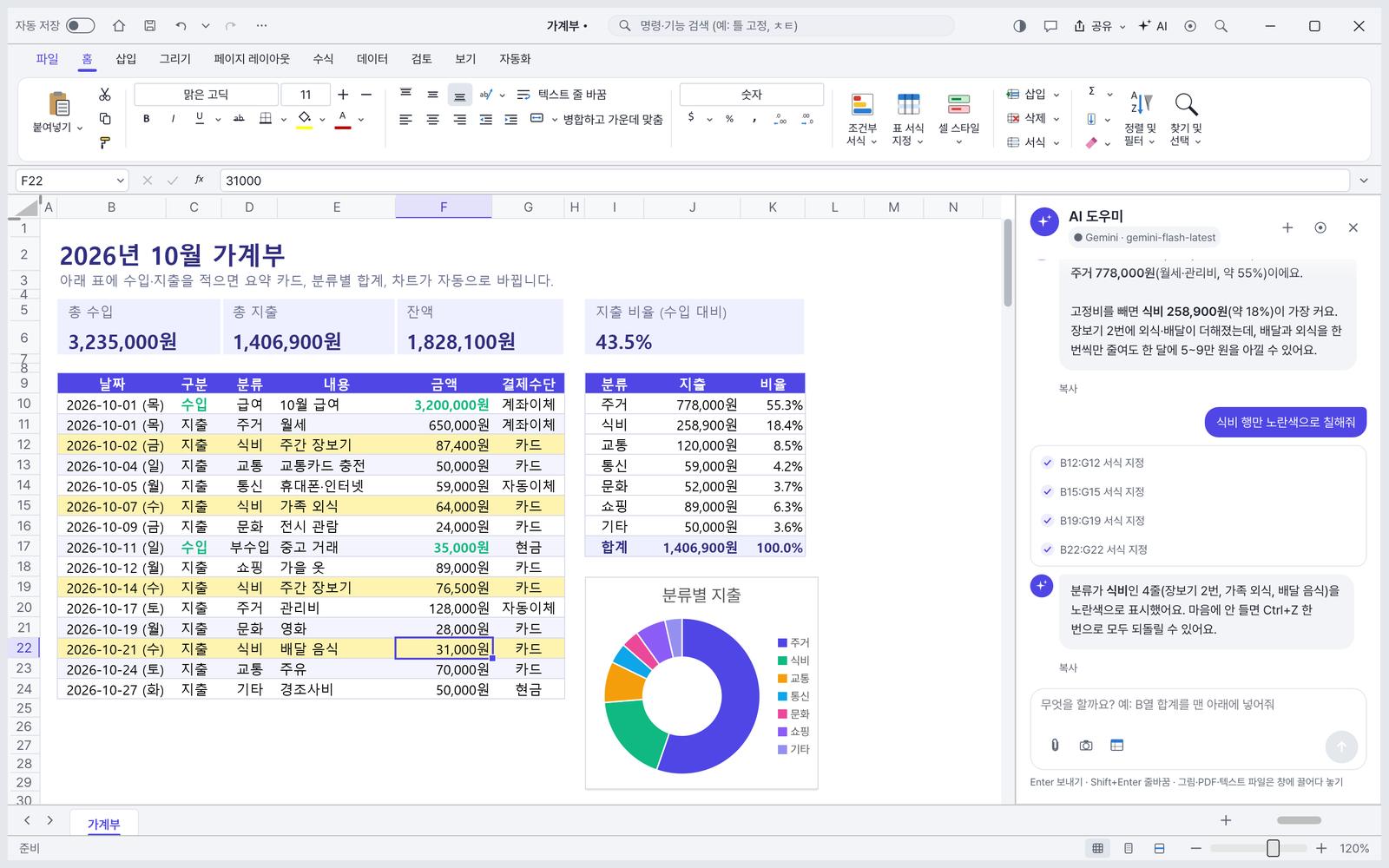
Budget + AI assistant — Asked “What was my biggest expense this month?”, it analyzes housing and food; with “Color only the food rows yellow” it highlights the four food rows. The summary cards and donut chart update automatically when you edit the table.
01 · AI ASSISTANT
An AI assistant you talk to
Type what you want in the AI panel on the right (Ctrl+Shift+A) and the AI first reads the sheet structure, then does the work itself. Plain requests like “Add a total for column B” or “Chart only the top 5 sales” are enough.
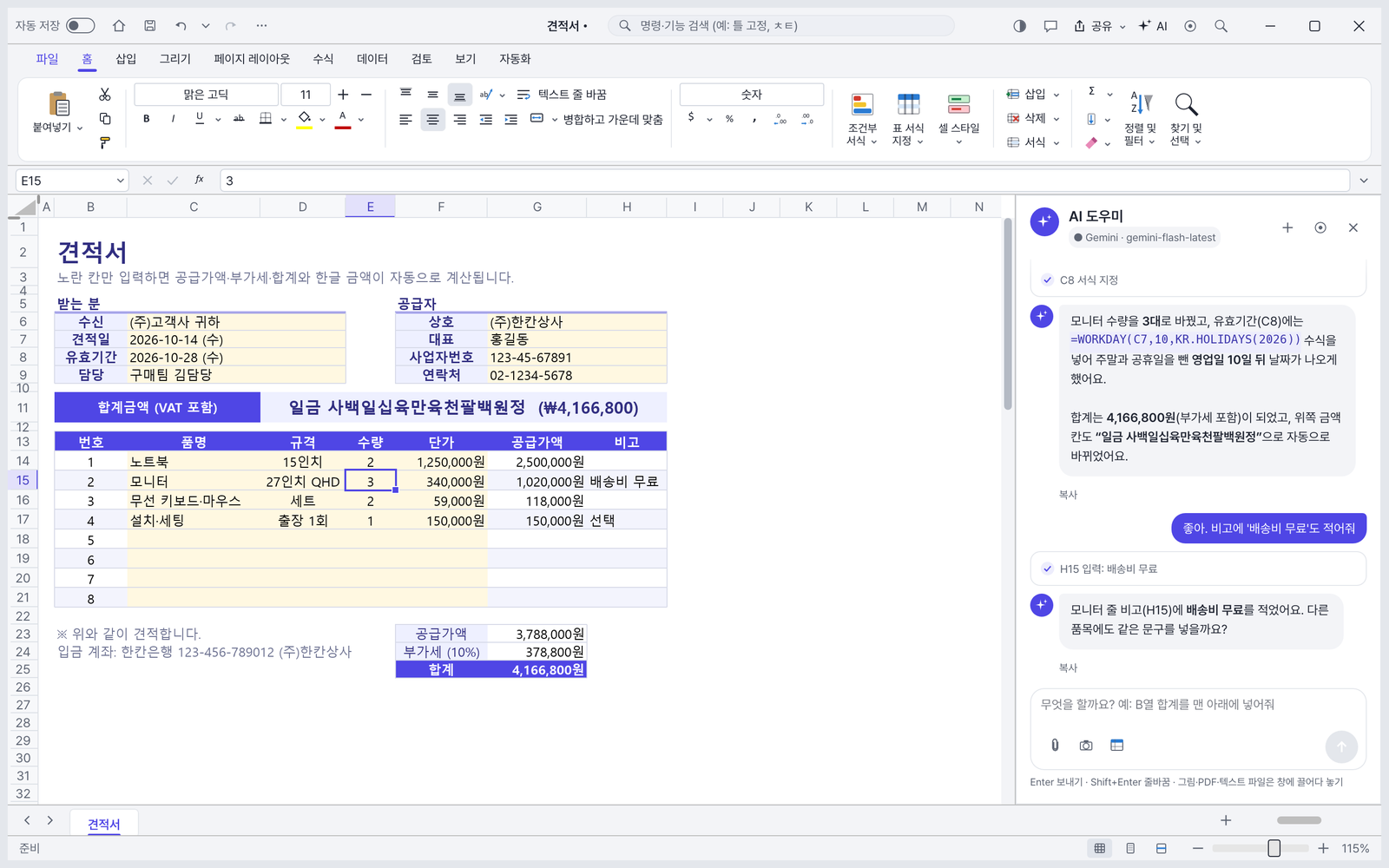
Editing a quotation by talking — It changed the monitor quantity to 3 and calculated the validity date as 10 business days later excluding holidays (WORKDAY + KR.HOLIDAYS). The amount at the top changes automatically to the Korean written form “일금 사백일십육만육천팔백원정”.
What the AI assistant does
✓Runs formulas · formatting · sort · filter · charts · conditional formatting for you
✓Asks first with a confirmation card before changing the sheet
✓Don’t like it? One Ctrl+Z undoes everything the AI did
✓Attach a screenshot · PDF · image and say “Make it like this form”
✓Choose your AI: Gemini · Claude · GPT · local AI (Ollama · LM Studio)
What about AI fees? HanKan does not charge for AI. AI is connected directly to each provider with your own API key (Gemini has a free usage tier), and fees follow that provider’s pricing. Local AI costs nothing and your data never leaves your PC. API keys are stored in Windows Credential Manager.
02 · EXCEL FILES
Opens and saves Excel files as they are
A familiar screen with ribbon menu, formula bar and sheet tabs. It has the everyday features you need to use it as an Excel alternative.
📂
.xlsx open · save
Opens and saves Excel files (.xlsx). Also opens older Excel (.xls) and CSV, including Korean CSV (CP949) without garbled text.
Keeps the default font of Korean Excel files (Malgun Gothic) as is.
🧩
Macros (VBA) are preserved only
VBA macros are not run, only preserved in the file. Some advanced features may not be supported yet, so check important files on a copy first.
03 · TEMPLATES
41 Korean templates — just fill in the yellow cells
Preview the real layouts by category on the “New” screen. Fill in only the yellow cells and totals · summary cards · charts · the Korean written amount (“일금 ○○원정”) update automatically.
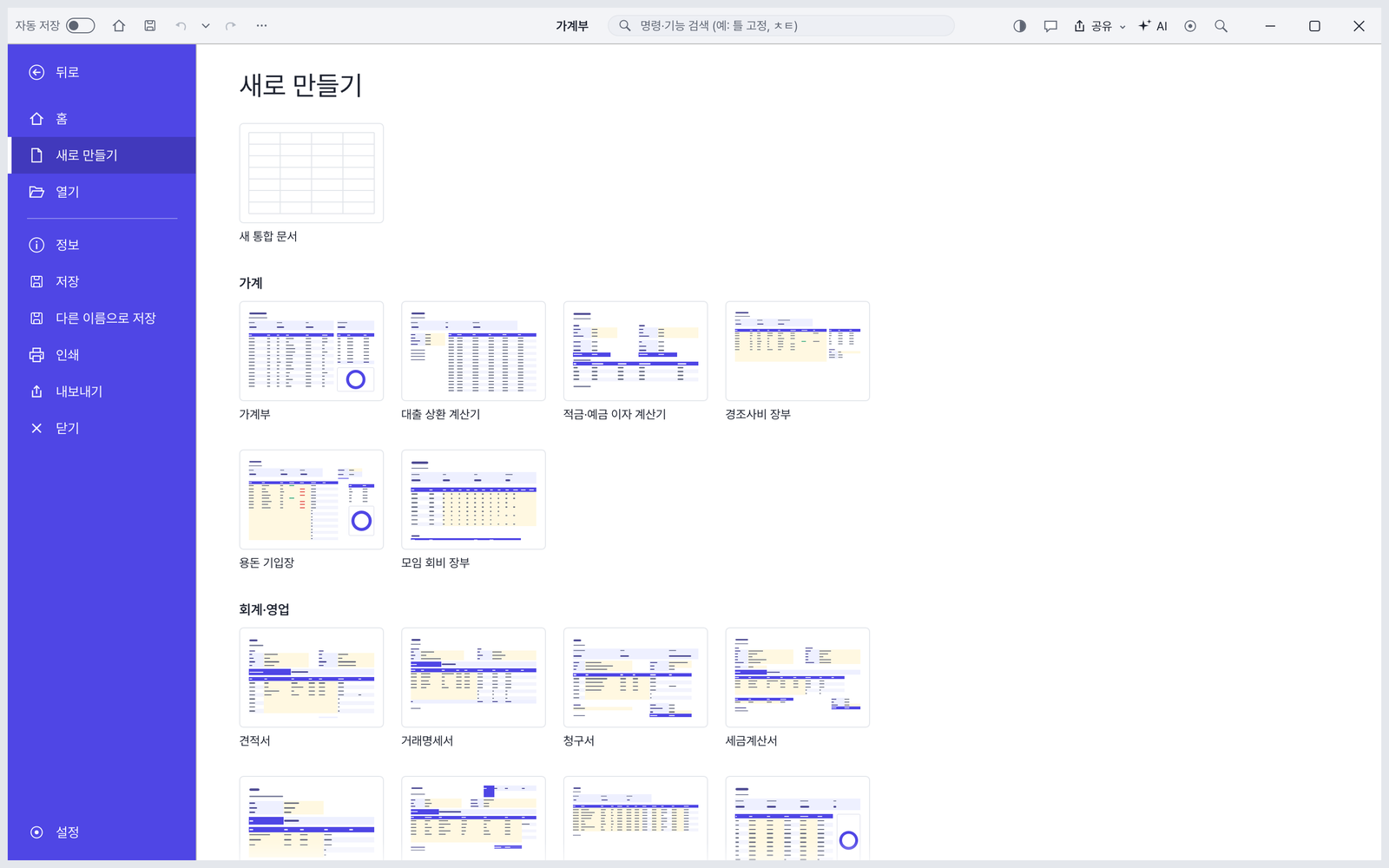
New — Open a household budget, loan repayment calculator, quotation, transaction statement and more right from preview tiles grouped by household · accounting · sales.
Included templates
✓Household — Household budget, allowance log, club dues ledger, gift money ledger, loan repayment calculator, savings · deposit interest calculator
✓Life — Monthly calendar (holidays auto-filled), family schedule, car maintenance, health · exercise log, habit · reading log, moving checklist, meal plan · shopping list
✓Education — Student grade sheet, academy attendance book, tuition tracker
04 · PAYROLL · TAX
Payslips and VAT worksheets calculate themselves
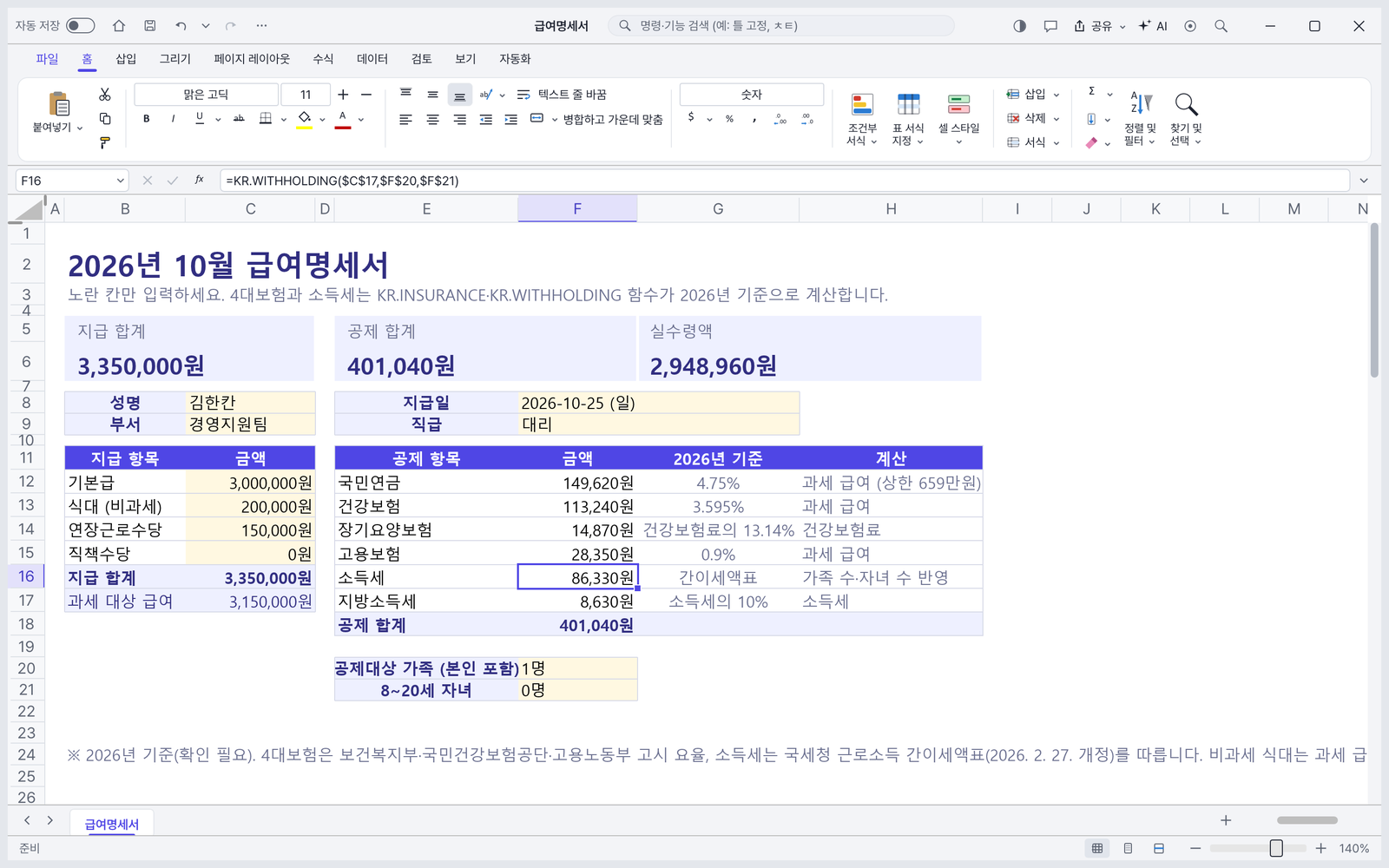
With the payroll functions KR.INSURANCE(Korea’s four social insurances) and KR.WITHHOLDING(simplified income tax withholding), the payslip calculates deductions automatically. Forms that include taxes or rates show the base year and source.
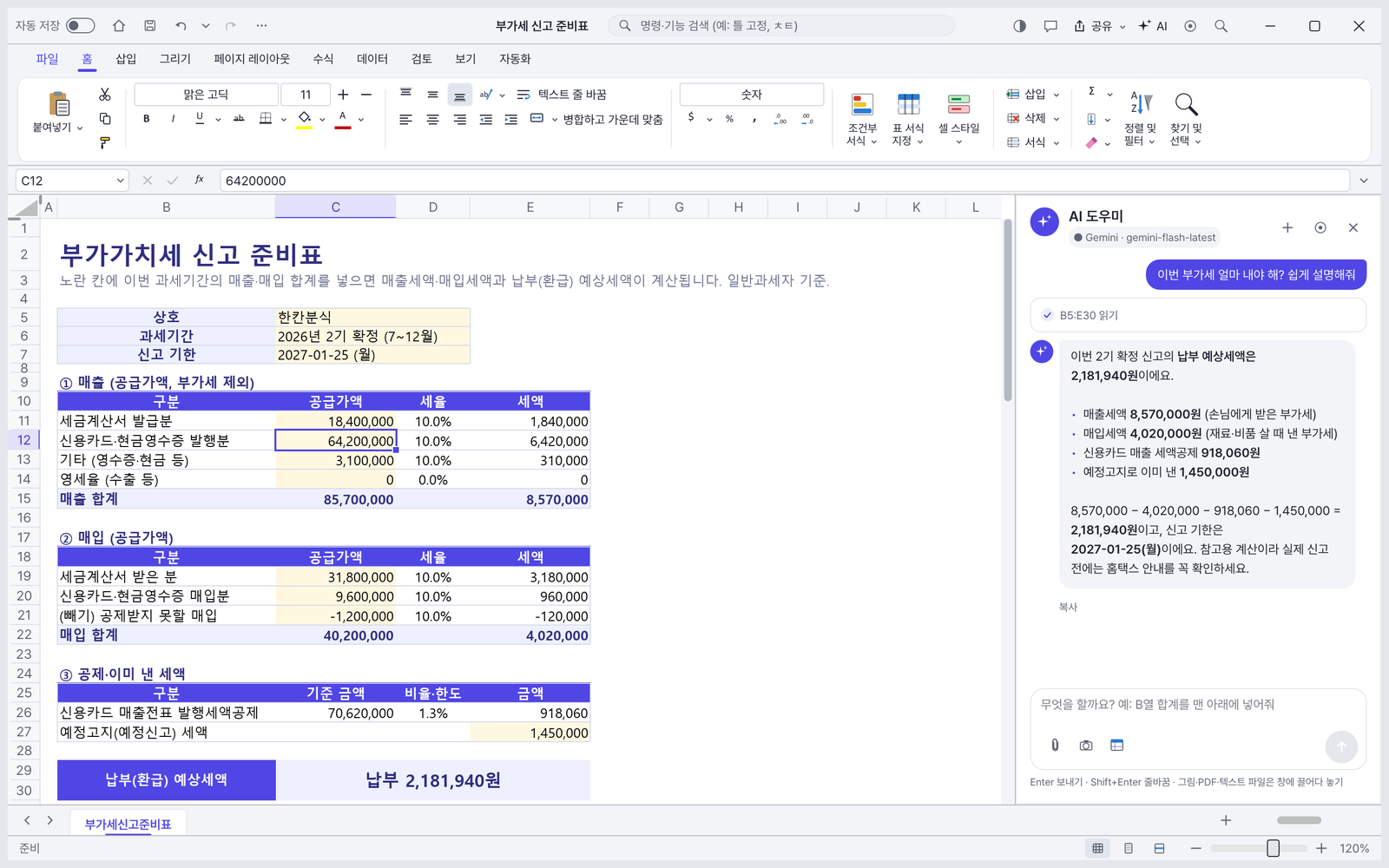
Payslip — Calculates national pension · health insurance · long-term care · employment insurance · income tax · local income tax with functions and shows take-home pay on a card.VAT return worksheet — Enter sales · purchases · deductions to get the estimated VAT due, and the AI assistant explains the calculation in plain words.
Tax · payroll note VAT · year-end settlement · social insurance · withholding calculations are based on 2026. Always check the National Tax Service’s guidance before actually filing.
05 · MADE FOR KOREA
Features made for Korea
Holidays · Korean written amounts · phone numbers — things Korean offices and homes use every day.
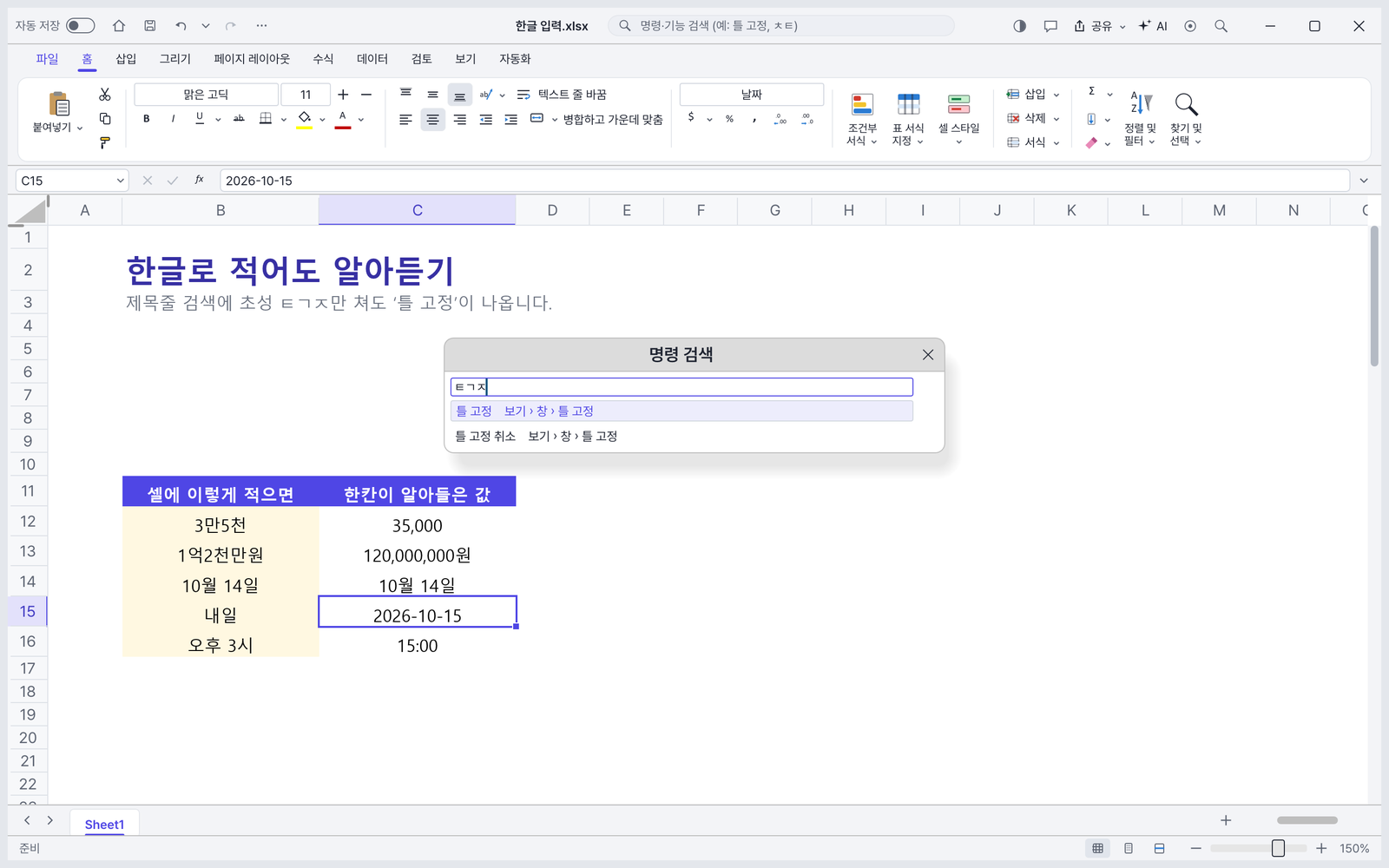
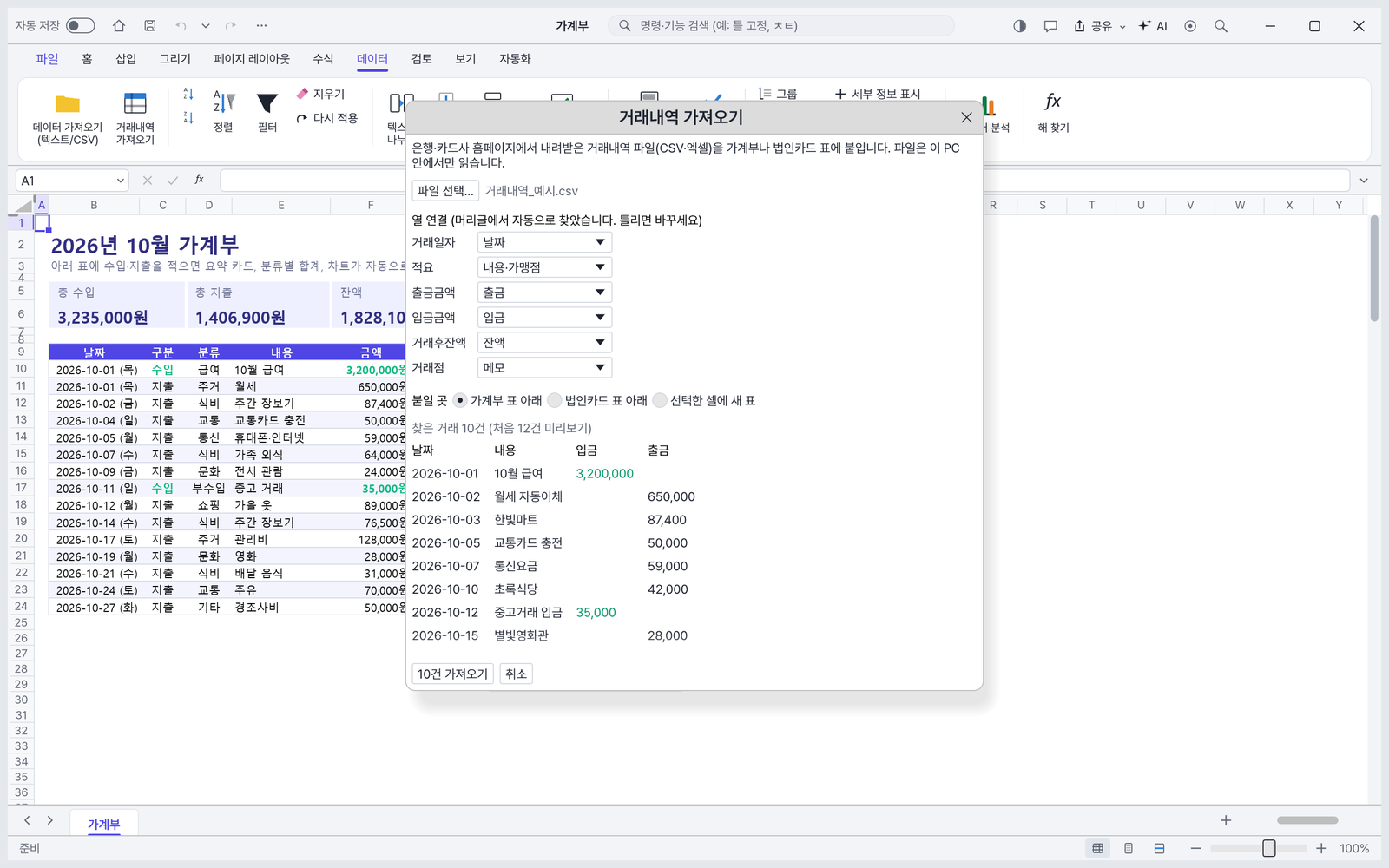
Initial-consonant search · Korean input — Type just “ㅌㄱㅈ” in the title-bar search to find ‘Freeze Panes’. Type “3만5천”, “1억2천만원”, “내일” (tomorrow) or “오후 3시” (3 PM) in a cell and it becomes a number · date · time (can be turned off in Options).Transaction import — Finds the date · description · deposit · withdrawal columns in CSV · Excel files from banks and card companies and pastes them straight into the budget or corporate card table.
Korean functions
✓NUMBERSTRING Korean written amount · KR.HOLIDAYS holidays including Seollal · Chuseok · substitute holidays
✓KR.PHONE phone number cleanup · KR.BIZCHECK · KR.IDCHECK business · resident registration number check
✓Won (₩) and weekday cell formats
✓Monthly calendar · Gantt schedule count business days excluding weekends · holidays
06 · CHARTS · DARK MODE
Good-looking dashboards and dark mode
Templates with summary cards and charts turn into a report just by changing the numbers. There is also an easy-on-the-eyes dark mode.
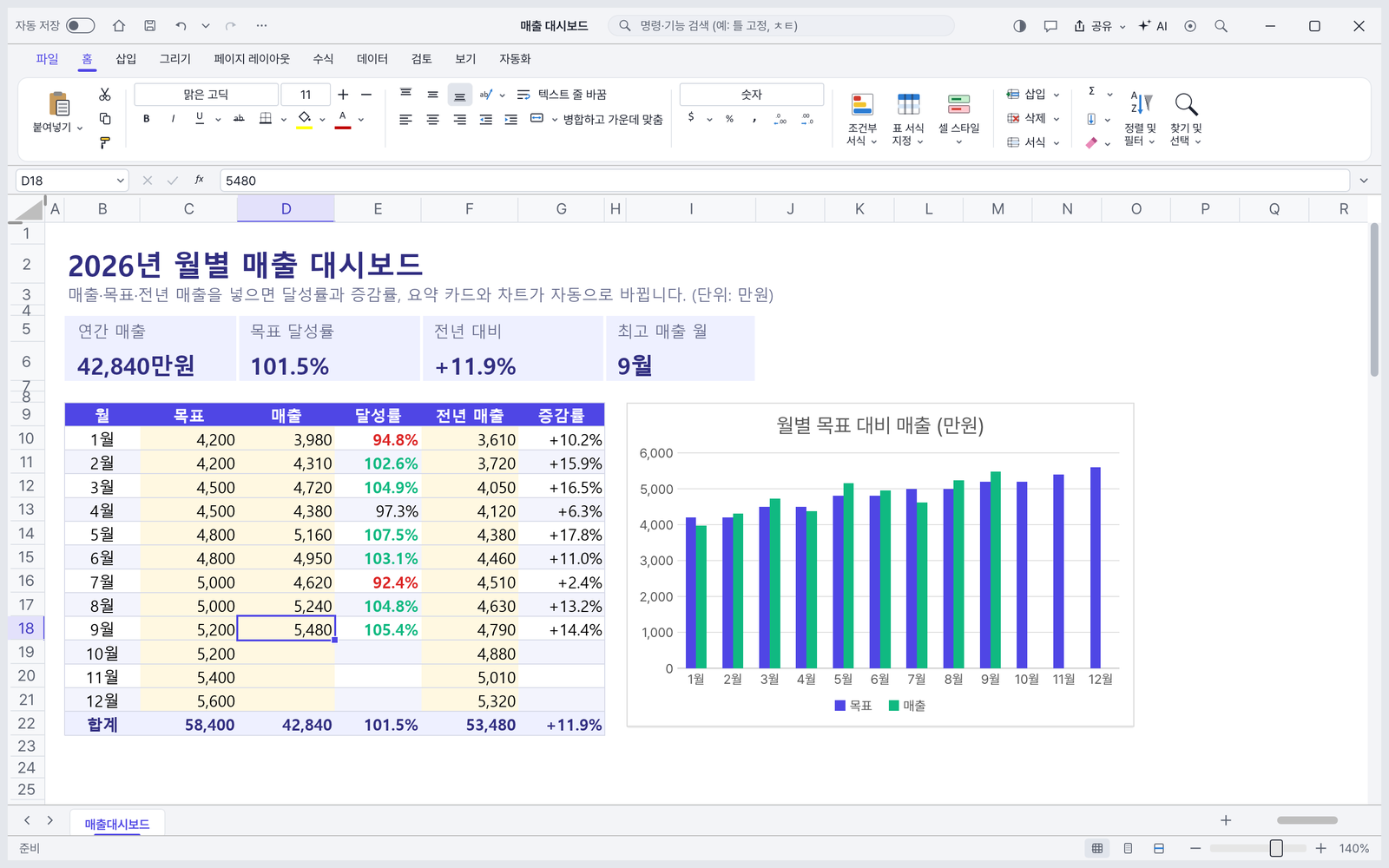
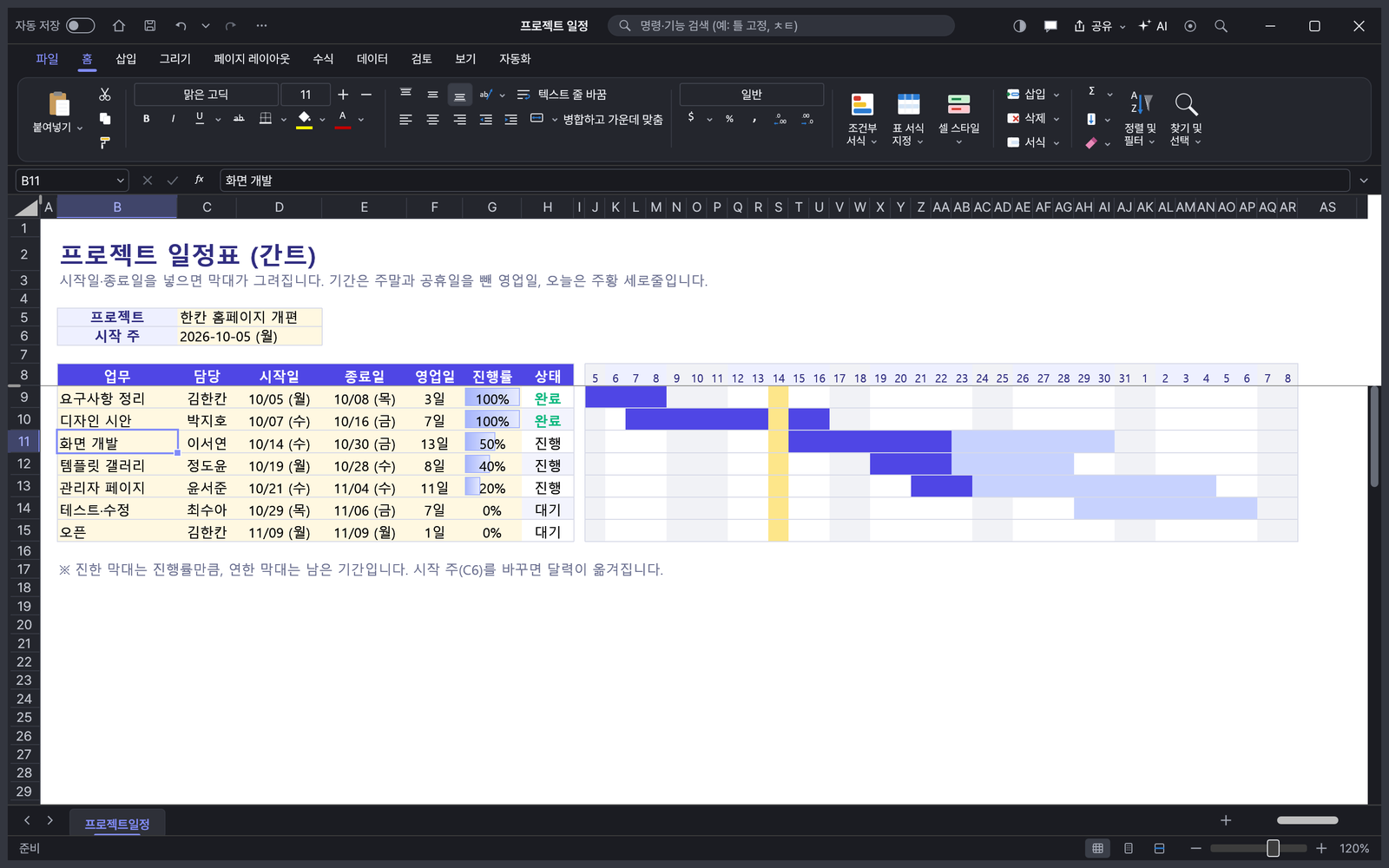
Monthly sales dashboard — Annual sales · target achievement · year-over-year cards and a target vs. sales bar chart. Achievement is shown in red · green.Dark mode · Gantt schedule — Progress bars, gray weekends, a vertical line for today. Durations are business days excluding weekends · holidays.
07 · LOCAL AI
Local AI that runs on your own PC, no internet needed
For sensitive data, choose local AI. Connect Ollama · LM Studio · vLLM and your data never leaves your PC, and it costs nothing.
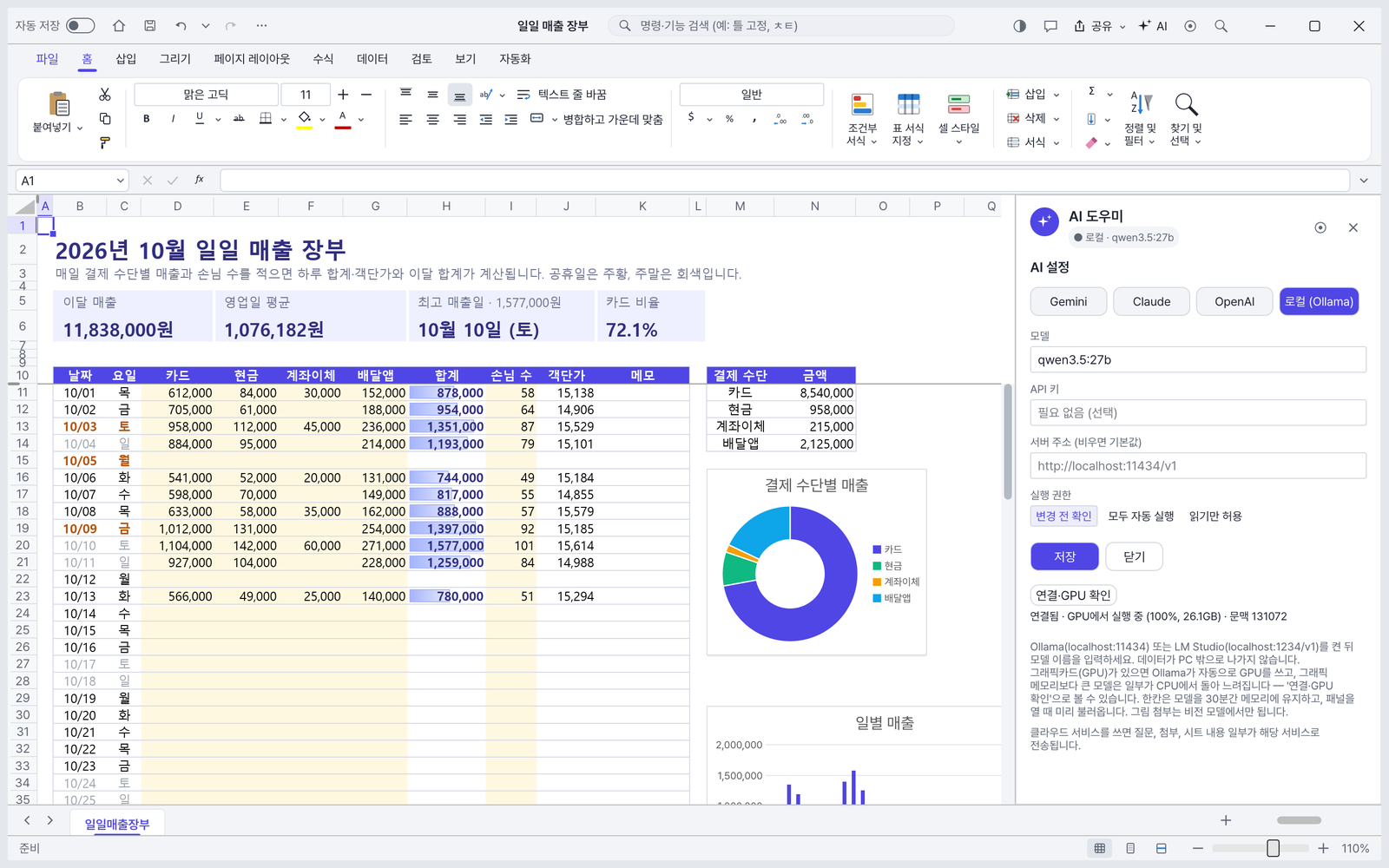
Local AI connection check — Enter the Ollama address in AI settings and press [Connect · Check GPU] to see GPU usage at a glance, like “Connected · running on GPU (100%, 26.1GB)” (e.g. qwen3.5 27B, RTX 3090).
Gemini
Google · free usage tier, a good place to start
Claude
Anthropic · strong at complex table work
GPT
OpenAI · also connects to OpenAI-compatible servers
Local AI
Ollama · LM Studio · vLLM · costs nothing, data never leaves your PC
08 · FAST · SAFE
Light and fast, and safe to use
A native program built with Rust, it is light and uses almost no CPU while idle. The figures below were measured on the developer’s PC.
StartupAbout 0.8 s — until the window appears (about 1.3 s on the first launch after a long time)
Open fileAbout 1.7 s — a 6MB Excel file with 200,000 formulas
RecalculateAbout 0.4 s — recalculating 100,000 cells after editing one cell
SortAbout 0.9 s — 100,000 rows
SaveAbout 1.3 s — a 6MB Excel file
Idle CPU0% — while idle
Measured on the developer’s PC (HanKan 0.7.2, median of 3 runs): AMD Ryzen 9 3900X (12 cores) · 48GB RAM · NVIDIA GeForce RTX 3090 · NVMe SSD · Windows 11 Pro. Results vary with PC specs.
💾
Auto-save every minute
Unsaved documents are kept every minute, so you can recover them after an unexpected shutdown.
🎁
Completely free
No sign-up · ads · payments · trial period. Free for personal · business · school use.
🔒
Minimal personal data
File contents are sent only when you use AI, and only to the AI provider you choose; with local AI they never leave your PC. The app only sends update checks and anonymous usage statistics (launch count · version), which you can turn off in Settings.
🌙
Dark mode · 4 languages
Dark mode and a Korean · English · 日本語 · 简体中文 interface.
09 · QUICK START
3-minute quick start
1Download and run
Get the Windows installer or portable ZIP from the download section below. There is also a web version that needs no install.
2Pick a template
Open a budget · quotation etc. from [New] and fill in only the yellow cells.
3Connect AI (optional)
In Settings → AI, enter a Gemini (free tier) · Claude · GPT key, or the address of a local AI (Ollama).
4Ask in plain words
Open it with the [AI] button at the top right (Ctrl+Shift+A) and type what you want. Done.
10 · DOWNLOAD
Download (free)
The buttons and links below go straight to the always-latest version files on the official site hankan.kbox.uk. When a new version comes out, just download from the same address.
Windows installerRecommended
hankan-0.9.2-windows-x64-setup.exe18.7MB
✓Windows 10 / 11 · 64-bit
✓Installs without admin rights
✓Start menu shortcut · Excel file association · uninstaller
PriceFree · personal · business · school, no paid features · ads · sign-up
If you see “Windows protected your PC” on first launch This notice appears because this beta does not have a code-signing certificate yet. Click [More info] → [Run anyway]. You can use the SHA-256 values below to check that the downloaded file matches the original.
Is there a free program I can use instead of Excel?
HanKan is a free spreadsheet made to be used as an Excel alternative. It opens and saves Excel files (.xlsx) and CSV as they are, and supports everyday features such as the ribbon menu · formulas · formatting · tables · charts · conditional formatting · pivot tables. It also includes an AI assistant you talk to and 41 Korean templates.
Is HanKan really free?
Yes, completely free. Every feature is free for personal · business · school use, with no paid features · trial period · sign-up · ads.
Do Excel files open 100% the same?
Common formulas · formatting · tables · charts open and save as they are. However, VBA macros are not run, only preserved, and some advanced features may not be supported yet. Please check important files on a copy first.
Can I open xlsx files without Excel?
Yes. Install HanKan or unzip the portable ZIP and run it, and you can open an .xlsx, edit it and save it back as .xlsx. Older Excel (.xls) and CSV also open, and there is a web version that runs in the browser without installing.
How much does AI cost?
HanKan does not charge for AI. AI connects directly to each provider (Google · Anthropic · OpenAI) with your own API key, and fees follow that provider’s pricing. Gemini has a free usage tier, and local AI on your PC (Ollama etc.) costs nothing.
Can AI create Excel formulas or charts?
Type something like “Total column B at the bottom” or “Chart only the top 5 sales” in the AI panel on the right (Ctrl+Shift+A), and the AI runs formulas · formatting · sorting · charts itself. It asks with a confirmation card before changing the sheet, and one Ctrl+Z undoes everything the AI did.
Do my files leave my PC?
File contents are sent only when you use AI, and only the parts needed for the request go to the AI provider you choose. With local AI nothing leaves your PC. The app only sends update checks and anonymous usage statistics (launch count · version), which you can turn off in Settings.
Are there free budget · quotation · payslip templates?
The app includes 41 Korean templates. Pick a household budget, quotation, transaction statement, payslip, annual leave tracker, VAT return worksheet, project schedule (Gantt) and more from [New], fill in only the yellow cells, and totals · charts · Korean written amounts update automatically. Payroll · tax calculations are based on 2026, so check the National Tax Service’s guidance before actually filing.
What is the difference between the installer and the portable version?
The features are the same. The installer installs without admin rights and adds a Start menu shortcut · file association · uninstaller, so it is recommended for first-time users. The portable version runs right after unzipping and installs nothing, which makes it good for USB drives and work PCs.
Can I use it on a Mac?
The macOS version is in preparation. For now you can use the web version in your browser (hankan.kbox.uk/app); files are not uploaded to a server and open only inside your browser.
I get a “Windows protected your PC” warning. Is that OK?
It appears because this beta does not have a code-signing certificate yet. Click [More info] → [Run anyway], and you can first check that the downloaded file matches the original using the SHA-256 values on this page.
How do I update?
When a new version is available, a [New version] button appears in the title bar. If that button does nothing in version 0.7.0 or earlier, download the new version from this page and install it over the old one. The download buttons always point to the latest version.
Microsoft Excel is a trademark of Microsoft Corporation; HanKan is not affiliated with Microsoft. Gemini is a trademark of Google, Claude of Anthropic and GPT of OpenAI. Other product names are trademarks of their respective owners.
Version history(7)
v0.9.2Latest
October 18, 2026
셀을 고른 뒤 바로 한글을 입력해도 첫 글자가 빠지지 않아요, 엑셀 단축키 맞춤: F4 마지막 작업 반복, Ctrl+Shift+V 값만 붙여넣기, 행·열 전체에서 Ctrl+- 바로 삭제, Ctrl+; 날짜는 2026-10-18 형식, 단축키 안내가 Windows 표기(Ctrl+…)로 바뀌고, 명령줄 도구 hankan-cli가 PDF로도 변환해요
엑셀 호환 강화: 한셀로 만든 공공기관 서식의 글꼴·채우기가 어긋나던 문제를 고쳤어요 (공개 서식 39개로 점검, 서식 차이 0), 한 칸 안의 부분 서식(빨간 굵은 글씨 등)을 그대로 보여 주고 저장해요, 인쇄 배율·한 페이지에 맞추기·열 너비 등 파일의 설정을 저장할 때 그대로 유지해요
리본 그룹 이름: 리본 버튼 묶음 아래에 '클립보드·글꼴·맞춤…' 이름이 보여요 (리본 높이는 그대로, 파일 › 설정에서 끌 수 있어요), 열 전체를 '전체 병합'하거나 열 전체로 자동 채우기할 때 프로그램이 멈추던 문제를 고쳤어요, #SPILL!·순환 참조 결과를 값 붙여넣기하면 저장 후 값이 바뀌던 문제를 고쳤어요, 행 높이 자동 맞춤 뒤 SUBTOTAL이 바뀌지 않던 문제를 고쳤어요
AI로 템플릿 만들기: 파일 › 새로 만들기에서 "우리 학원 수강료 관리표"처럼 적으면 AI가 머리글·입력칸·수식·요약 카드·차트까지 설계해 새 문서로 만들어요 (만들기 전에 설계를 먼저 보여 줘요, 내 API 키·로컬 AI), 사용자 제보 반영: AI 설정 버튼이 눌리지 않던 문제를 고쳤어요, 사용자 제보 반영: 창 위치·크기와 확대 배율을 기억해요, 작은 화면에서도 AI 설정을 스크롤해서 '저장' 버튼을 누를 수 있어요
데이터 정리: 데이터 탭 '데이터 정리'가 공백·전화번호·사업자번호·날짜·글자로 된 숫자·이름과 전화가 섞인 칸·중복 행을 찾아 한 번에 정리해요 (Ctrl+Z 한 번으로 되돌리기), 추천 차트: 차트 이름을 한글로 바꾸고, 왜 이 차트가 맞는지 한 줄로 알려 줘요, 숨긴 행에 행 높이를 주면 부분합이 안 바뀌던 문제를 고쳤어요, 배열 수식 범위 안에 넣은 값이 다시 열 때 사라지던 문제를 고쳤어요
말로 수식 만들기: 셀에 "=AI? 식비 합계"처럼 적거나 수식 탭의 '말로 수식'을 누르면 AI가 수식을 만들고 결과를 미리 보여 줘요 (내 API 키·로컬 AI), 공지 알림: 한칸 새 소식을 리본 아래 한 줄로 알려 줘요 (✕로 닫으면 다시 안 떠요), 안전한 업데이트: '새 버전' 버튼이 파일을 직접 받아 디지털 서명을 확인한 뒤 설치해요, 명령 검색·상태 표시줄 한국어 번역을 보강했어요
저장하지 않은 문서를 1분마다 자동으로 보관해, 갑자기 꺼져도 다시 켜면 복구할 수 있어요, 큰 파일 열기가 2배 이상, 붙여넣기·정렬이 3~6배 빨라졌어요, 큰 파일을 열 때 진행 상황이 보이고 중간에 취소할 수 있어요, 셀 서식에 원(₩)·요일 형식이 추가되고 설정 화면이 깔끔해졌어요, 일본어·중국어 화면 번역을 보강했어요