Plenty of tools will find your problems. The hard part is what comes next —
you changed something, and now nobody knows what broke, or what the original value was.
Products that do all of this are usually enterprise gear costing tens of thousands a year, they make you install an agent, and your scan results get uploaded to a vendor cloud. AEGIS fills that gap — double-click one executable and you're done, it saves a way to undo before it touches anything, and the results never leave this PC.
1 executable no install |
0 external deps no supply-chain risk |
106 check rules accounts · network · crypto |
~12s full scan 13 collectors in parallel |
127.0.0.1 results never leave this PC |
AEGIS is a vulnerability diagnosis and auto-remediation console that runs on Windows 10 and 11. Whether the firewall is on, whether anonymous users can enumerate your account list, which ports are open to the outside, whether your installed software carries a vulnerability that is actually being exploited in the wild — things that normally mean opening a different tool for each and reading each one differently — all of it comes down to double-clicking a single executable.
Read your current state on one screen
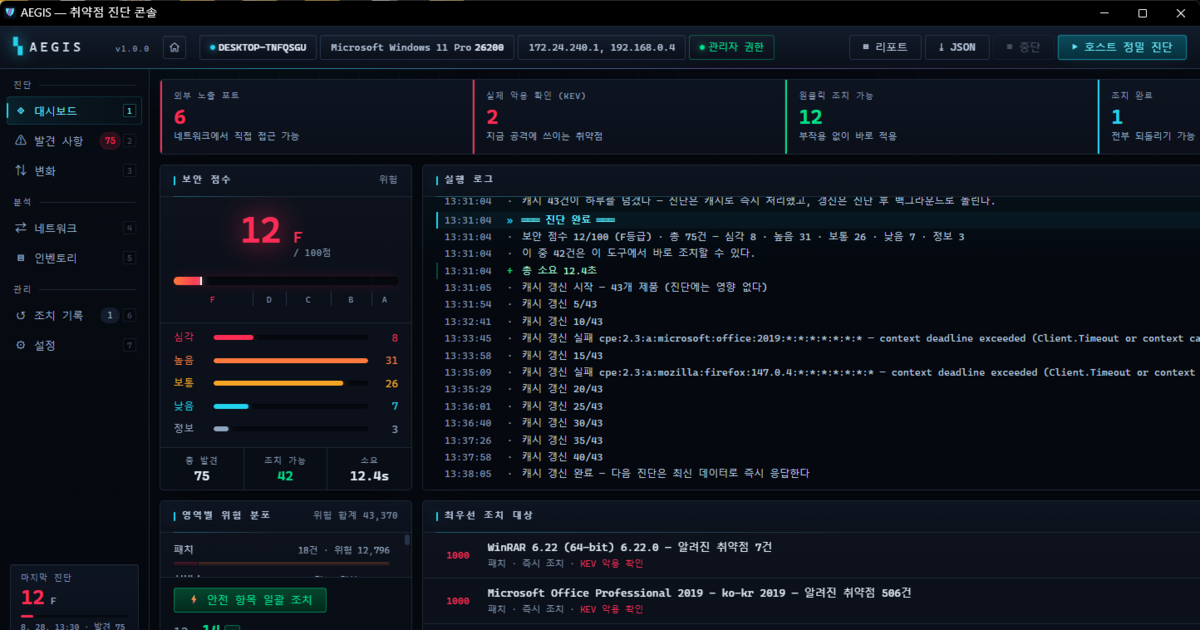
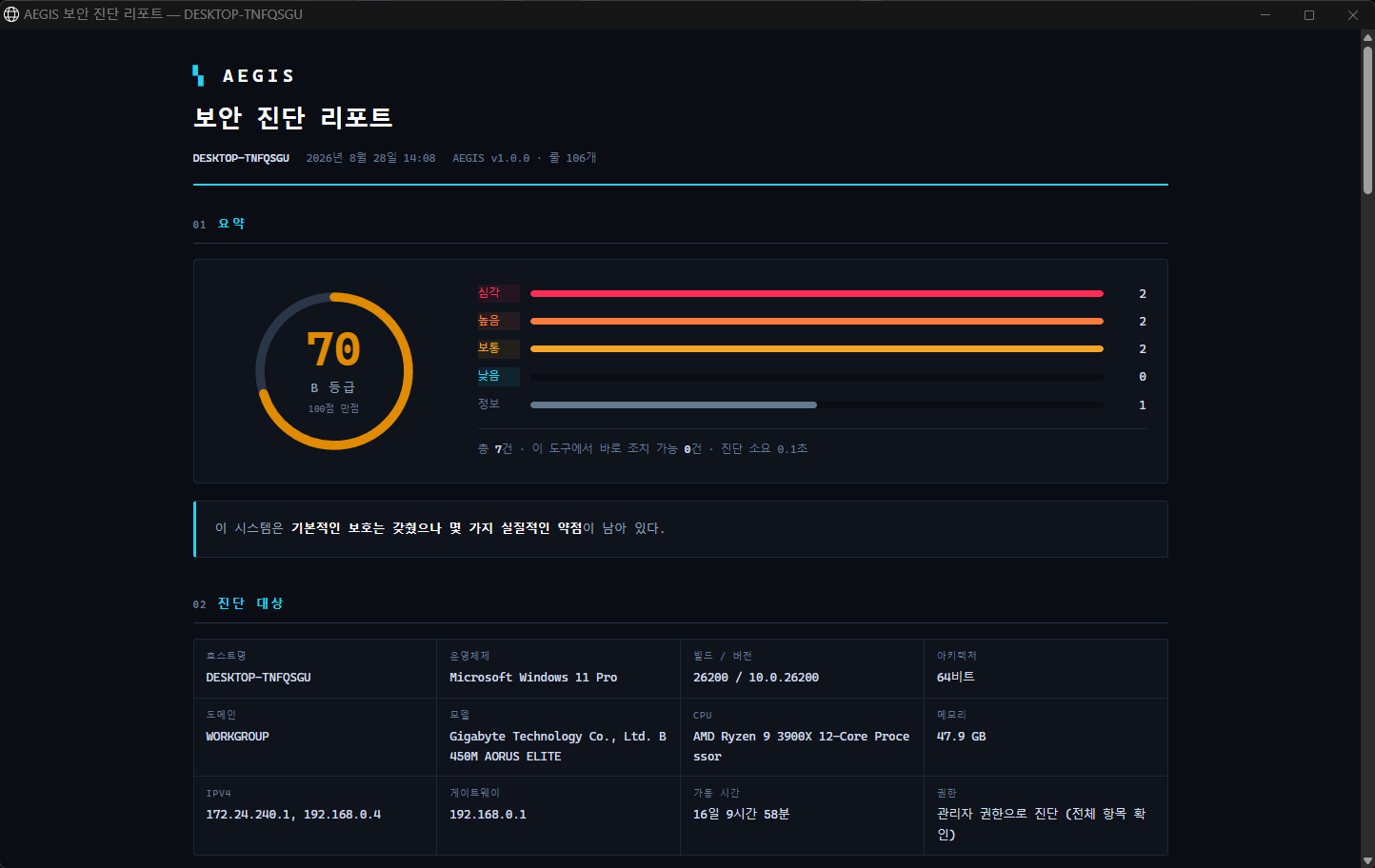
Launch it and a console opens in your browser. It's built with web technology, but designed to read like a developer tool, and every number on the screen is a real diagnostic result. Alongside the security score (F to A+), it shows you what's urgent right now first — ports open to the outside, vulnerabilities with confirmed active exploitation (KEV), and the number of one-click fixes you can apply and reverse with no side effects.
106 rules to check, CVE intelligence to prioritize
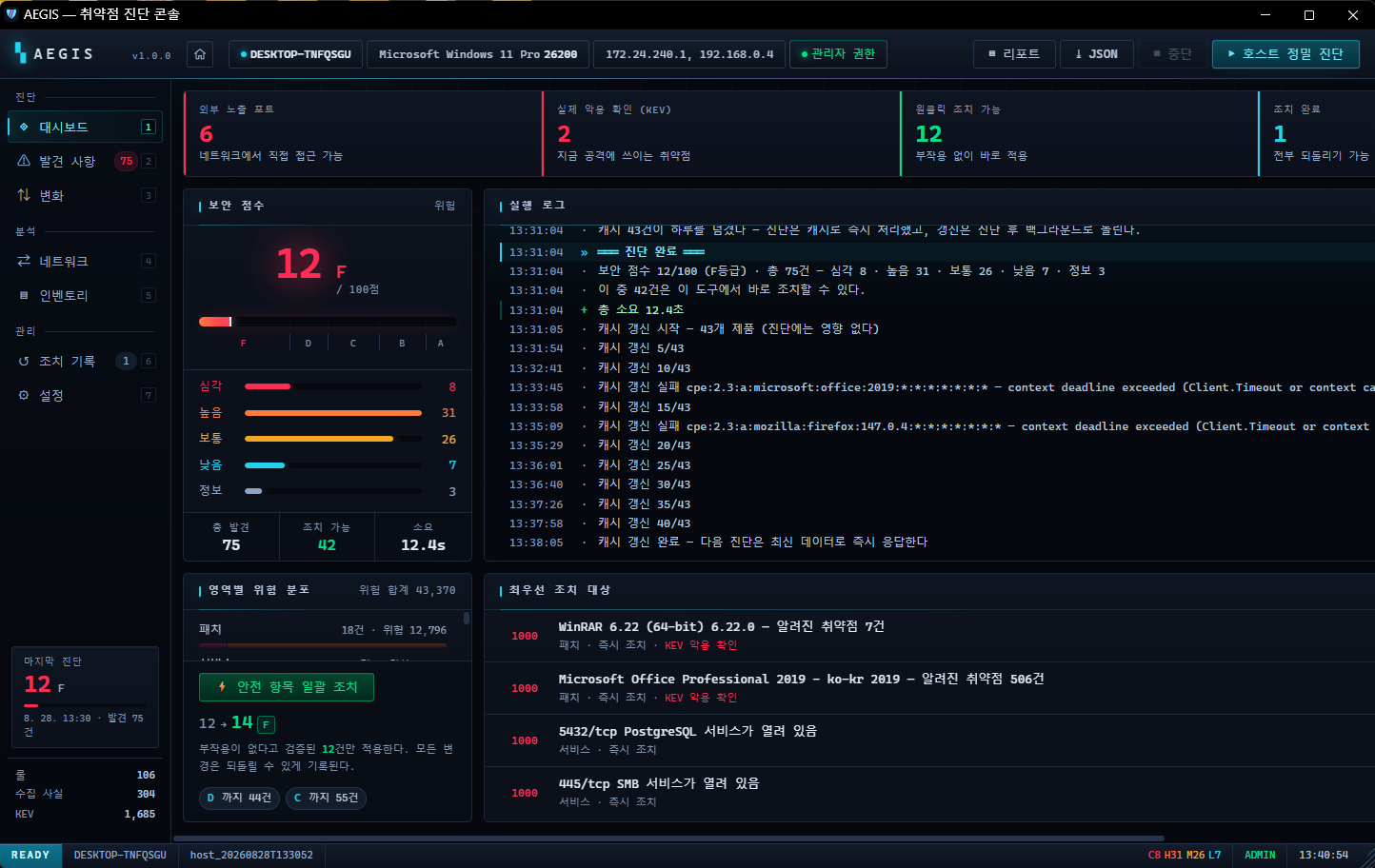
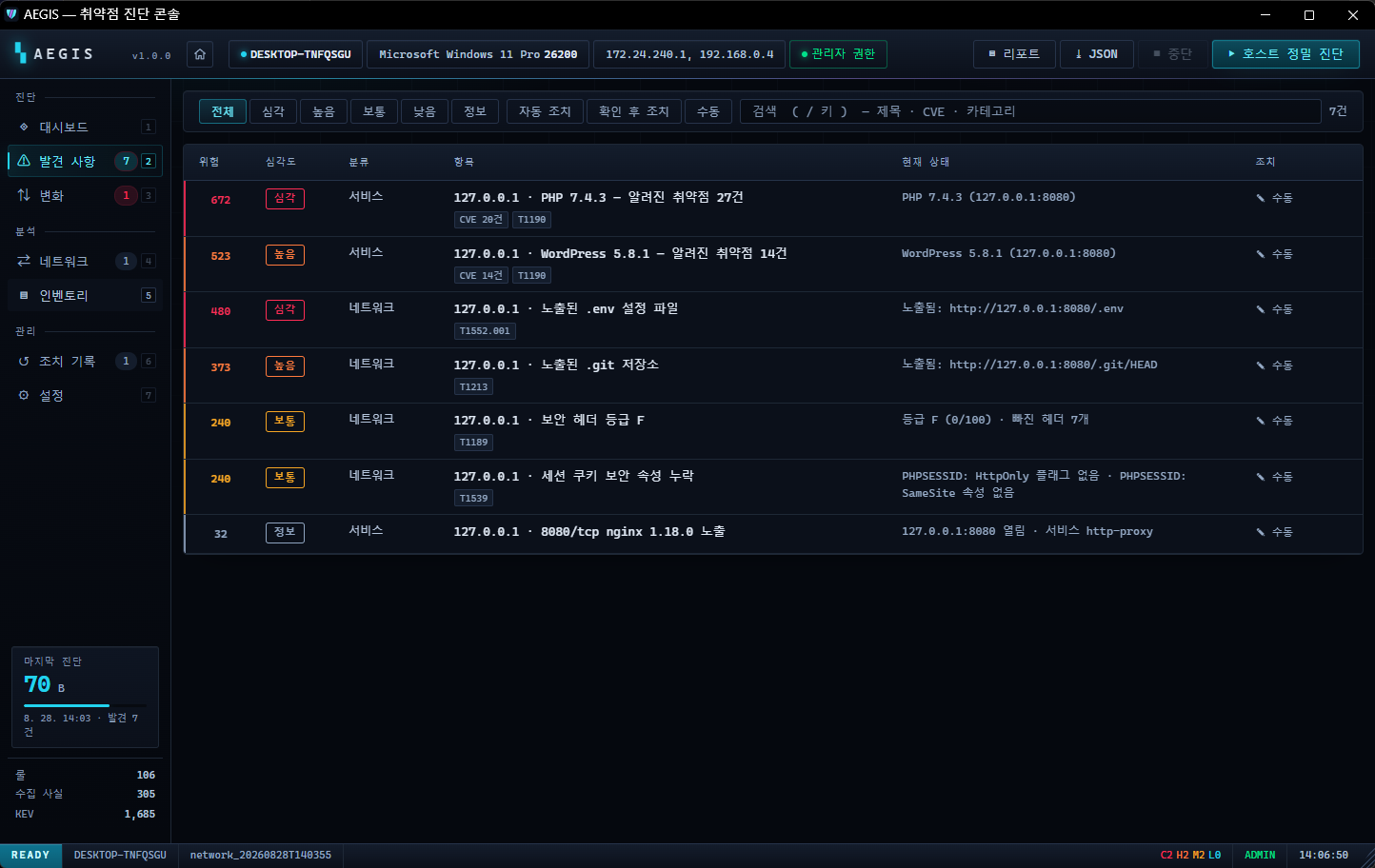
It checks 106 rules across accounts, network, cryptography, execution control, audit policy, and privilege-escalation paths. Every finding comes with why it's dangerous, how it gets exploited, and what was observed to reach that conclusion — it doesn't just say "this is risky" and stop there.
Installed software is cross-referenced against NVD · CISA KEV · FIRST EPSS. Instead of looking at the CVSS score alone, it re-prioritizes based on whether it's actually being used in attacks right now (KEV) and the probability of near-term exploitation (EPSS). It also separately detects the 34 signed vulnerable drivers (BYOVD) that ransomware uses to disable antivirus.
Fix it so it can be undone
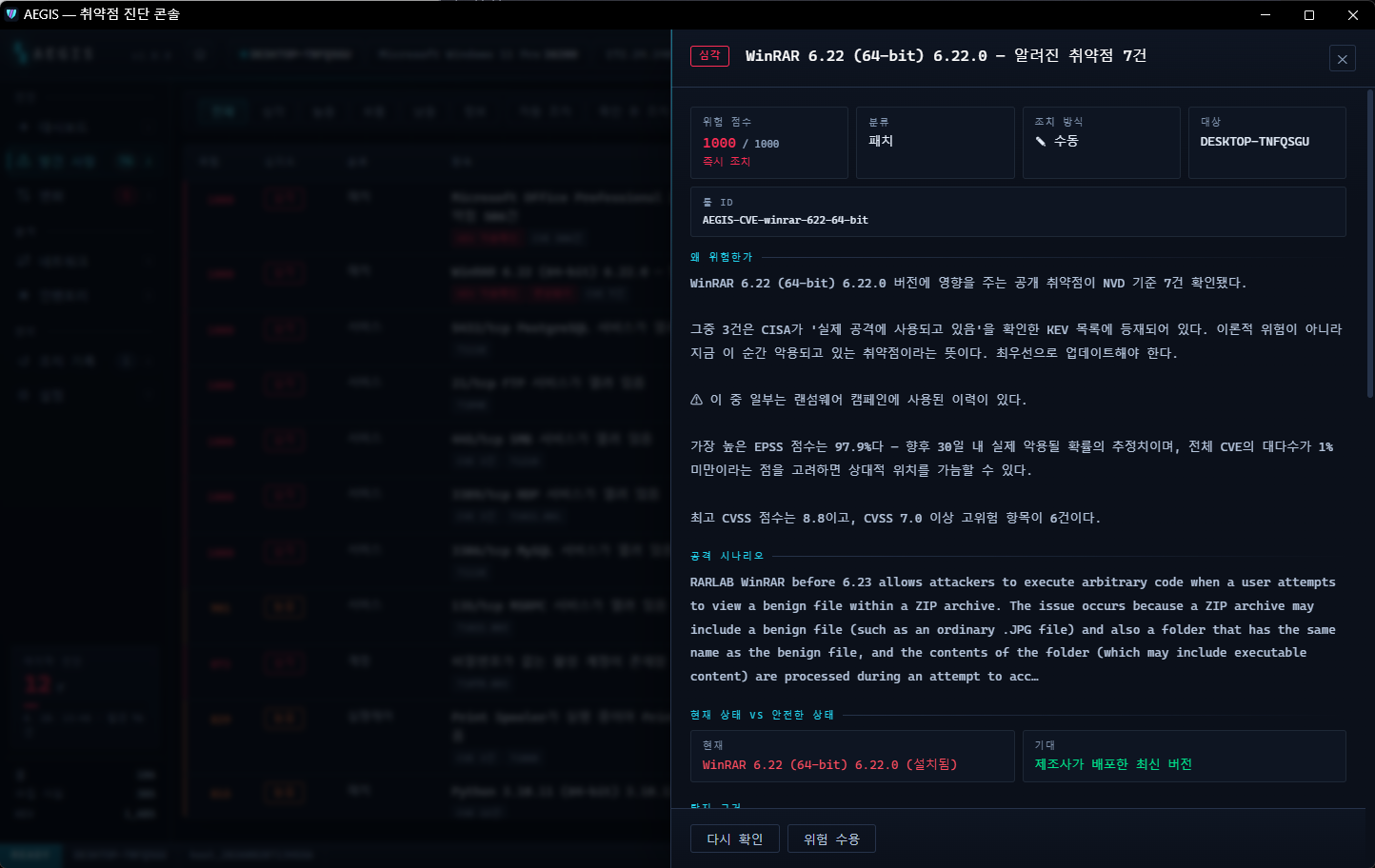
Automated hardening tools always lose your trust at the same point — something broke, and nobody knows what the original value was. So every action in AEGIS enforces an order. If it can't save a way to undo first, it doesn't take the action at all.
verify admin privileges
  → capture the pre-change value    ← stops here if this fails
  → apply
  → verify
  → record with a rollback script    (append-only, fsync)
Whether it fails at the apply step or the verify step, the way to undo it is already written in the journal. Anything with side effects, anything that requires a reboot, or anything with no defined way to reverse it is never touched automatically — it gets a manual guide only. It also lays out an improvement plan: what you'd score if you fix a given item, and the minimum number of items to reach the next grade.
What changed since your last scan — change tracking and reports
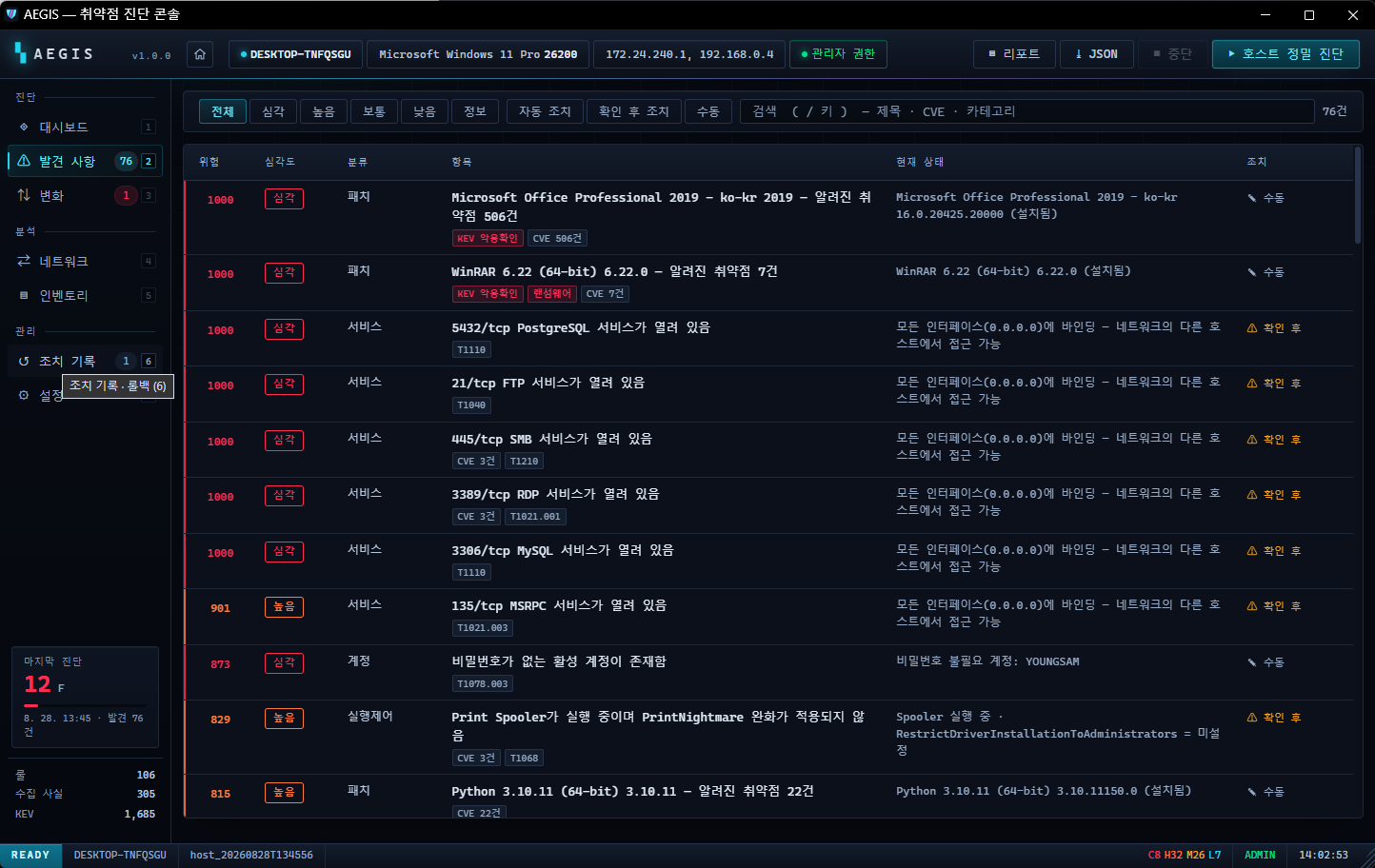
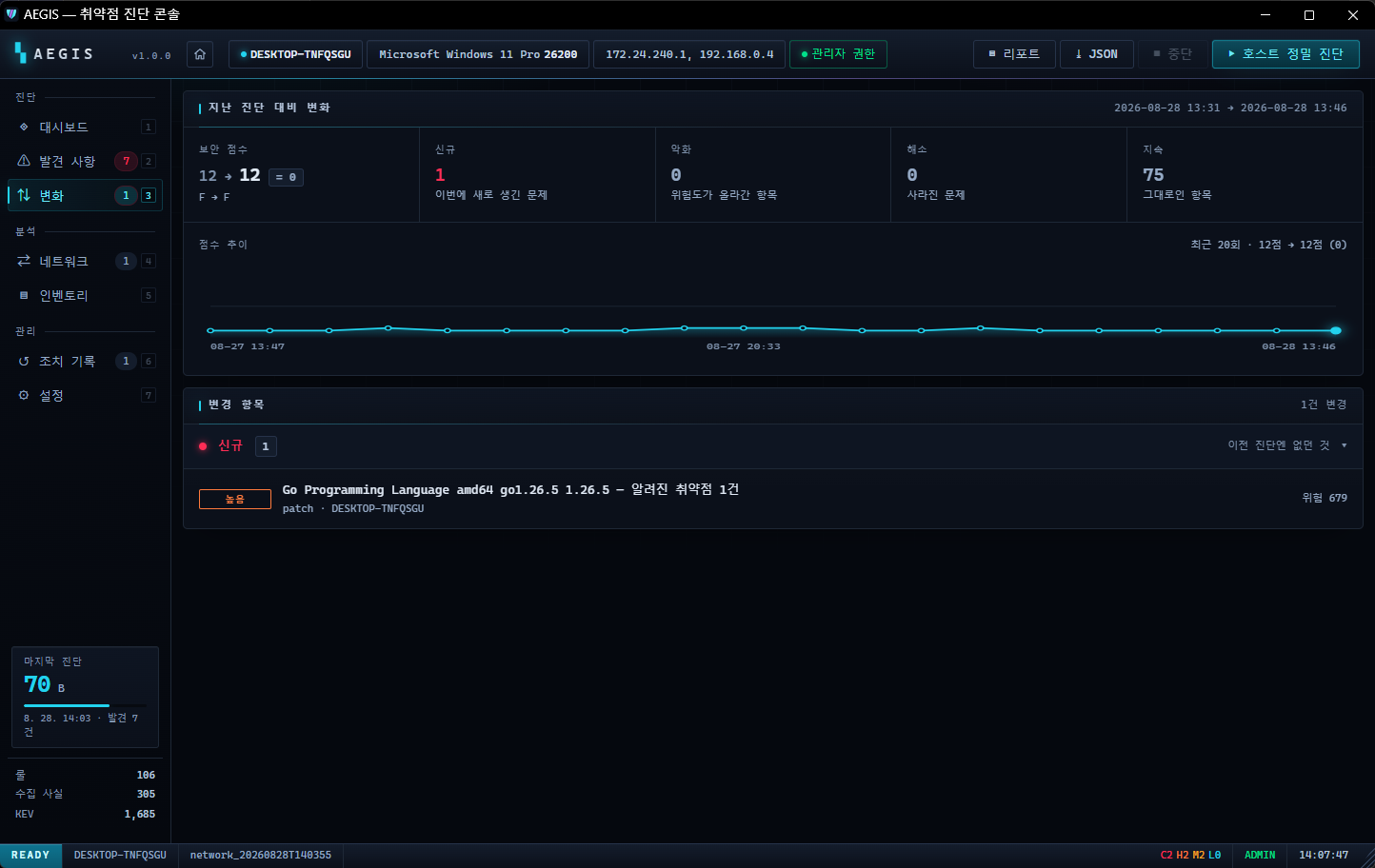
Compared to the previous scan, it distinguishes what's new, what's gone, and what got worse, and shows the score trend so you can see which way things are heading. Because the CISA exploitation list (KEV) is updated daily, when a vulnerability that was unremarkable yesterday appears on it today, it tells you without a re-scan — a case where your PC hasn't changed at all, but the risk has.
★ Deep Recon — the heart of this release
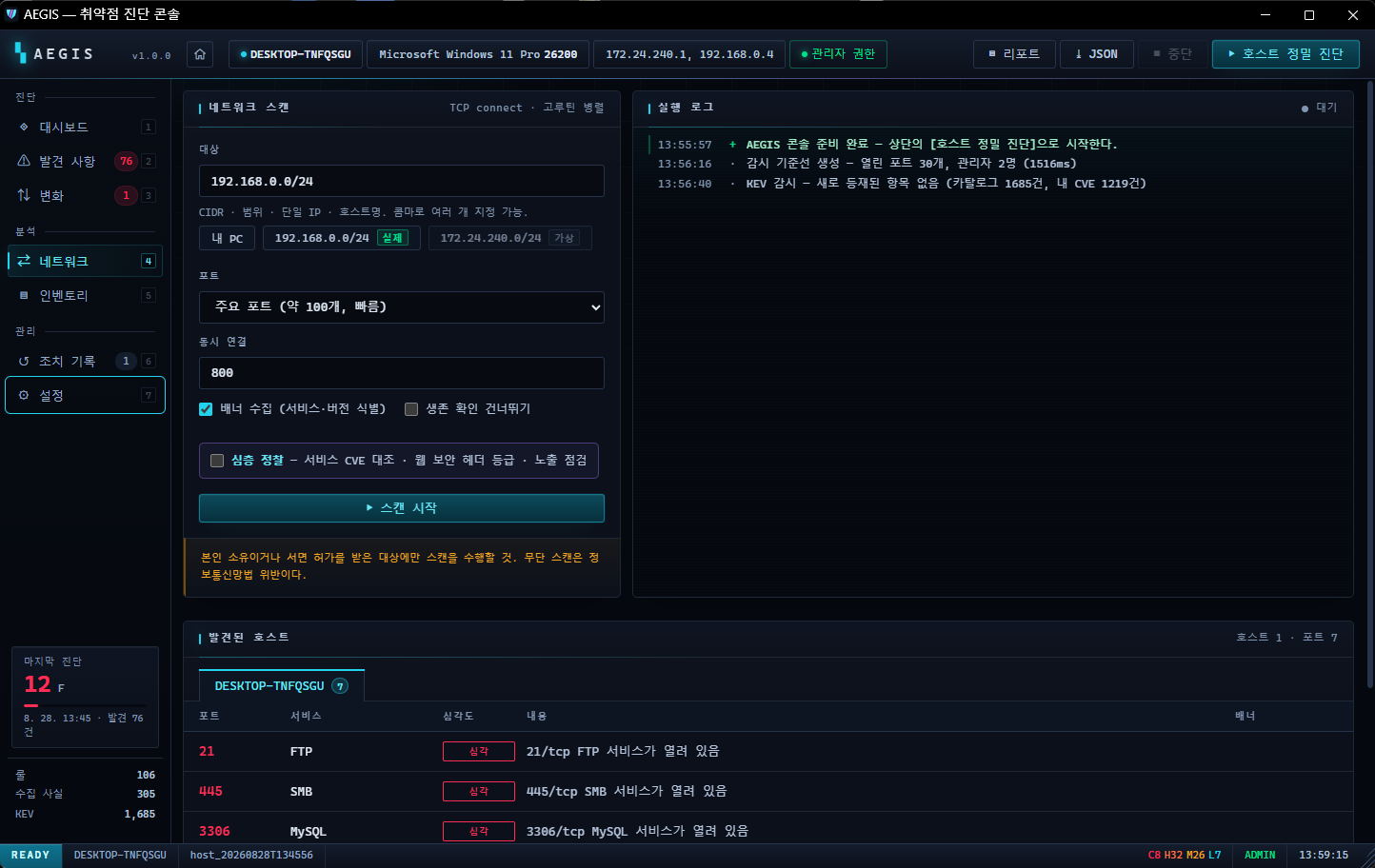
Beyond inspecting this PC, it scans the open services of a remote target you specify and
correlates the product and version read from the banners against real CVEs. If it's a web server, it grades the security headers and
checks whether paths that should never be exposed, like .git and .env, are reachable.
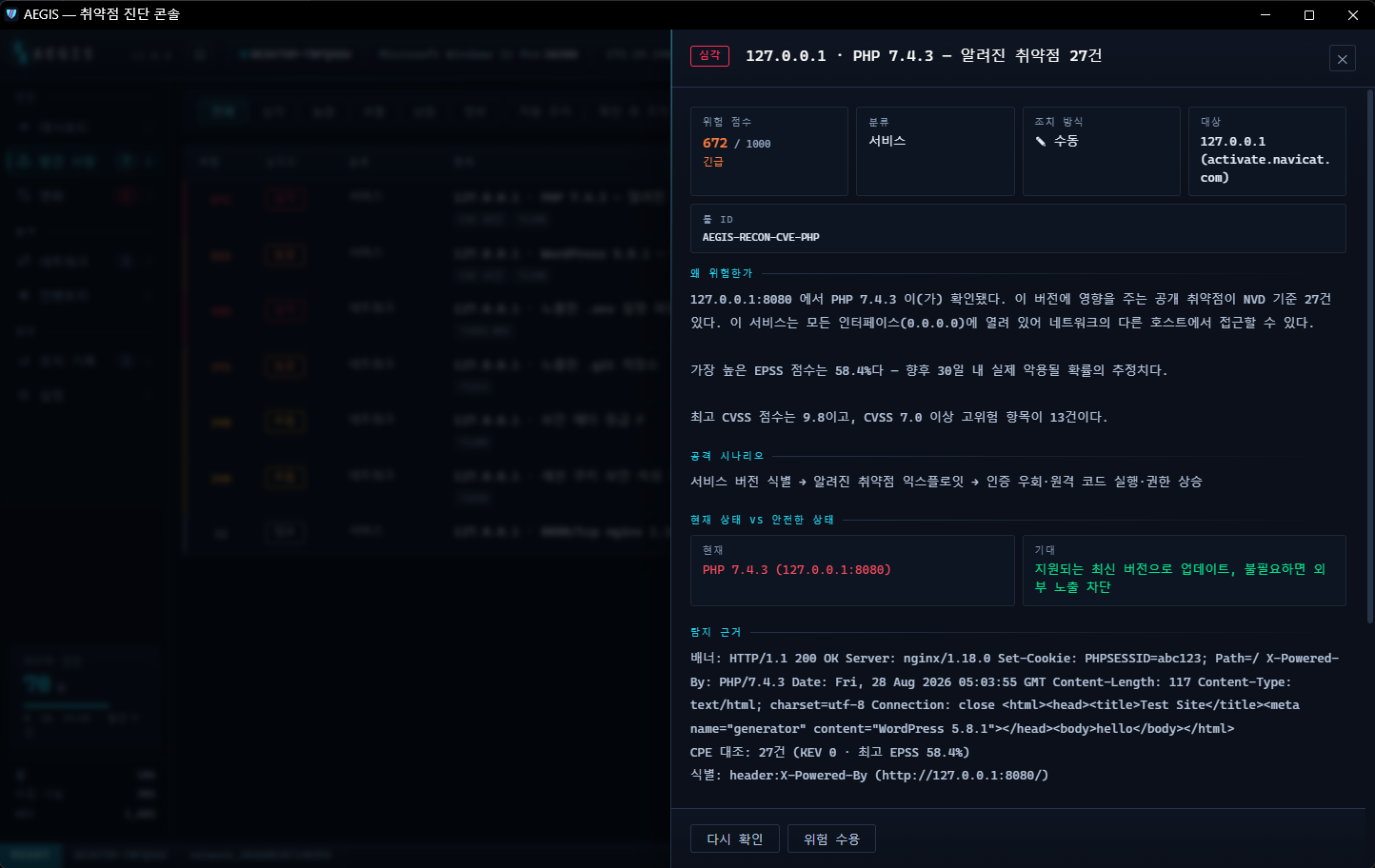
On top of a range port scan, it performs a real TLS handshake against any open port 443 — checking certificate expiry, self-signing, name mismatch, and whether outdated TLS is allowed. Each service it finds is version-identified and matched against known vulnerabilities in NVD, prioritized by EPSS and CVSS, and then presented together with an attack scenario and the detection evidence (the raw response banner).
Facts become inventory, behavior becomes settings
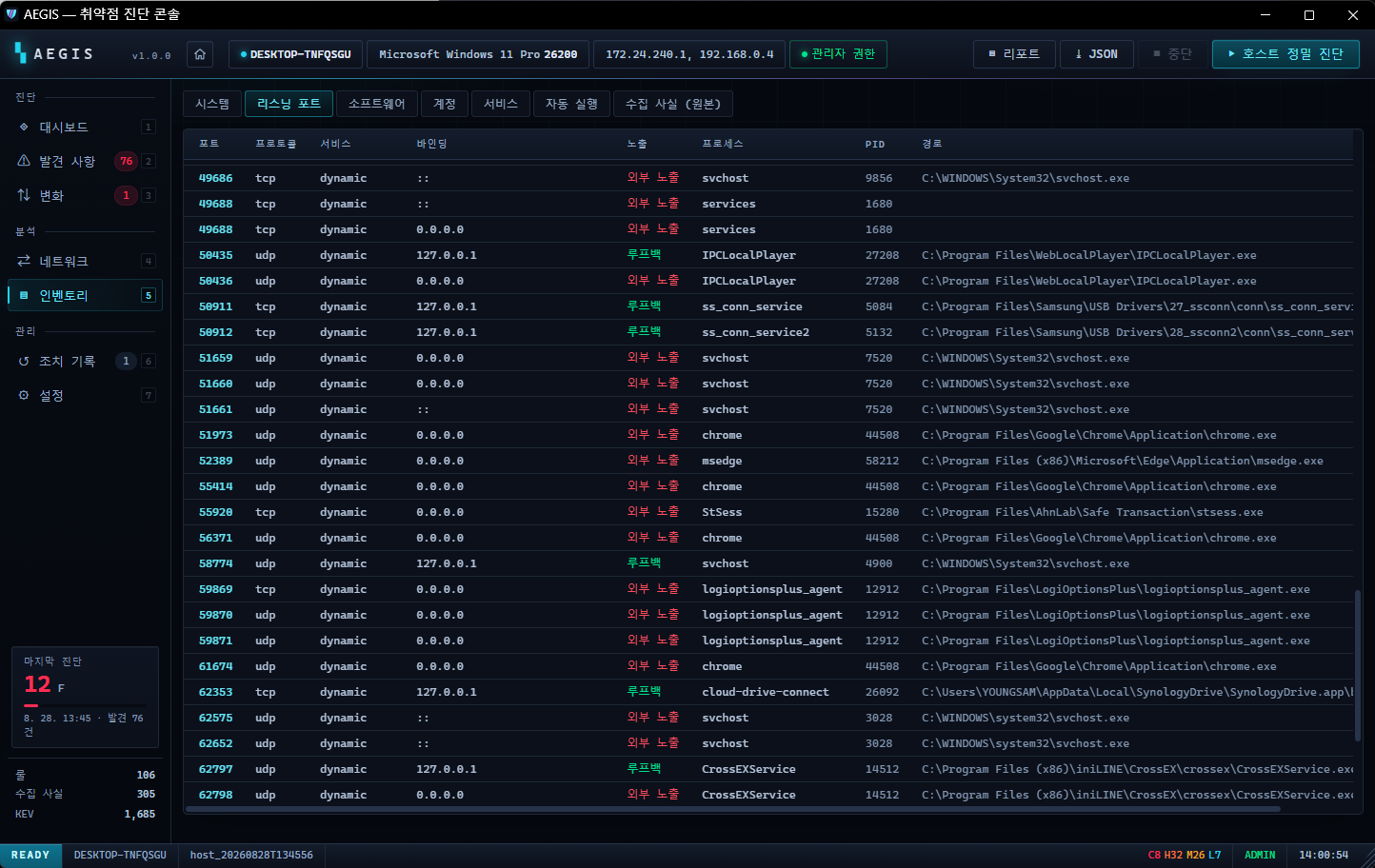
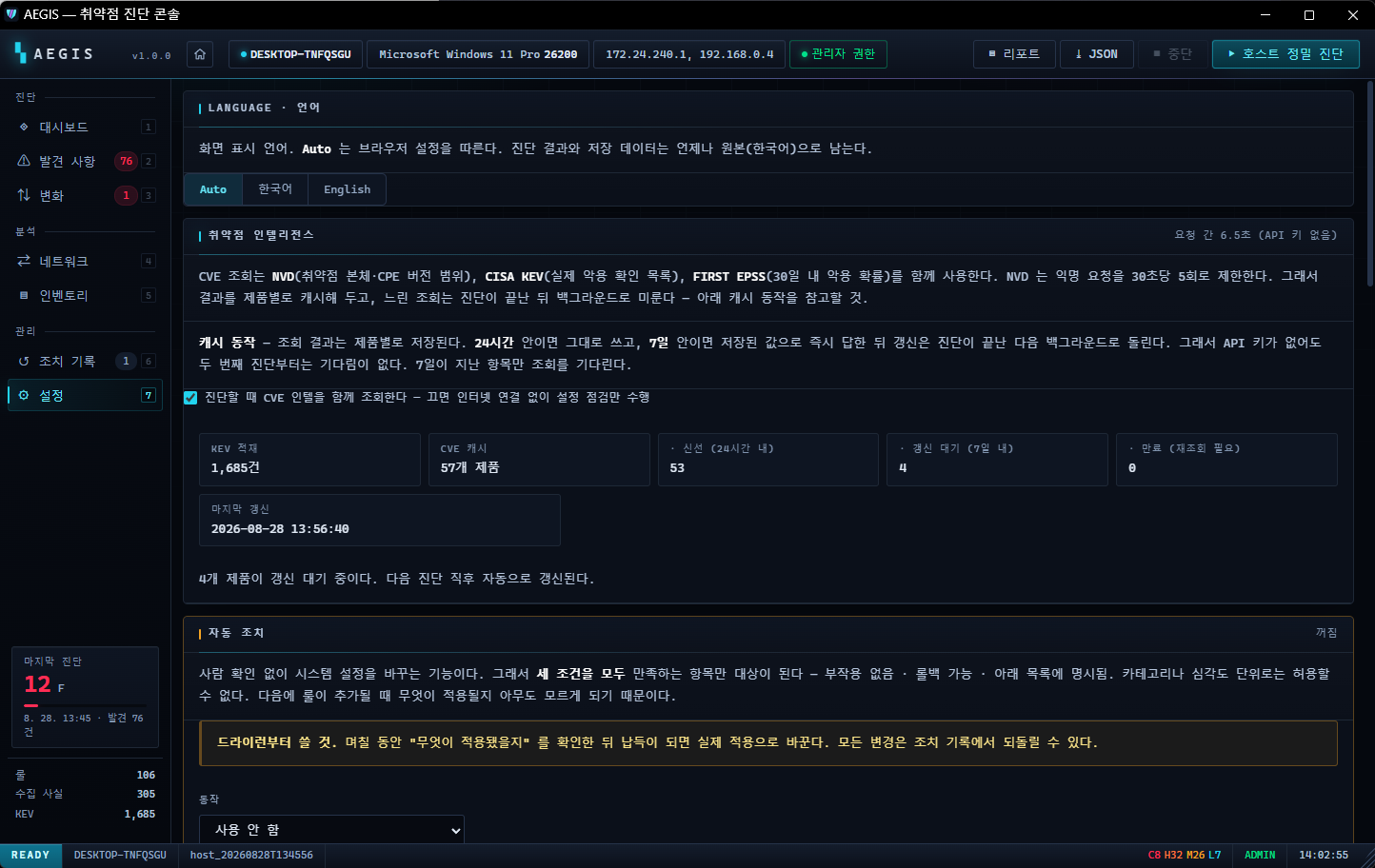
The facts used in the scan (installed software, services, open ports, and so on) can be reviewed directly as an inventory. The auto-remediation policy, turning CVE lookups on and off, the resident-monitoring interval, and switching between Korean, English, Japanese, and Chinese are all adjusted in settings. Turn CVE lookups off and it works without an internet connection.
The Hard Way, On Purpose — How It's Built
What makes this tool special isn't the feature list — it's how those features were built. At every point where it could have been made the easy way, the harder way was chosen on purpose.
Call PowerShell once per rule and 106 of them take 50s.
So it gathers the facts all at once (13 collectors in parallel), and does every rule evaluation entirely in Go memory. Grow the rules to 200 and evaluation is still measured in milliseconds. The speed came from changing the structure itself.
| Technology | Choice | Why |
|---|---|---|
| Go 1.26 | single binary | no runtime to install; even the web UI is embedded in the executable |
| 0 dependencies | standard library only | go.mod is empty — nothing can come in through the supply chain |
| syscall | tray · message box | calls user32 and shell32 directly, with no library |
| SSE | instead of WebSocket | plenty for a one-way log stream, and simpler |
| 2-tier cache | 24 hours / 7 days | so users never wait on NVD rate limits |
| windowsgui | console-less build | suppresses even child-process windows |
The UI is built with web technology for one reason too — to avoid pulling in a native GUI framework. One framework drags along tens of MB and hundreds of dependencies — and it would be a contradiction for a security tool to accept that. Instead the UI is baked into the executable and opens as a single window with no address bar and no tabs.
The security surface wasn't compromised either. The server refuses to bind anywhere but 127.0.0.1, and on top of that
a 192-bit session token, DNS-rebinding protection, CSRF protection, and a default-src 'self' CSP are layered on.
The undo journal is append-only + fsync, so the record survives even if the program dies mid-run.
badssl.com to actually verify expiry, self-signing, and name mismatch, each in turn.Three things we wouldn't give up
Never make an irreversible change
Every action enforces the order capture value → apply → verify → record. If the capture fails, it stops right there. The journal is kept append-only.
Zero external dependencies
There's nothing in go.mod. The web UI, the tray, the charts — all of it is built from the standard library and syscall. Download it, run it, and that's it; there's nothing to come in through the supply chain.
Diagnostic results never leave this PC
The only outbound communication is the CVE lookup, and all it sends is the question "does this software name and version have any known vulnerabilities?" Turn even that off in settings and it runs completely offline.
What this tool does not do
In security, knowing what you can't do matters more than knowing what you can.
- It's not antivirus. It doesn't find or remove malware that's already infected you. It's a tool that inspects your configuration and exposure surface to reduce the ways in.
- It's not an intrusion detection system. It doesn't block attacks in real time. Resident monitoring notices change; it doesn't stop it.
- CVE lookup isn't perfect. It only looks up software whose name it can resolve to a CPE, and for the ones it can't, it doesn't force a match — it shows it plainly as "coverage N/M". Better to say "I don't know" than to pour out false positives.
- It doesn't automate every action. Items with side effects, items requiring a reboot, or items with no defined undo get a manual guide only.
- It's a single-PC tool. There's no central management of multiple machines yet.
Download and integrity verification
Unzip it and double-click aegis.exe. There's no installation process.
After the UAC (administrator) prompt, the console opens. To remove it, delete the folder — that's all; it writes nothing to the registry.
(If you enabled scheduled scans, turn them off in settings first.)
| Supported OS | Windows 10 / 11 |
| Privileges | Administrator (required for some checks and fixes) |
| Also requires | PowerShell 5.1 or later (included with Windows by default) |
| Executable | single exe · about 9.8 MB |
To confirm the file you downloaded hasn't been tampered with, use the hash below. Run
Get-FileHash aegis.exe in PowerShell and check that the value matches.
331C30532854BC6B05DB7FF5992138B07F63E206B26511C3689968A1C7D8B1A4
Download it, double-click, and 12 seconds later this PC's real state comes back as a single letter, F through A+.
No install, no sign-up, no payment, no uploaded results. Don't like it? Delete the folder and it's gone. Grab it above and see for yourself what your PC scores right now.
Frequently asked questions
Is AEGIS free?
Yes, you can download and use it for free. There are no ads, no payments, and no account sign-up.
Does it need to be installed?
No. Unzip it and double-click aegis.exe to run it right away. It writes nothing to the registry, so removing it is just deleting the folder.
Are diagnostic results sent anywhere?
No. The server binds only to 127.0.0.1, and results stay on this PC. The only outbound communication is the CVE lookup — the question "does this software name and version have any known vulnerabilities?" — and turning it off in settings makes it run completely offline.
Do I have to install any external libraries or runtimes?
No. It's built with the Go standard library and syscall alone, so there isn't a single third-party dependency in go.mod. One executable is all you need — it doesn't require a runtime like .NET, Java, or Electron.
Does it really need administrator privileges?
Some diagnostic items and fixes (firewall, policies, services, and so on) need administrator privileges to be read and applied accurately. Run it without them and those items are skipped.
Can I use Deep Recon on someone else's server?
No. Network scanning and Deep Recon must only be used against targets you own or have explicit permission to test. Unauthorized scanning is a violation of Korea's Network Act (and unauthorized scanning is illegal in most jurisdictions), and it leaves records in the target system's logs.
Does it replace antivirus?
No. AEGIS is not antivirus — it's a configuration and exposure-surface inspection tool. It doesn't find or remove malware that's already infected you. Use it alongside antivirus, to reduce the ways an attack can get in.