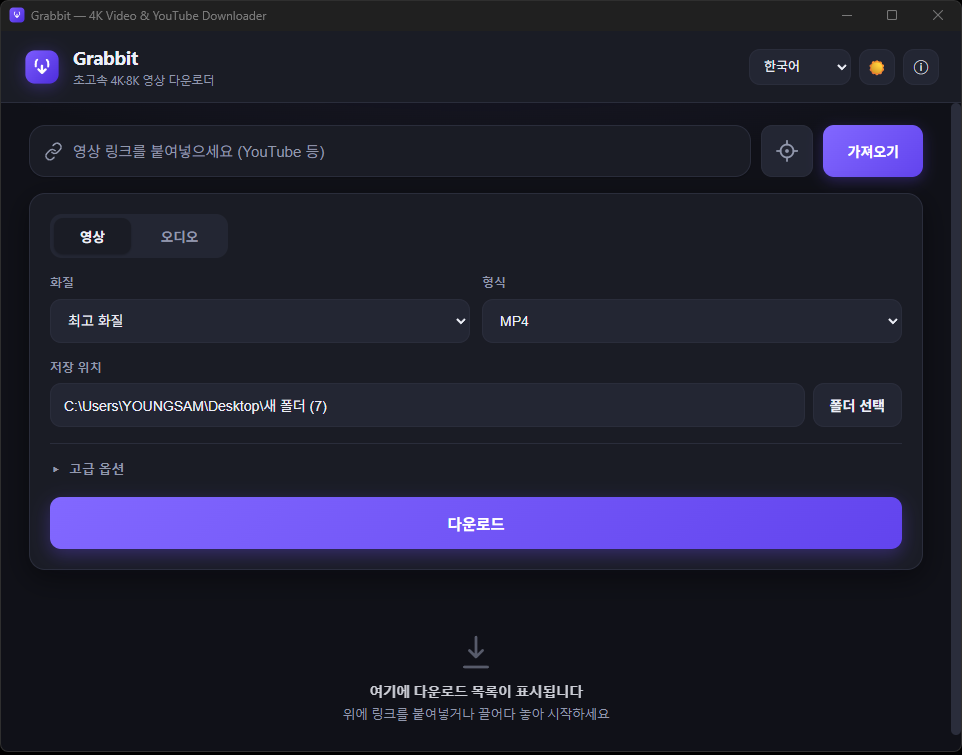
Grabbit - Free 4K YouTube Downloader for Windows - a lightning-fast video & MP3 saver
Want to save YouTube videos to your PC, but tired of ad-plastered sites and heavy programs?
Grabbit is a free, ad-free Windows video downloader that finishes the job the moment you paste a link. It is light and fast enough to open the instant you install it, and it saves videos from YouTube and over 1,000 sites in 4K/8K quality, or as MP3 audio.
> Key points
> · Free · ad-free · Windows only
> · Supports 1000+ sites beyond YouTube (Vimeo, X (Twitter), Instagram, TikTok, Naver TV and more)
> · 8K / 4K / 1080p quality options, MP4 · MKV · WebM
> · Extract audio only as MP3 · M4A · FLAC and more
> · Batch playlist, subtitle and clip downloads supported
> · Developer: youngsam.net (https://youngsam.net)
## What is Grabbit?
Grabbit is a desktop video downloader that takes just two steps: "paste the URL → download."
No complicated settings, no sign-up, no ads. It is built to prioritize launch speed, so it is ready the instant you open it and uses little memory.
Under the hood it bundles proven open-source engines (yt-dlp and FFmpeg), so even when YouTube changes its specs, a single engine-update button inside the app keeps it up to date. No separate installation required.
## Key features
· 4K/8K high-quality downloads - pick any resolution from the original best quality down to 480p
· MP3 audio extraction - pull just the sound from a video and save it as MP3, M4A, FLAC, WAV or OPUS
· Various formats - MP4, MKV and WebM containers supported
· Batch playlist downloads - grab whole channels or playlists at once
· Clip downloads - save just the part you want, like 1:30-3:00
· Subtitle download & embedding, plus thumbnail and metadata embedding
· 1000+ site support - YouTube, Vimeo, X (Twitter), Instagram, TikTok, Facebook, Twitch, Naver TV, CHZZK and more
· Multilingual - 8 languages including Korean, English, Japanese and Chinese
· Light/dark theme - follows your system theme automatically
· Drag & target capture - drag a browser link in, or use the target icon to auto-detect the address
· 100% free · no ads
## How to use it (3 steps)
1. Copy the link - copy the address of the video you want from YouTube or elsewhere.
2. Paste and click [Fetch] - paste it into Grabbit's input box and the title, thumbnail and quality appear. (You can also drag a link from your browser, or drag the target icon over a video to auto-detect it.)
3. Pick quality/format and click [Download] - grab video in the quality you want, or music as 'MP3'. Done. Progress, speed and time remaining show in real time, and you can open the folder right away when it finishes.
## Supported sites
Downloads are supported from over 1,000 video sites, including YouTube, Vimeo, X (Twitter), Instagram, TikTok, Facebook, Twitch, Naver TV and CHZZK. Just paste in the address from most video platforms.
## Download & installation
· OS: Windows 10 / 11 (64-bit)
· Run the installer and follow the prompts. (No administrator rights required.)
· After installing, launch Grabbit from the desktop or Start menu icon.
👉 Download link: (insert installer link here - Grabbit_1.0.0_x64-setup.exe)
※ On first launch, Windows SmartScreen may appear. Click 'More info → Run anyway' and it will install normally. (It is not malware.)
## Frequently Asked Questions (FAQ)
Q. Is Grabbit free?
A. Yes, completely free. No payments, watermarks or ads whatsoever.
Q. Can I download YouTube videos as MP3?
A. Yes. Select 'Audio' and download as MP3 to save just the audio.
Q. Can I download in 4K or 8K?
A. Yes. You can choose up to the highest quality the video offers, saving in 8K, 4K, 1080p or whatever resolution you want.
Q. Does it work on sites other than YouTube?
A. Yes. It supports over 1,000 sites including Vimeo, X (Twitter), Instagram, TikTok and Naver TV.
Q. Is installation complicated? Do I need to install other programs?
A. No. Every engine you need is built in, so just install Grabbit and you are ready to go.
Q. What if a download fails?
A. The site may have changed its specs. Click 'About → Update engine' in the app to refresh to the latest version, and it usually gets resolved.
Q. Is it safe?
A. It uses proven open-source engines and has no ads, tracking or bundled installs.
## In closing - developer youngsam.net
Grabbit was built to be "the fastest, simplest, ad-free video downloader."
You can find more development stories and useful programs on the developer's blog.
· Developer: youngsam.net
· Blog: https://youngsam.net
Copyright notice: Please use downloaded videos and audio for personal purposes only, and take care not to infringe on the rights of copyright holders.