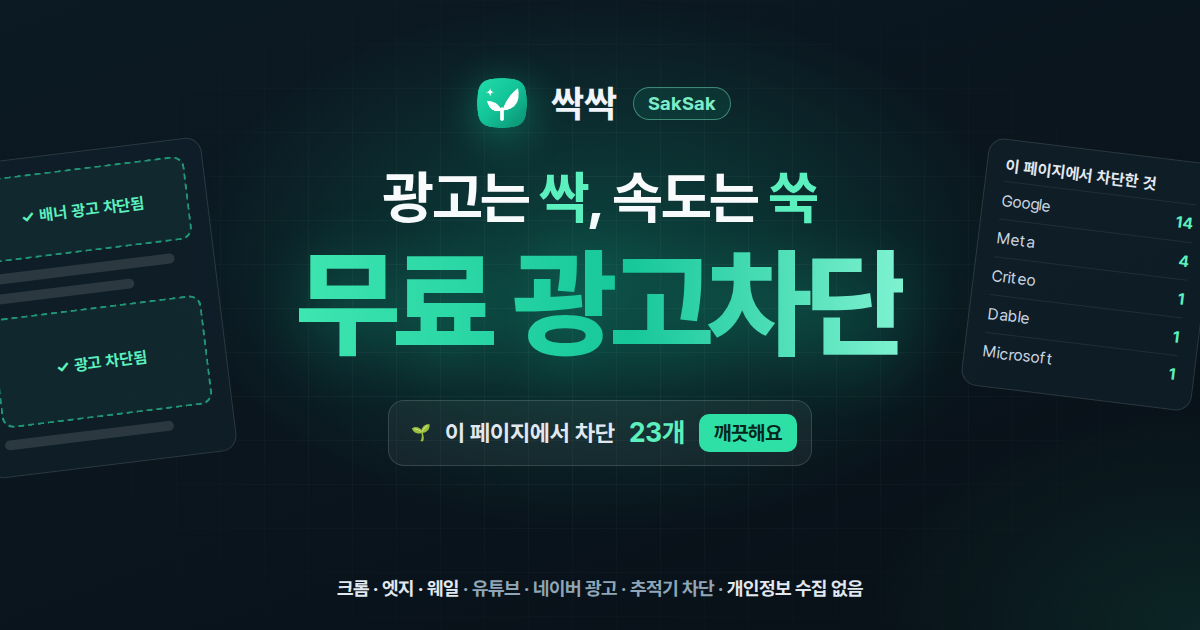
Free ad-blocking extension for Chrome, Edge and Whale
A free ad-blocking extension that clears ads, pop-ups and trackers on YouTube, Naver and news sites in one go. Works on Chrome, Edge and Whale; remove leftover ads with Remove element and fix broken sites with Fix it automatically. Lightweight, with no data collection.
v1.6.0·Published October 25, 2026·Updated October 29, 2026·Downloads 497·★5.0(2)
#광고차단#광고 차단 확장#유튜브 광고 차단#네이버 광고 차단#크롬 광고차단#엣지 광고차단#웨일 광고차단#파이어폭스 광고차단#Firefox 확장#추적기 차단#팝업 차단#쿠키 동의창#애드블록#싹싹#SakSak#Chrome확장#프리웨어+11Official site
SakSak is a lightweight, fast ad-blocking extension built for the Korean web. Install it and ads and trackers on YouTube, Naver, Daum and news sites are cleaned up right away. It works well with no setup, and you can fine-tune it when you want. It does not collect personal data or browsing history.
Free · No adsNo data collectionGPL-3.0Korean · English · Japanese · Simplified Chinese
Pending store review SakSak 1.6.0 is currently awaiting review on the Chrome Web Store, Microsoft Edge Add-ons and Whale Store. Once the review is complete, you can install it directly with the button for your browser (Chrome · Edge · Whale) in the download section above. Until then, the store page may not open.
$0
Completely free
No ads · No sign-up
0items
Personal data collected
Settings and stats stay in your browser
12h
Quick filter updates
No waiting for store updates
4languages
Supported languages
KO · EN · JA · ZH
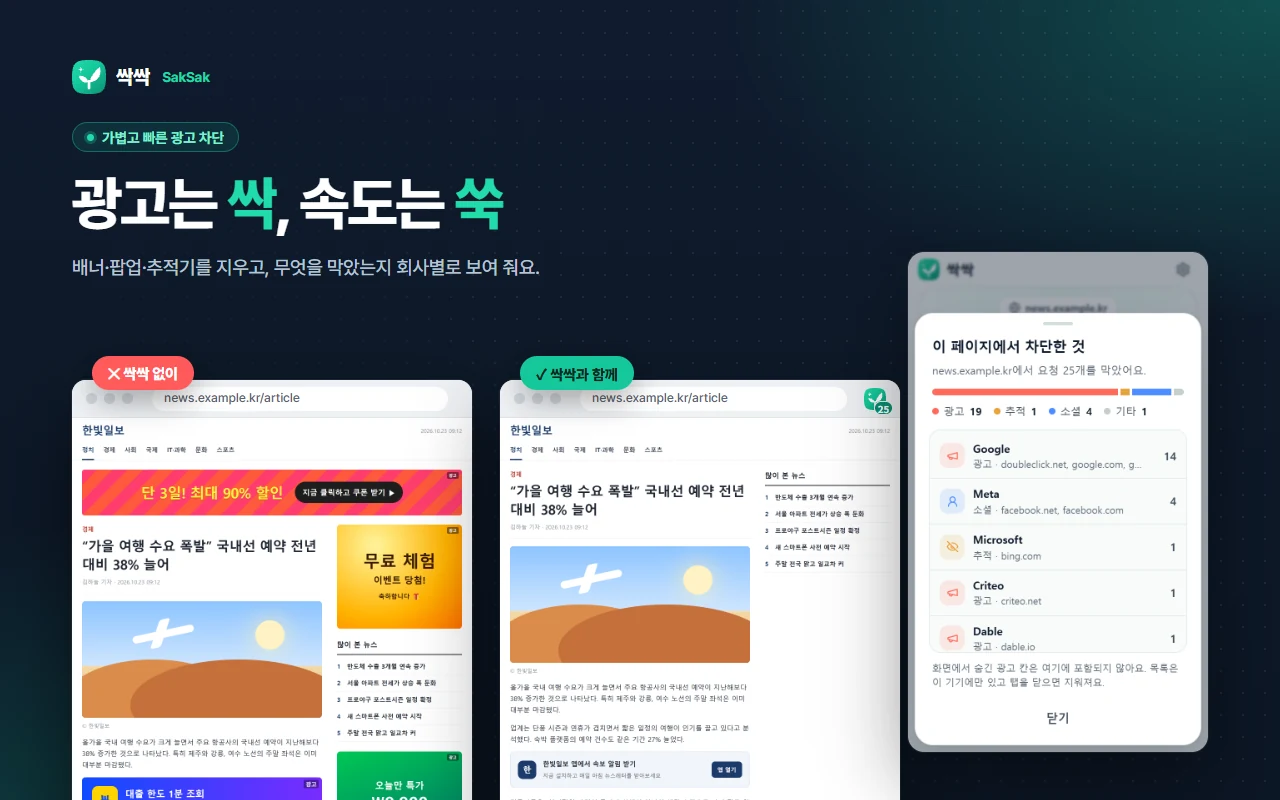
Before / after — the same article page viewed without SakSak and with it. On the right, “Blocked on this page” shows which companies’ ads and trackers were blocked, and how many.
01 · BLOCKING
Ads and trackers, all at once
Blocks banners, pop-ups, video ads, in-article ads and the tracking scripts that collect your browsing history. Filters tuned for Korean sites are on by default, so it works right after you install it.
🛡️
Ad & tracker blocking
Blocks banners, pop-ups, video ads, in-article ads and the tracking scripts that collect your browsing history.
▶️
YouTube ads
Cleans up pre-roll and mid-roll ads and banners that cover the video.
🇰🇷
Strong on Korean sites
Korean filters for Naver, Daum, major news sites and communities are on by default, and you can also turn on filters for Japanese and Chinese sites.
📊
Blocked on this page
Tap the blocked count in the toolbar to see at a glance which companies’ ads and trackers were blocked, and how many.
02 · ELEMENT REMOVER
Pick and remove leftover ads
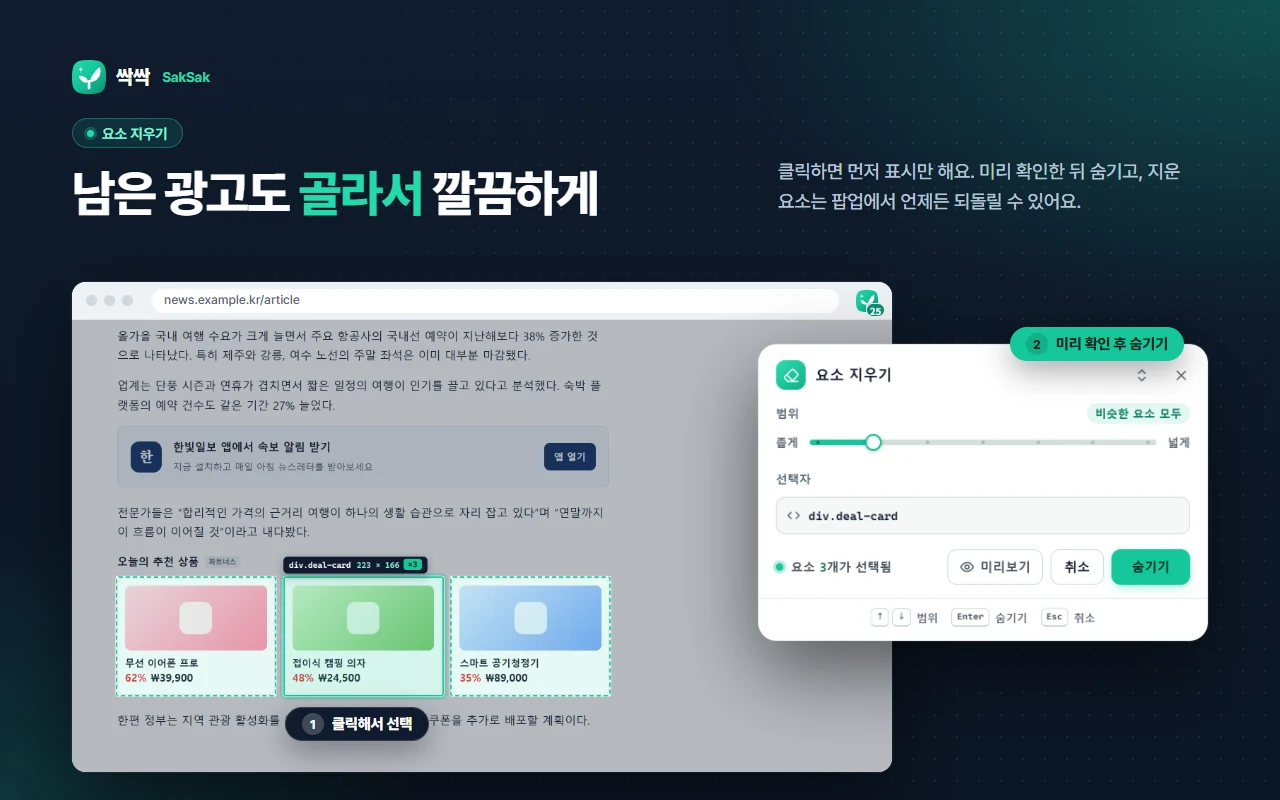
Ads the filters miss, or anything that bothers you, can be removed by simply clicking to select them. Widen or narrow the selection, preview it, then hide it. Every erased element can be restored one by one from the popup at any time. The shortcut is AltShiftH.
Remove element — ① click to select, ② adjust the range and preview, then hide. You can also start it with “Remove this element” in the right-click menu.
03 · AUTO FIX
Site broken? Fix it automatically
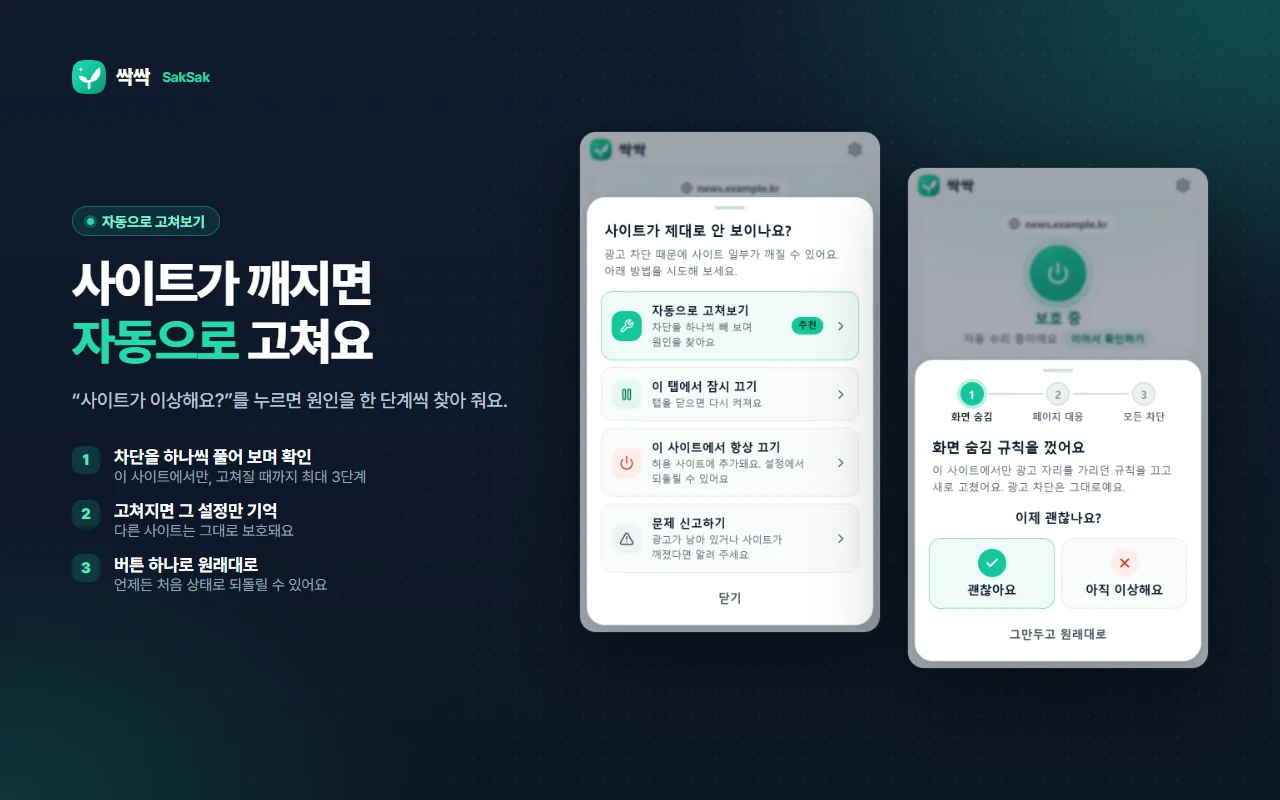
Ad blocking can sometimes make part of a site look wrong. Tap “Site broken?” in the popup and SakSak relaxes blocking on that site one step at a time to find the cause.
1Relaxes one step at a time
On this site only, blocking is eased step by step until the site works.
2Remembers only what fixed it
Other sites stay fully protected.
3Undo with one tap
You can return to the original state at any time.
Fix it automatically — just answer “Works now / Still broken” at each step. Pause in this tab, Always off for this site and Report a problem are in the same menu.
04 · ANNOYANCES
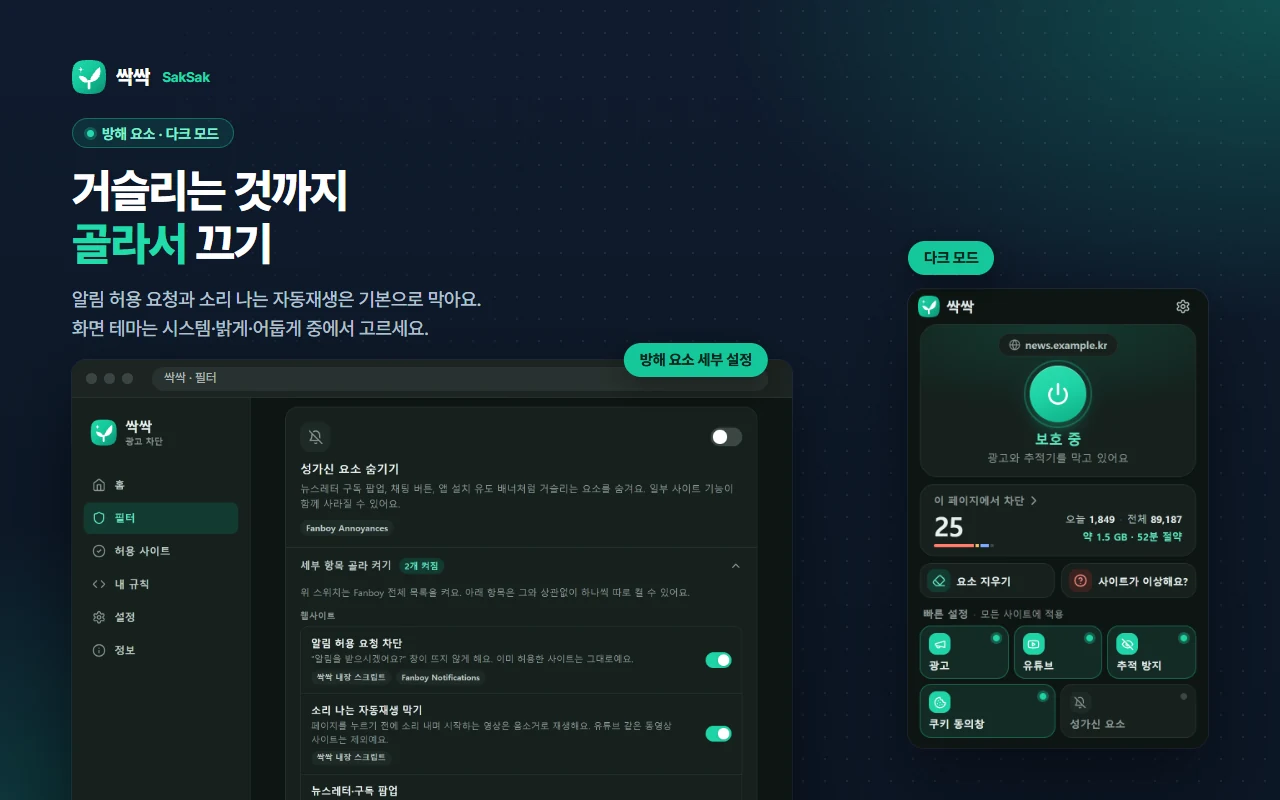
Switch off the annoyances, too
Some things make the web annoying even when they aren’t ads. Blocking notification-permission prompts and muting autoplaying sound are on by default; turn on only the others you need.
Annoyance switches
✓Block “Allow notifications?” prompts (on by default)
✓Mute autoplaying sound (on by default)
✓Hide newsletter · sign-up pop-ups
✓Hide chat buttons · recommended articles
✓Hide YouTube Shorts · end screens
✓Clean up cookie consent banners
✓Remove link tracking tags (utm_source, etc.)
✓Theme: system · light · dark
Annoyances · dark mode — turn each item on or off individually in the filter screen. On the right is the popup in the dark theme.
05 · REPORT
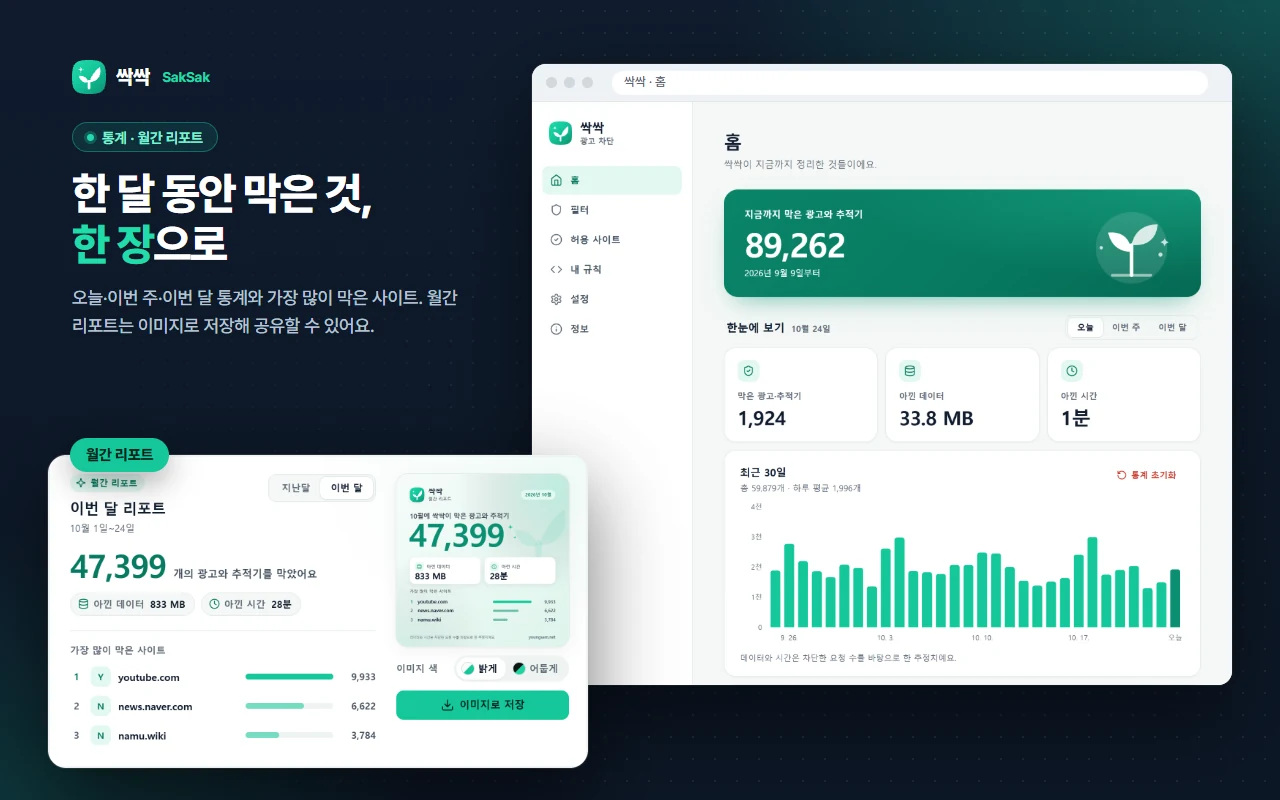
A month of blocking, on one page
The home dashboard shows ads blocked today, this week and this month, the data and time saved, and your most-blocked sites. Save the monthly report as an image to share.
Home · monthly report — data and time saved are estimates based on the number of blocked requests. All stats are stored only in your browser.
06 · MORE
More features
📥
Import from other blockers
Bring over your rules and allowed sites from uBlock Origin · AdGuard backup files or ABP-format rules.
⚡
Quick filter updates
Without waiting for a store update, urgent rule fixes (data) are fetched from youngsam.net every 12 hours and applied right away.
⏸️
Per-site off · pause in this tab
Turn it off on specific sites only, or pause it in the current tab. It turns back on when you close the tab.
🧭
Simple mode / Expert mode
Start simple; when you need to, check filter lists, your own rules and the blocked-request list yourself.
07 · FAST & PRIVATE
Fast, light, and no data collection
The browser’s built-in rule engine
It uses the browser’s modern built-in rule engine (Manifest V3 declarativeNetRequest), so the browser itself filters requests. No heavy scripts running on every page means less memory and battery use.
No data collection
SakSak does not collect any personal data or browsing history. Settings and stats are all stored only in your browser, and there are no analytics tools or ad SDKs. For details, see the Privacy Policy.
Problem reports only when you send them “Report a problem” is sent only after you review its contents and press [Send]. Nothing is sent automatically.
08 · HOW TO USE
How to use
1Pin the icon After installing, pin the SakSak icon from the puzzle icon in your browser toolbar.
2Check the blocked count Click the icon to see how many items were blocked on the current site and the on / off button. Tap the number to see what was blocked.
3Leftover ads · broken sites Leftover ad? Use “Remove element” (AltShiftH). Broken site? Use “Site broken?”.
Yes, it’s completely free. There are no ads and no sign-up, and it’s distributed under the GPL-3.0 license.
Does it block YouTube ads too?
Yes. It cleans up pre-roll and mid-roll ads and banners that cover the video. If you like, it can also hide YouTube Shorts and end-screen recommendations.
Does it remove ads on Korean sites like Naver and Daum?
Yes. Korean filters for Naver, Daum, major news sites and communities are on by default. You can also turn on filters for Japanese and Chinese sites.
Does it collect personal data or browsing history?
No. Settings and stats are all stored only in your browser, and there are no analytics tools or ad SDKs. A problem report is sent only when you review its contents and press [Send].
A site looks broken after blocking ads.
Tap “Site broken?” → “Fix it automatically” in the popup. SakSak relaxes blocking on that site one step at a time to find the cause, and remembers only what fixed it. You can undo it with one tap. You can also pause it in this tab only, or turn it off for this site permanently.
An ad the filters missed is still showing.
Use “Remove element” (Alt + Shift + H) and click the leftover ad to hide it. If an ad keeps coming back, let us know with “Report a problem”.
I was using another ad blocker. Can I bring my settings over?
Yes. You can import your rules and allowed sites from uBlock Origin · AdGuard backup files or ABP-format rules.
How are filters updated?
Separately from extension updates, urgent rule fixes are fetched from youngsam.net about every 12 hours and applied right away. Only text data such as addresses to block and selectors to hide is downloaded; no external code is ever run.
Why does it need permission for all sites?
Ads and trackers can appear on any site you visit, so it needs this to apply blocking rules and hiding styles and to count blocked requests on every site. No page content or browsing history is collected.
Can I use it on Edge or Whale?
Yes, it’s an extension that works on Chrome, Edge and Whale. It’s currently pending review on the Chrome Web Store, Edge Add-ons and Whale Store; once the review is complete, the install button for each browser on this page will open the store directly.
※ YouTube, Naver and Daum are trademarks of their respective owners. SakSak is not affiliated with these services.
Version history(1)
v1.6.0Latest
October 25, 2026
첫 공개 — 크롬 웹 스토어 · Edge 추가 기능 · 웨일 스토어 (파이어폭스 부가 기능은 심사 중)