Overview
What do you do when your PC feels slow?
Open Task Manager, see what's eating your memory, google "how to speed up Windows," run Disk Cleanup, turn off startup programs one by one, and figure Windows Defender has security covered.
PC Manager Pro handles all of this from a single screen.
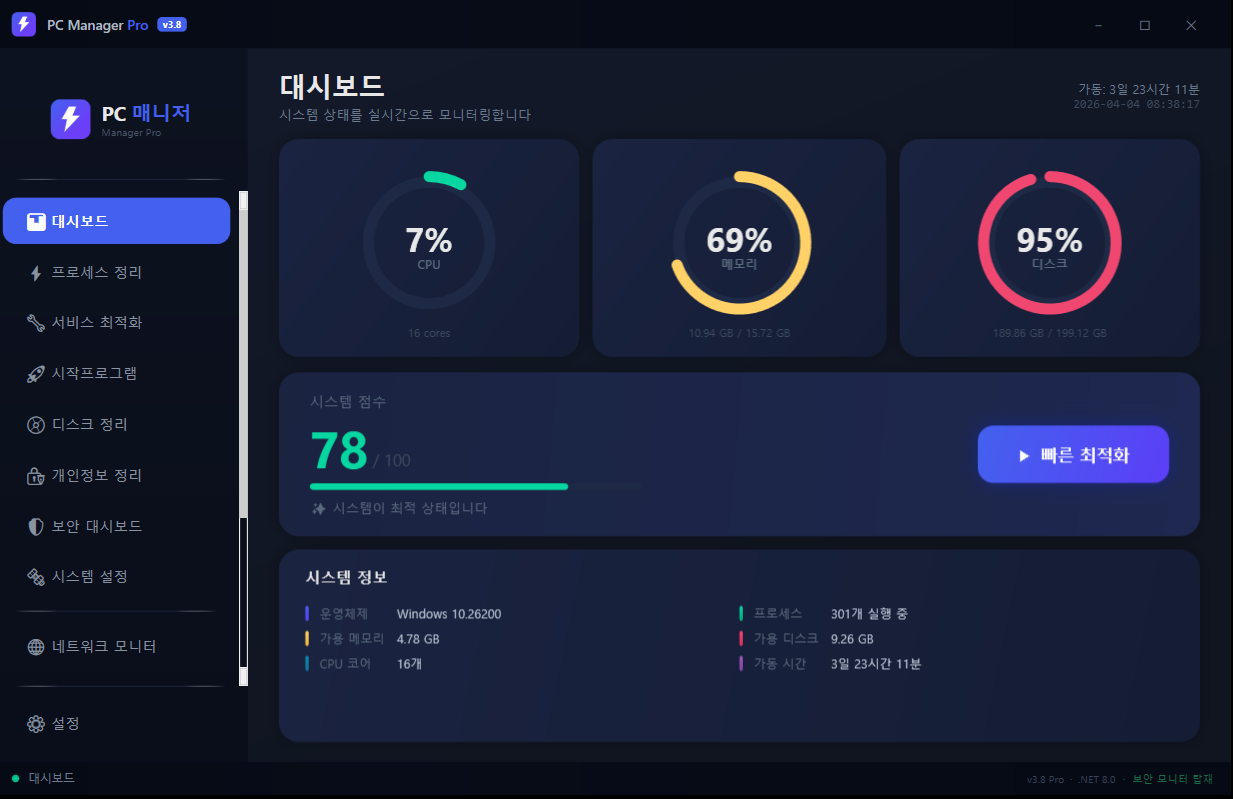
Launch it and you see it right away — your PC's current score. CPU, memory, and disk usage show as live gauges, and one "Quick Optimize" button runs a 5-step automatic sequence: ending unneeded processes, deleting temp files, and freeing up memory.
Security doesn't just scan and stop, either. If the firewall is off, it turns it back on; if the Windows Update service is stopped, it starts it automatically; if the hosts file has been tampered with, it backs it up and resets it. Just one "Fix All" button.
Dark theme. No ads. No telemetry. No subscription. A native Windows app built with .NET 8.0 + WPF.
Key Features
1. Real-Time Dashboard
- Live CPU, memory, and disk usage gauges (refreshed every 2 seconds)
- System score from 0 to 100 — see your PC's current state as a number
- Shows OS, process count, available memory/disk, CPU cores, and uptime
- Splash loading screen — gathers system info first for a smooth transition
2. Quick Optimize (One Click)
- 5-step automatic optimization: system analysis → process cleanup → temp file deletion → memory optimization → wrap-up
- Live progress-ring animation plus detailed step-by-step progress
- Before/after score comparison
- Detailed breakdown of processes ended, files deleted, and memory/disk reclaimed
- Only safe processes are ended (3-tier Essential/Caution/Safe classification system)
3. Process Cleanup
- Scans all running processes and shows memory usage
- Smart 3-tier classification: Essential / Caution / Safe
- Protects core system processes (csrss, lsass, dwm, explorer, and more are force-protected)
- Parent-process chain protection — even if you end only a child, the parent is protected
- User whitelist — processes you designate are never ended
- Shows the estimated memory to be reclaimed in advance
4. Service Optimization
- Lists all Windows services (PowerShell-based)
- Filter by category: Xbox/gaming, telemetry, remote, banking/security, rarely used
- Start/stop/disable/enable a service with one button
- Essential services are protected (cannot be disabled)
5. Startup Program Management
- Collects startup items from 3 registry locations + 2 startup folders
- Toggle switch to enable/disable
- Shows boot impact (Heavy/Normal)
- Shows the source location (HKCU, HKLM, startup folder)
6. Disk Cleanup
- 8 cleanup categories: Windows temp files, system cache, log files, crash dumps, Windows Update cache, browser cache (Chrome/Edge/Whale), Windows.old, Recycle Bin
- Preview the size of each category, then delete selectively
- Empty the Recycle Bin (Shell32 API)
7. Privacy Cleanup
- Auto-detects installed browsers (Chrome, Edge, Whale, Firefox)
- Scans/deletes browsing history, cookies, cache, and autofill data per browser
- Windows privacy: cleans recent documents, jump lists, and internet cache
8. Security Dashboard + Auto-Fix
- 9-item comprehensive security check: Defender, firewall (3 profiles), UAC, Windows Update, hosts tampering, suspicious processes (18 types), network connections, system file integrity (8 DLLs), account security
- Security score from 0 to 100 + a visual ring gauge
- Individual "Fix" buttons + a "Fix All" button
- Auto-enable firewall, start the Update service, back up/reset hosts, end suspicious processes, run SFC, and disable auto-login/Guest
9. System Settings (Tweaks)
- 7 optimizations: disable animations, disable transparency effects, disable SysMain, disable search indexing, disable telemetry, high-performance power plan, flush DNS cache
- Toggle each setting on/off + one-shot execution
- Automatic backup before changes
10. Network Monitor
- Live upload/download speeds (refreshed every 2 seconds)
- Network adapter info (name, local IP, public IP, MAC address)
- Active TCP connection count
- Ping test — measures 8.8.8.8, 1.1.1.1, google.com, and naver.com at once
- Shows open ports (TCP LISTEN)
11. Large File Scanner
- Select a drive + minimum size filter (10MB to 1GB)
- Shows filename, path, size, modified date, and extension
- Sort by size — starting with the files hogging the most disk
- Check boxes and delete in bulk
- Automatically excludes system/protected folders
12. Duplicate File Detection
- Accurate duplicate detection based on MD5 hashes
- Sampling hash for large files — files over 10MB are compared quickly by sampling the start, middle, and end
- Original is auto-marked (the oldest file = the original, cannot be deleted)
- Shows wasted space per group; selective delete (the original is always protected)
13. System Restore Point Management
- List existing restore points (creation date, type, description)
- Create a new restore point — a safety net before optimizing
- Shows the disk usage of restore points
14. Driver Info Viewer
- Lists all drivers (WMI-based)
- Auto-classifies into 10 categories (graphics, network, audio, storage, USB, etc.)
- Detects outdated drivers (2+ years), unsigned drivers, and problem drivers
- Filter: All / Problem / Outdated / Unsigned
15. System Report Generation
- Auto-generates an HTML report of your full system status
- Includes system score, security score, resource details, security check results, driver status, and startup program list
- Dark-themed HTML — printable and shareable
- Auto-saved to the desktop and opened immediately in your default browser
16. Automatic Optimization
- Schedule background auto-optimization (30 min/1 hr/2 hr/4 hr)
- Auto-skips when CPU usage is above 70% (to avoid interrupting your work)
- Ends only safe background processes (those with no UI window)
- Option to run automatically at Windows startup
Who It's For
- Anyone whose PC feels slow but doesn't know what to do about it
- People who feel Task Manager alone isn't enough
- Anyone who wants a tool like CCleaner but hates the ads and upsells
- People who want to see their PC's security status at a glance and fix issues right away
- Anyone who wants to find large/duplicate files and free up disk space
- People who want to check all their driver statuses at once
- Anyone who wants to export their full system status as a report to keep on record
- People who like a clean dark-themed UI
How It Compares
| Tool | Price | Ads | Security scan + fix | Real-time monitoring | Network analysis |
|---|---|---|---|---|---|
| CCleaner | Free/Paid | Yes | X | X | X |
| Advanced SystemCare | Paid | Yes | X | X | X |
| Glary Utilities | Free/Paid | Yes | X | X | X |
| Windows Security | Free | No | Scan only | X | X |
| PC Manager Pro | Free | No | Scan + auto-fix | Yes (2s refresh) | Yes (ping/port/speed) |
How to Use
- Run
PCOptimizer.exe(no install needed) - The dashboard appears automatically after the splash screen
- Click "Quick Optimize" — runs the 5-step automatic optimization
- Use the left sidebar to jump to any feature
- Security Dashboard → "Start Security Scan" → if issues are found, "Fix All" or an individual "Fix"
No separate installation required. Just download the single executable (.exe) and run it.
To remove it, simply delete the file. It doesn't clutter your registry.
(If you set up auto-start / auto-optimization, turn them off in settings before deleting.)
Download Options
| Format | Filename | Size | Notes |
|---|---|---|---|
| NSIS installer | PCManagerPro_v3.8_Setup.exe | 381 KB | Setup wizard, creates shortcuts |
| MSI installer | PCManagerPro_v3.8.msi | 388 KB | For enterprise/AD deployment |
| Lightweight portable | PCManagerPro_v3.8_Lite.zip | 401 KB | Requires the .NET 8.0 runtime |
| Standalone portable | PCManagerPro_v3.8_Portable.zip | 68 MB | Runtime included, runs right away |
Technical Specifications
| Name | PC Manager Pro |
| Version | v3.8 |
| Developer | Youngsam.net |
| Platform | Windows 10/11 (64-bit) |
| Framework | .NET 8.0 |
| UI | WPF (Windows Presentation Foundation) |
| Language | C# |
| Distribution | Single executable (self-contained) |
| Memory usage | About 40–80 MB |
| CPU usage | ~0% idle (2-second timer based) |
| Data collection | None |
| Network | Once for public IP lookup (api.ipify.org), otherwise none |
| Telemetry | None |
| Ads | None |
| License | Freeware (free for personal and business use) |