Naru — The World's Fastest Free Torrent Client for Windows
Naru — the world's fastest free torrent client for Windows
Naru is a free, ad-free BitTorrent client for Windows built for speed: it connects to hundreds of peers to use your connection to the full. One-click magnet links, download-only mode (turn off uploading), scheduled speed limits, auto shutdown when done, 8 themes and auto updates. A uTorrent alternative, installer or portable.
v0.3.45·Published July 21, 2026·Updated October 15, 2026·Downloads 22,230·★5.0(7)
#토렌트#토렌트 프로그램#토렌트 클라이언트#무료 토렌트#토렌트 다운로드#빠른 토렌트#초고속 토렌트#토렌트 속도#가장 빠른 토렌트#토렌트 추천#가벼운 토렌트#광고 없는 토렌트#토렌트 검색#토렌트 무설치#마그넷#magnet#비트토렌트#BitTorrent#유토렌트#uTorrent#유토렌트 대안#uTorrent 대안#윈도우 토렌트#Windows 토렌트#한글 토렌트 프로그램#나루#나루 토렌트#Naru#NaruTorrent+23Official site
FREE · WINDOWS TORRENT CLIENT · INSTALLER · PORTABLE
The world's fastest torrent client, squeezing every bit out of your connection
Naru is a free Windows torrent client built with an obsession for speed. It connects to hundreds of peers at once to push your connection up to the speed it can actually deliver, wrapped in a newly built interface with 8 themes. No ads, no bundled software, no tracking — and it handles magnet links and .torrent files right away.
Free · no ads or bundlesInstaller · portableWindows 10 / 11 64-bitAuto update
$0
Price
No ads, bundles or tracking
8
Themes
Follows system dark/light
3
Upload modes
Allow · stop after done · never
0.3.45
Latest version
September 2026
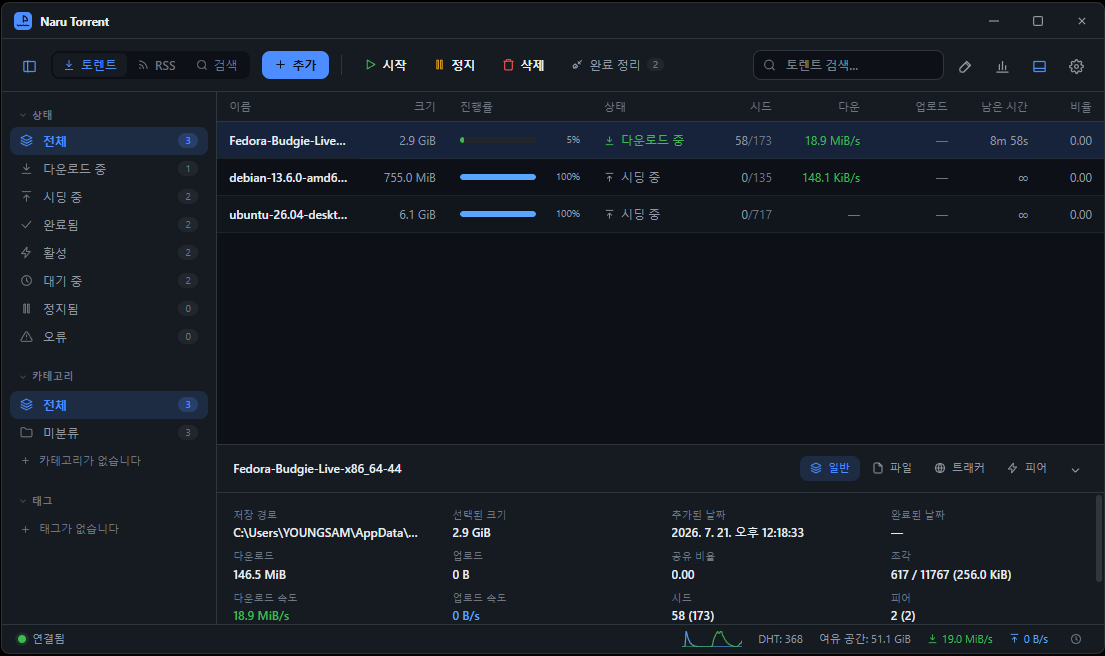
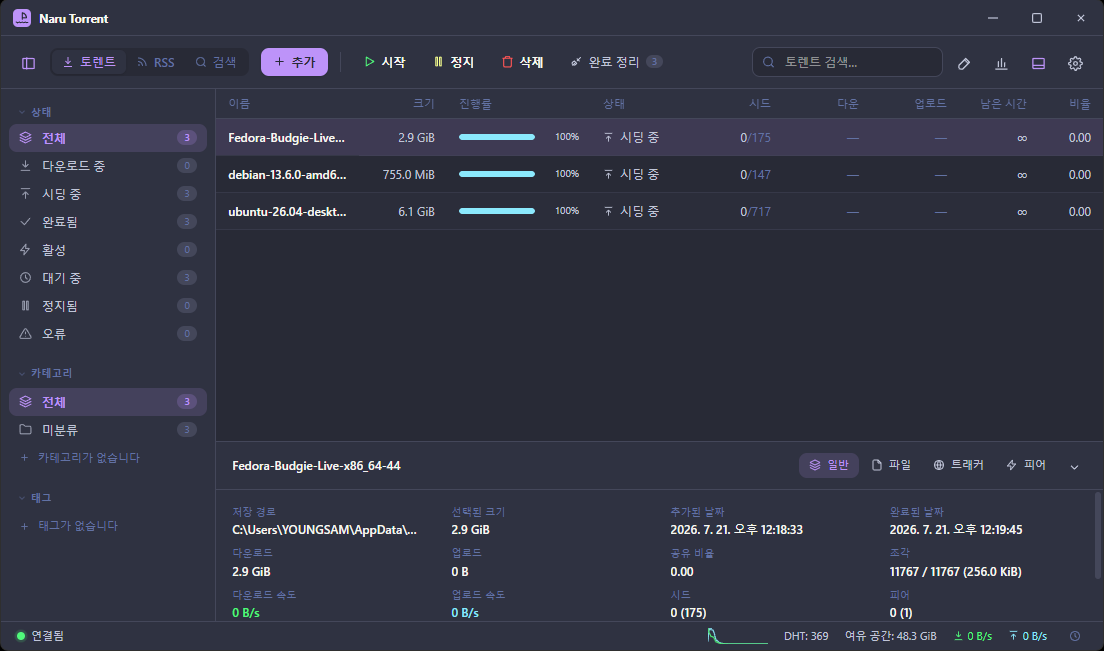
Main window — Status, categories and tags on the left, active list in the middle, and the selected torrent's progress, peers, trackers and files at the bottom. The status bar shows current speed and free disk space.
01 · WHY FAST
Why it's fast — using your connection to the full
Torrent speed depends on how many peers you connect to, and how good they are. Naru focuses on making those connections as wide and as fast as possible.
🔗
Hundreds of peers at once
Connects to many peers simultaneously to push up to the top speed your line can deliver. On gigabit internet, it aims for gigabit speed.
🎯
Fast peers · needed pieces first
Prioritizes the fastest peers and fetches the pieces you need first, so downloads feel faster.
🪶
Lightweight
Opens instantly and uses little memory. Close the window and it keeps downloading quietly from the tray.
⚙️
Proven engine
Downloads are handled by an engine (naru-engine) built on open-source libtorrent-rasterbar. Nothing else to install.
Real-world speed depends on your environment. Even on the same connection, speed varies greatly with the torrent's seed count, peer health and whether your router port is open. See the FAQ below for what to check when things are slow.
02 · SCREEN
The layout — everything in four areas
Top toolbarSwitch between Torrents · RSS · Search, + Add, Start / Stop / Delete, clear completed, statistics, settings
SidebarFilter by status (downloading · seeding · completed · stopped · error), category and tag
Center listDrag column headers to resize, click to sort, right-click to choose visible columns
Detail panelGeneral info · files · trackers · peers of the selected torrent. Drag the top edge to resize
Status barCurrent download · upload speed, DHT, free disk space, connection status
03 · ADD
Starting a download — whichever way you like
Magnet link or .torrent file, there are several ways to add one.
1Copy a magnet
Just copy the link and Naru detects it and asks "Add this?".
2Double-click a .torrent
The installer sets up file association automatically. It's added even when Naru is in the tray.
3Drag and drop
Drop files into the window.
4+ Add
Paste a magnet address from the toolbar or pick a .torrent file.
Pick only the files you want — Uncheck files in the add dialog and they won't be downloaded. Turn on [Settings › Behavior › Choose files for magnets too] to get the same dialog for magnets. Save location can be set per item, and you can keep incomplete files in a temporary folder and move them when finished.
04 · CONTROL
Speed · queue · seeding — fine-grained control
Leave it unlimited normally and cap it only when needed. Units are KiB/s, and 0 means unlimited.
✓Download / upload limits — If you game or video-call at the same time, capping just the upload works best.
✓Alternative limits (slow mode) — Switch instantly with the clock icon in the status bar.
✓Schedule — Apply the alternative limits automatically during set hours (e.g. 10 pm to 8 am).
✓Per-torrent speed limit — Right-click in the list → Speed limit….
✓Queueing · share ratio · seeding time limits, categories · tags, RSS auto-download.
05 · NO UPLOAD
Just want to download? Turn off uploading
Torrents send pieces to others while you download. Since 0.3.43 you can turn this uploading off globally or for a single torrent. [Settings › Speed › Upload to other users]
Allow (default · recommended)
Send and receive as usual. Gives the best speed.
Stop after completion
Works normally while downloading and stops uploading the moment it hits 100%. Almost no speed penalty — the recommended middle ground.
Never (download only)
Sends no pieces even while downloading. The most thorough option, but downloads may get slower and private trackers may restrict your account.
To block a single torrent, check "Don't upload this torrent" in the add dialog, or right-click an active item → Don't upload. Affected items get a small icon before their name.
06 · AUTOMATION
Hands-free when done — completion actions and tray
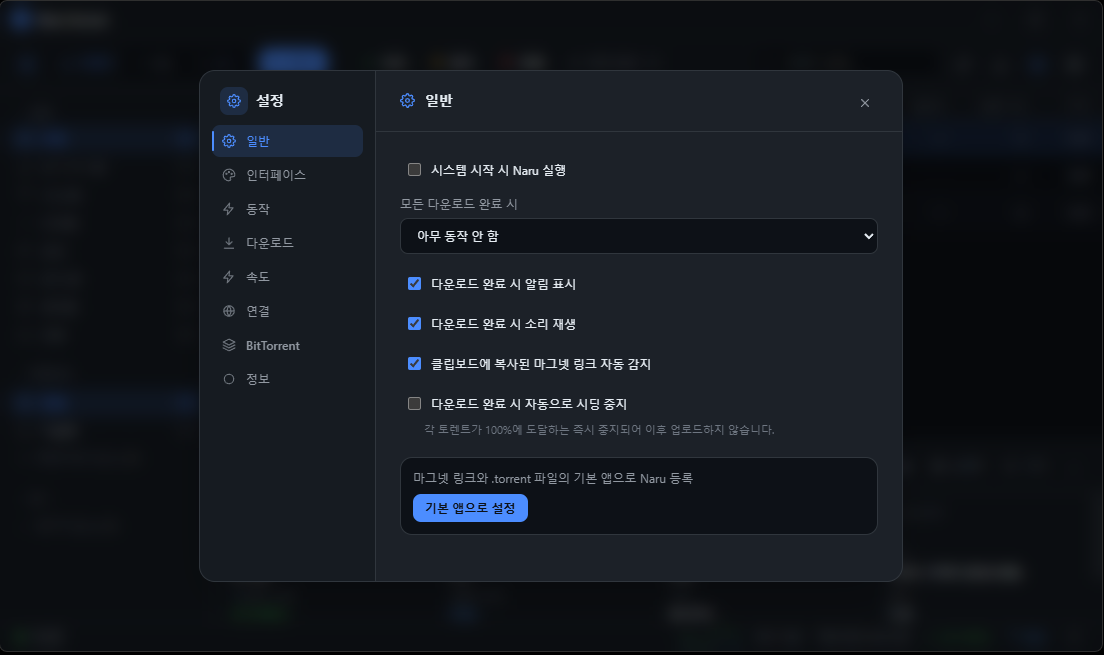
Settings › General — Completion notification and sound, clipboard magnet detection, stop seeding when done, and magnet/.torrent default app registration in one place.
✓When all are complete, Naru runs one of: quit the app · sleep · shut down the PC. You get 10 seconds to cancel first.
✓Auto-clear on completion — Removes finished items from the list (choosing "also delete files" deletes downloaded files too, so be careful).
✓Stay in tray — Keeps downloading after you close the window; right-click the tray for start/stop all and quit.
✓Run at boot — Combine with "Minimize to tray on start" to start quietly in the background.
✓Change data location — Move the settings/list folder; if a USB or network drive disconnects, Naru falls back to the default location.
07 · SEARCH
Public content search — right inside the app
Search from the toolbar (Ctrl+F) and double-click a result to add it. Sort by seeds · size · date, or show only items with seeds.
📚
Default search sources
Internet Archive and Academic Torrents — public-domain and freely licensed films · music · audiobooks · software · research data.
🧩
Add your own sources
Add a plugin (.py) URL under [Search sources] on the search screen. The runtime is bundled with the app.
Responsible use A torrent is just a way of sharing files. Please use Naru only for content you have the right to download (public material, free licenses, or files you own the rights to). Downloading or distributing copyrighted material without permission may carry legal liability.
08 · THEMES
8 themes and system dark mode
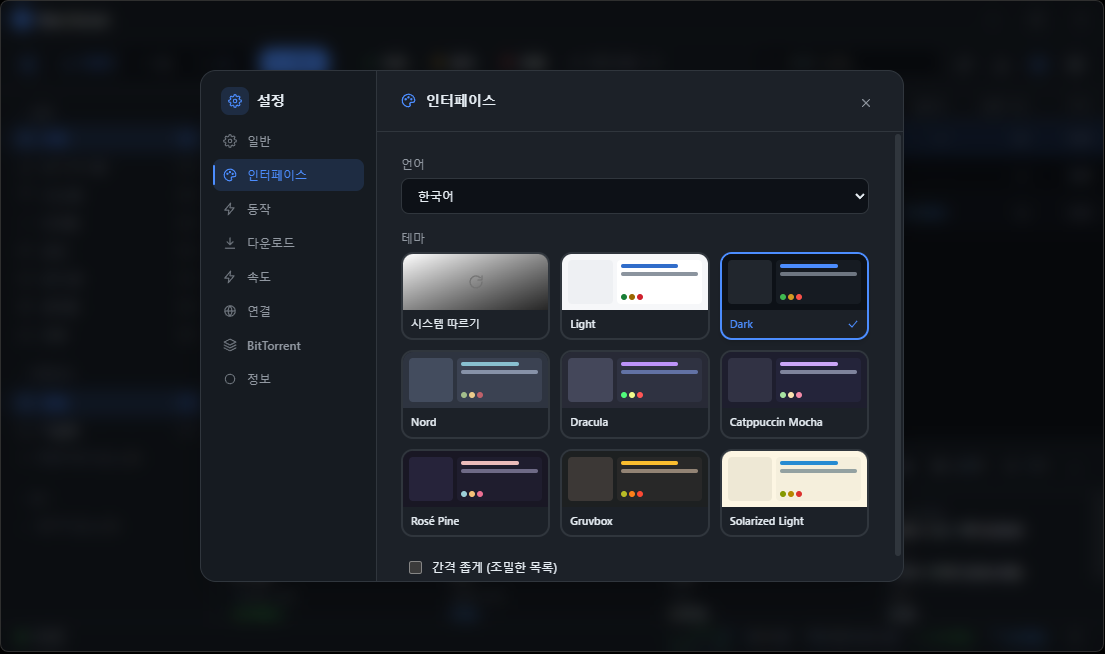
Light · Dark · Nord · Dracula · Catppuccin Mocha · Rosé Pine · Gruvbox · Solarized Light, plus automatic system dark/light. There is also a "compact" option for a denser list. Korean is the first-class menu language.
Settings › Interface — Language and theme change as soon as you pick them.Another theme — Accent color and background change together with the theme.
09 · SHORTCUTS
Key shortcuts
Ctrl+KCommand palette
Ctrl+FSearch screen
Ctrl+ASelect all
SpaceStart · stop
DeleteDelete (confirm)
Double-clickOpen downloaded file
Press Ctrl+K once to find and run anything by name — add, settings, statistics, screen switching and more.
10 · DOWNLOAD
Download
InstallerRecommendedAbout 39MB
Naru_0.3.45_x64-setup.exe
✓Magnet · .torrent association set up automatically
✓One-click updates to new versions
✓Start menu · desktop shortcuts
PortableFor USBAbout 58MB
Naru_0.3.45_portable.zip
✓Unzip and run naru.exe
✓No registry traces
✓New versions: download from the notice and overwrite
OSWindows 10 / 11 64-bit
Built withDesktop app + download engine based on libtorrent-rasterbar, with a bundled Python runtime for search plugins — nothing else to install
"Windows protected your PC" (unknown publisher) on first run This notice appears because this independently developed program doesn't have a code-signing certificate yet. Click "More info" → "Run anyway". You can use the SHA-256 values below to confirm your download matches the original.
I'm looking for the fastest free torrent client. Why is Naru fast?
It connects to hundreds of peers at once to push up to the top speed your connection can deliver, prioritizes the fastest peers, and fetches needed pieces first. Actual speed still depends on the torrent's seed count, peer health and your connection.
Is Naru torrent really free?
Yes. It is completely free, with no ads, bundled software or tracking.
What's the difference between the installer and the portable version?
The installer (setup.exe) automatically sets up magnet/.torrent association, one-click updates and Start menu shortcuts. The portable zip just needs to be unzipped and naru.exe run, and can be carried on a USB stick, but it has no file association and new versions are downloaded from the notice and overwritten.
Can I download without uploading (seeding)?
Yes, since 0.3.43. In [Settings › Speed › Upload to other users], choose "Stop after completion" or "Never (download only)". You can also disable it for a single torrent. Not uploading can slow downloads, so "Stop after completion" is recommended.
My torrent download is very slow. What should I check?
First check the seed count — with 0 seeds nobody has the file and you'll have to wait. Make sure no limit is set in [Settings › Speed], the alternative speed limit isn't on in the status bar, and uploading isn't set to "Never". Forwarding the port from [Settings › Connection › Listening port] on your router helps connections.
I get "The download engine is not responding."
Your antivirus or firewall is most likely blocking naru-engine.exe. Add the Naru install folder to your antivirus exceptions, fully quit the app (right-click the tray icon → Quit) and start it again.
What can I find with Naru's built-in search?
The default sources are Internet Archive and Academic Torrents, which cover public-domain and freely licensed material. You can add other search plugins yourself, but whatever the source, use it only for content you have the right to download.
Can Naru shut down my PC when downloads finish?
In [Settings › Behavior], choose quit app, sleep or shut down under "When all are complete". A notice lets you cancel within 10 seconds before it runs.
Can I use it instead of uTorrent?
Yes — it covers the usual features such as magnet/.torrent downloads, speed limits and scheduling, queueing, seeding limits and RSS. It runs without ads or bundles and supports Korean first. It doesn't interfere with other torrent clients installed on the same PC.
I get an "Unknown publisher" warning during installation. Is it safe?
It's a Windows SmartScreen notice shown because a code-signing certificate hasn't been applied yet. Click "More info" → "Run anyway" to install, and you can first check that your download matches the original using the SHA-256 values on this page.
Windows is a trademark of Microsoft Corporation. uTorrent and BitTorrent are trademarks of their respective owners and are not affiliated with Naru. Internet Archive and Academic Torrents are services of their respective operators.