Overview
Still opening PuTTY, memorizing commands and editing config files in vi to manage your server?
Flectra handles all of it in a single desktop app.
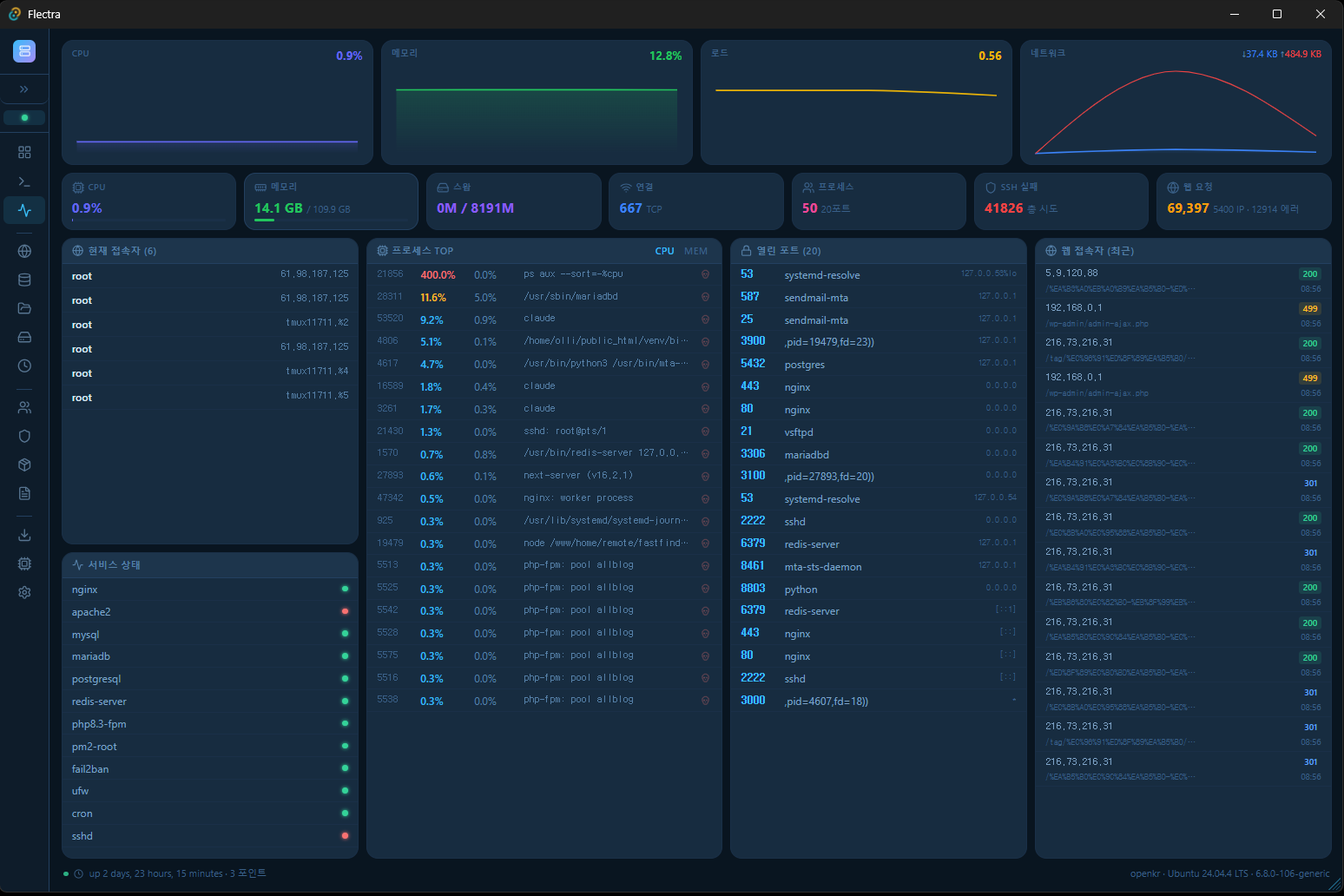
Connect to a server over SSH and the dashboard shows CPU, memory and disk in real time, you run commands right in the terminal, spin up a website in a few clicks, manage user accounts, and even run security checks — all from this one app.
2.1MB. That's the installer. A tool that can replace paid server management panels like ServerPilot and RunCloud, packed into 2MB. No monthly subscription, no agent to install on the server. Install it on your PC, connect over SSH, and you're done.
Built with Tauri 2 + React 19 + Rust. 10x lighter than Electron, with near-native speed.
Key features
1. Real-time dashboard
- Real-time monitoring of CPU, memory, disk and network
- Load average, uptime and OS/kernel info at a glance
- Service status summary
2. SSH terminal
- Full terminal based on xterm.js (PTY support)
- Multiple tabs — several server terminals at once
- 200+ built-in command snippets (system, network, Docker, PM2, Git and more)
- 12 terminal themes (Dracula, Monokai, Nord, One Dark and more)
- Save your own custom snippets
3. Website management
- Enter a domain → automatic DNS verification → automatic Nginx/Apache config generation
- One-click install of WordPress, Gnuboard5, XE, Drupal, Ghost and Nextcloud
- Automatic system user creation + isolated web hosting environment setup
- Automatic Let's Encrypt SSL issuance
- Edit config files directly + syntax check + automatic backup/restore
- Selective deletion of web files/DB/SSL/user when removing a site
4. User account management
- Add/delete/lock/unlock system users
- Grant/revoke sudo privileges (applied in real time)
- Change passwords, change shells, manage groups
- Show last login time and current session status
- Automatic PHP-FPM pool cleanup (keeps the server safe when deleting a user)
5. Security management
- Security check dashboard — combined diagnosis of firewall, SSH settings, Fail2ban and failed login counts
- UFW firewall rule management (allow/block ports)
- SSH config audit — compares PermitRootLogin, PasswordAuthentication and more against recommended values
- Open port scan — check LISTEN ports per process
- Fail2ban banned IP management
6. Service management
- List systemd services
- Start/stop/restart/enable/disable services
7. Package management
- Catalog of 60+ major packages (web servers, DB, PHP, runtimes, security, monitoring, network)
- One-click install/remove + automatic install-status check
- Categorized + searchable
8. Log management
- Real-time log viewer — 12 log files including syslog, auth, nginx, apache, mysql and kernel
- In-log search + error/warning highlighting
- Log maintenance — check /var/log usage, Journal vacuum, force logrotate
- Empty individual log files + delete archives (safely, with no service interruption)
9. File management (SFTP)
- Remote file explorer
- File upload/download
- Directory browsing
10. Database management
- Check status of MySQL/MariaDB, PostgreSQL and Redis
- List databases and view their sizes
11. Cron job management
- View/edit crontab
- Check systemd timers
12. System settings
- Change hostname, set time zone, NTP sync
- DNS settings, edit /etc/hosts
- Create/manage swap memory
- System update/upgrade
- Reboot/shut down the server
13. App settings
- 12 themes (Dark, Light, Midnight, Forest, Sunset, Ocean, Rosé, Nordic, Copper, Arctic, Neon, Mocha)
- 10 languages (Korean, English, Japanese, Chinese, Spanish, German, French, Portuguese, Russian, Vietnamese)
- Terminal font/size settings
- On close, choose minimize to tray / quit the program
- Set a default documents path
Recommended for
- Developers/operators who manage Linux servers
- Anyone setting up their own web hosting environment
- Anyone tired of juggling PuTTY + WinSCP + phpMyAdmin separately
- Anyone looking for a free tool instead of paid panels like ServerPilot or RunCloud
- Anyone who wants to manage multiple servers in one place
- Server beginners who aren't comfortable with SSH commands
How Flectra differs from other server management tools
| Tool | Price | Server agent | Install location | Size |
|---|---|---|---|---|
| ServerPilot | $5-28/mo | Required | Server | - |
| RunCloud | $6.67+/mo | Required | Server | - |
| CyberPanel | Free | Required | Server (heavy) | - |
| Flectra | Free | Not needed | Your PC | 2.1MB |
All you need is SSH. Install a panel on the server and that panel itself becomes a security risk. Flectra doesn't touch the server. It just connects from your PC over SSH.
How to use
- Run
Flectra_0.1.0_x64-setup.exeto install - Launch the program
- Add a server with the "+" button at the bottom left (host, port, username, password or key file)
- Connect with a single click on the server
- Check server status on the dashboard, then go to the feature you want from the left menu
No separate agent needs to be installed on the server.
As long as SSH access is available, you can manage any Linux server.
To remove it, just uninstall Flectra from Add/Remove Programs.
Why Flectra?
2.1MB. That really is all of it.
Compare for yourself:
- Similar tool A: installs directly on the server + monthly subscription + agent required
- Similar tool B: free, but installs on the server + heavy + security risk
- Flectra: 2.1MB. Installs on your PC only. Does nothing to the server. Free. Forever.
It's possible because it's built with Tauri 2 and Rust. 10x lighter than Electron, with near-native speed.
- Installer size: 2.1MB
- Executable size: 5.5MB
- Memory usage: about 30-50MB
- CPU usage: 0% when idle (event-driven)
- Network: uses only the SSH connection (no communication with external servers)
- Personal data collection: none
Download options
| Distribution | File name | Size | Description |
|---|---|---|---|
| NSIS installer | Flectra_0.1.0_x64-setup.exe | 2.1MB | Recommended distribution |
| MSI installer | Flectra_0.1.0_x64_ko-KR.msi | 2.9MB | For enterprise/AD deployment |
| Portable (no install) | server-pilot.exe | 5.5MB | Run directly with no installation |
Technical specifications
| Program name | Flectra |
| Version | v1.0 |
| Developer | youngsam.net |
| Platform | Windows 10/11 (64-bit) |
| Framework | Tauri 2 |
| Frontend | React 19 + TypeScript |
| Backend | Rust (ssh2 crate) |
| Styling | Tailwind CSS 4 |
| State management | Zustand 5 |
| Terminal | xterm.js 6 (PTY) |
| Charts | Recharts 3 |
| Build optimization | LTO + strip + codegen-units=1 |
| SSH protocol | SSH2 (password, key file, hybrid auth) |
| Security | Passwords stored locally (never sent to any server) |
| License | Freeware (free for personal/business use) |