■ Why is making a bootable USB such a hassle?
Whether you are reinstalling Windows or trying Ubuntu, you always need one thing: a bootable USB.
But the usual tools have cluttered screens, you have to hunt down the ISO file separately, and Windows 11 setup keeps getting blocked by TPM and Secure Boot checks.
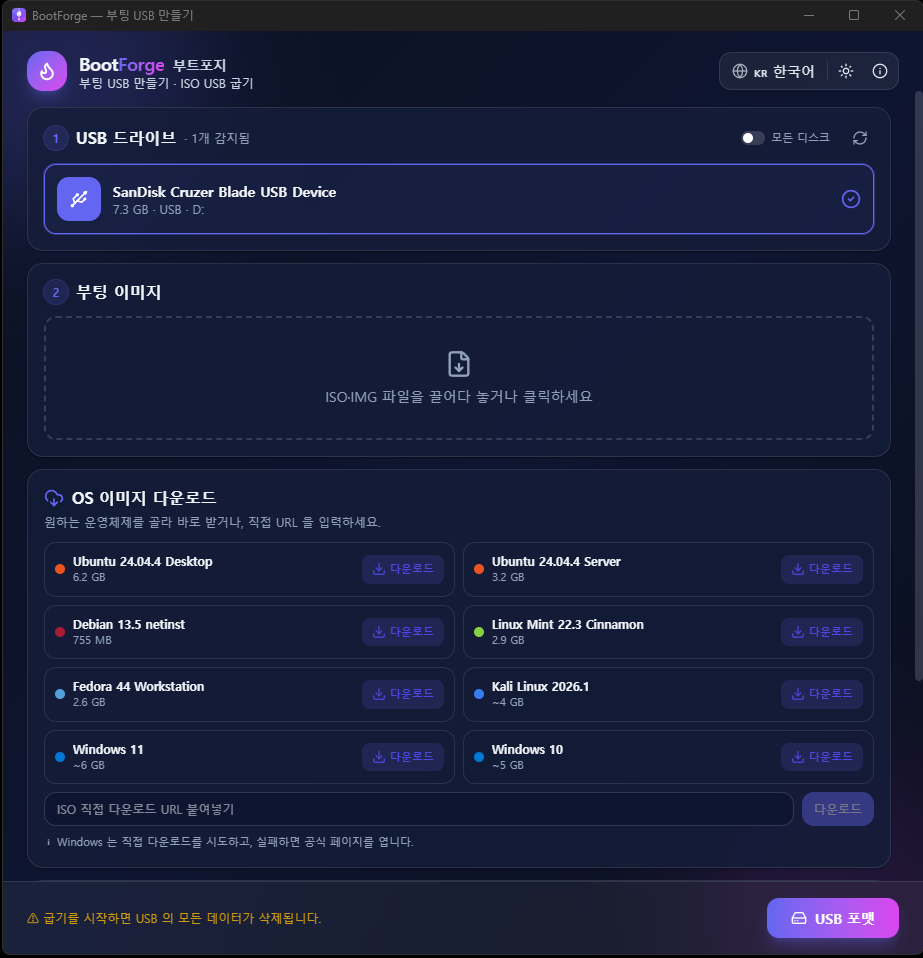
BootForge is a bootable USB creator built from the ground up to handle the whole process on a single screen. The installer is around 2MB, it is completely free, and it supports 5 languages including English.
■ What makes BootForge great
🚀 Fast and lightweight
A low-level engine written in Rust writes the ISO straight to your USB. Around 2MB installed, about 25MB of memory when running.
📥 Download the OS right inside the app
Ubuntu, Debian, Mint, Fedora, Kali Linux - and even Windows 10 and 11 - can be searched, downloaded and burned without ever leaving the app.
🪟 Bypass Windows 11 requirements
A single toggle builds a Windows 11 install USB that skips the TPM 2.0, Secure Boot, RAM and CPU checks. (Install Windows 11 on older PCs.)
🛡️ Safety first
Your system (C:) drive is automatically flagged with a red warning, only removable USB drives are shown, and a confirmation step before burning stops you from wiping the wrong disk by mistake.
✅ Integrity verification
SHA-256 checksums confirm your download or image has not been corrupted.
💾 USB formatting
Format an empty USB as FAT32, exFAT or NTFS - no image required - and set a custom label.
🌗 Easy-on-the-eyes design
Light and dark (night) themes, a live progress bar and a completion alert (taskbar flash) so you never miss the result even if you step away.
🌍 Multilingual
한국어 · English · 日本語 · 中文 · Español.
■ Who it is for
· Anyone doing a clean Windows reinstall
· Anyone wanting Windows 11 on an older PC (requirement bypass)
· First-timers installing Ubuntu or Linux
· Anyone who never knew where to get the ISO file
■ How to use it - just 3 steps
1) Select the USB - plug it in and it appears in the list automatically.
2) Pick or download an image - choose an ISO you already have, or download an OS straight from the list.
3) Start burning - you get a notification when it is done. That's it!
■ Frequently Asked Questions (FAQ)
Q. Is it free?
Yes, completely free.
Q. How is it different from Rufus?
The core features are similar, but BootForge lets you download the OS right inside the app and adds a multilingual UI (including English), a more intuitive interface and completion alerts for extra convenience.
Q. Can I install Windows 11 on a PC without TPM?
Yes. Turn on "Bypass Windows 11 requirements" and the install USB will skip the TPM, Secure Boot, RAM and CPU checks.
Q. A USB burned with a Linux ISO does not show up in Windows Explorer.
That is normal. Windows cannot read Linux file systems, but the USB boots just fine. If a "Do you want to format?" window pops up, click Cancel.
Q. Is it safe?
It includes safeguards such as system-disk protection, a pre-burn confirmation and checksum verification. It requests administrator rights on launch so it can perform disk operations.
■ Download
👉 Download BootForge
(BootForge_1.0.0_x64-setup.exe · about 2MB · Windows 10/11 64-bit)
※ If a SmartScreen warning appears during install, click [More info] → [Run anyway]. (It simply has no code signature because it is independently developed - it is safe.)
────────────────────────────────────────────────
Making a bootable USB is now simple with BootForge.
Give it a try and leave your thoughts in the comments!
────────────────────────────────────────────────